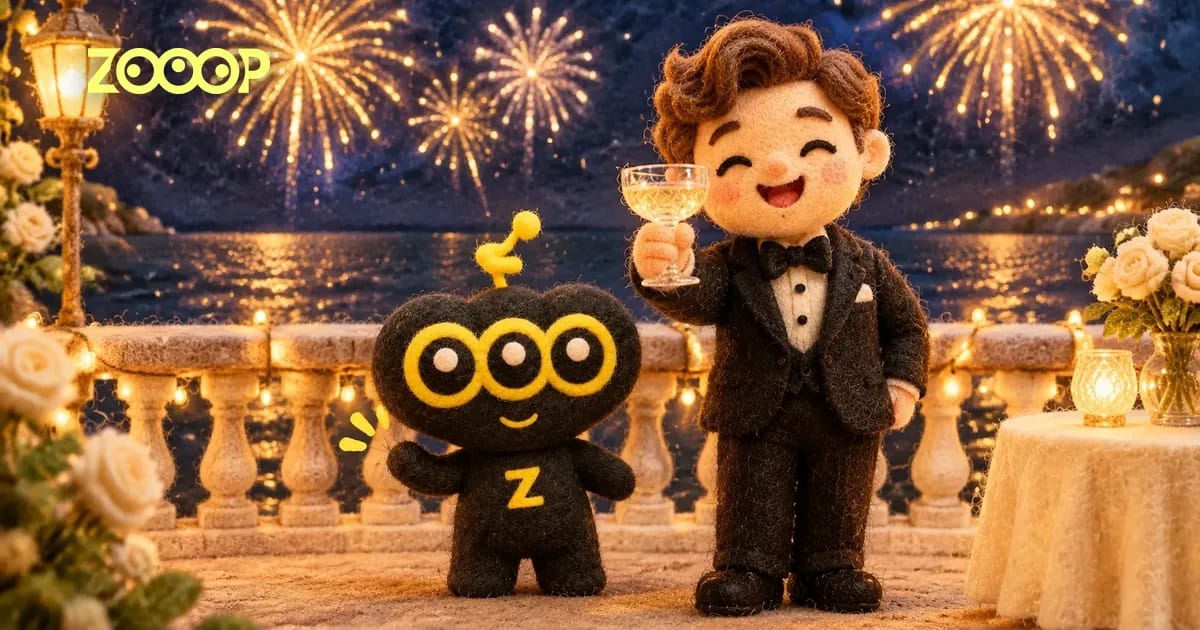
A friend drops “I got the job” in the group chat. Send them a Leo Cheers meme video. The host turns from a seaside railing, spots the camera, and lifts a coupe as fireworks light the water. Ten seconds of grand ceremony makes even a casual congratulations feel like an occasion.
With the Leo Cheers AI template in ZOOOP, the person in that shot comes from your photo. Upload one clear adult portrait to make a vertical clip with sound.
Why the Gatsby toast works in a short video
The gesture comes from The Great Gatsby. Gatsby catches the viewer’s eye, smiles and brings up a shallow glass. The shot became a reaction image that works just as well for a small win as it does for a big announcement. A Leo Cheers meme video gives each move a moment. The profile establishes the terrace, the turn reveals who is there, and the toast brings the glass into the foreground.
In the template, the sea is deep blue and the string lights and fireworks are warm gold. As the camera comes closer, the guests remain in the background while the face and glass become easier to see. That gesture already says most of what you want from a quick congratulations. Know Your Meme’s Gatsby toast entry
Pick a photo with clear eyes and hair
Start with a chest-up photo you already have on your phone. Choose a shot of one adult facing the camera or turned slightly to the side, with both eyes and the chin visible. Leave room around the outline of the hair. Light from a nearby window tends to work well. A portrait with half the face in deep shadow gives the template less detail to work with.
Both sample portraits show people in everyday shirts. In the tuxedo clip, the copper waves and short beard are still recognizable. In the gown clip, the short wavy bob stays visible as the host turns in a gold beaded dress. Spend your time getting the face and light right. The scene supplies the evening clothes and glass. Ask first if you want to use a friend’s photo for their birthday.
Make the Leo Cheers meme video in ZOOOP
- Open the Gatsby toast template and upload one adult portrait. If you have several options, pick the one with the clearest eyes and the most relaxed expression.
- Choose 480p or 720p. Both make a 9:16 vertical video. The default works for a chat message. You can choose the higher resolution for a story.
- Select Generate. When the ten-second clip is ready, download it and send it to the person you want to toast.
Small details can vary each time. In the tuxedo sample, fireworks open while the glass goes up. In the gown sample, the first burst arrives slightly earlier. How far the glass reaches also varies, and both samples give the viewer time to recognize the smile.
Keep any message clear of the toast
For a close friend, send the Leo Cheers meme video with a message only the two of you would get. For a wedding story, try putting names and the date near an edge, away from the eyes and rim of the glass. When the group chat already knows what happened, the ten-second clip can stand on its own. For other ways to animate a portrait, browse the AI video templates.
Frequently asked questions
Can I make a Gatsby toast with an ordinary selfie?
Yes. Pick a well-lit adult selfie with clear eyes and hair and take off any sunglasses. A straight-on or slightly angled photo in window light works.
Do I need to wear evening clothes or hold a glass?
You can upload a photo in everyday clothes. The terrace, glass and evening wear appear in the video. The samples show a black tuxedo and a gold gown.
Can I upload a group photo for a two-person toast?
The template takes one single-person photo per video. For two people, upload a separate portrait for each person and make two clips.
Does the video fit a story?
Yes. The ten-second 9:16 video can be downloaded and shared to a mobile story or short-video feed. Keep any added caption near the edge so the toast stays visible.