A man walks slowly along a garden path at night, head bowed. He stops, kneels and joins his palms. A second later there is a flash of golden light, and Hanuman Ji is standing beside him, tall and calm, one hand resting on his head, a golden mace planted on the ground. The whole thing takes about ten seconds, and nobody says a word.
That is the Hanuman Ji AI video, the devotional trend that took off on Instagram in early November. The reel that started it collected nearly 50,000 likes in two weeks, the #hanumanji tag on TikTok filled with remakes, and the comment everyone left was the same: how do I make this with my own photo? We built it into the Hanuman Ji AI Video template, so one photo is all you need, with no prompt to write. Below we use the two clips we made for the template page, plus one test clip, to show what you get, which photos work and how the scenes differ.
What happens in a Hanuman Ji AI video
Each clip is 10 seconds long, vertical 9:16, filmed from one fixed side-on angle with no cuts. It plays out in four beats:
- You walk into frame from one side, looking down, and take a few steps along the path.
- You stop, kneel, close your eyes and join your palms. By about four seconds you are in prayer.
- Around six seconds, a soft golden flash, and Hanuman Ji takes shape inside the light.
- For the rest of the clip he stands beside you with his right hand on your head in blessing, gold sparks drifting down, while you stay kneeling to the last frame.
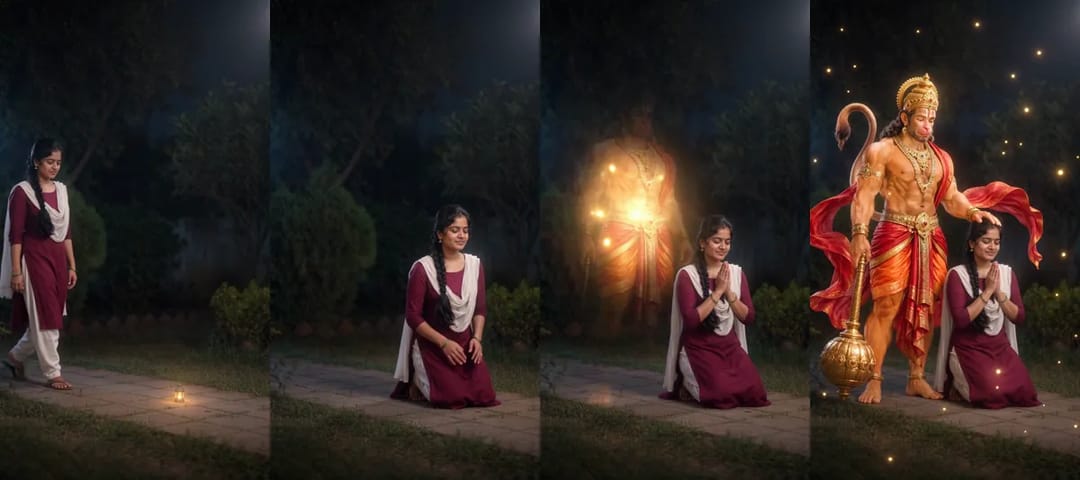
The sound is soft temple bells and a low, reverent hum, with no speech. Hanuman Ji looks the same every time: golden-orange skin, a tall golden crown, a red-and-saffron dhoti and a red sash lifting in the air. That matters more than it sounds. If everyone in a family makes one and you post them together, they look like one series instead of five different gods.
Make your Hanuman Ji AI video in three steps
- Upload your photo. Open the template and drop one photo of one person into the upload box. You can't generate without it.
- Pick a scene and a resolution. The scene starts on Night garden, the setting of the viral clip. Choose 480p or 720p; 480p is the cheaper way to see how it turns out, and the price is shown on the Generate button.
- Generate and download. When it's ready, download it. The clip is already vertical, so it goes to Reels, Shorts or your WhatsApp status without cropping.
Which photo works best
Our two photos were nothing special. A woman in a maroon kurta with a white dupatta and one long braid, and a man in a navy kurta. Both are waist-up shots against a plain wall, facing the camera, in even daylight.
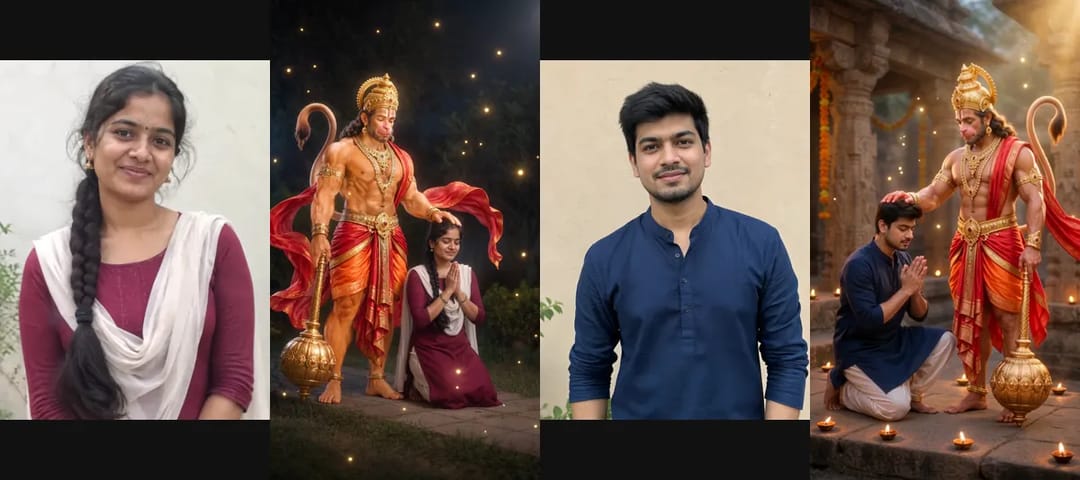
In the finished clips, both kept their faces, hair and clothes. The braid hangs over her shoulder from the first step to the last frame, and neither kurta changed colour or cut. A few things we learned along the way:
- A waist-up photo is enough. The clip shows you full body, so the legs and feet are filled in to match your top. She got light trousers and sandals, he got loose white trousers and bare feet. If you care what you wear below the waist, upload a full-length photo.
- You will probably kneel on both knees. The original has the devotee on one knee. In our three clips the man went down on one knee and settled onto both a few seconds later. It looks natural and doesn't break the moment.
- Keep the face clear. Sunglasses, a cap pulled low or a heavy beauty filter make the face look less like you.
- One person only. There is room for one devotee beside Hanuman Ji, so group photos, a parent holding a child and pet photos won't work.
Use your own photo, or one of an adult family member who has agreed to it. Not strangers, and not celebrities.
Change the scene: temple, ghat or mountain top
Besides the night garden there are three more scenes: Temple courtyard (carved stone pillars and rows of oil lamps), River ghat at sunrise (stone steps by the water with floating lamps) and Mountain top (a summit above a sea of clouds at golden hour). The scene changes the setting only. The walk, the kneel, the flash and the blessing stay exactly the same.
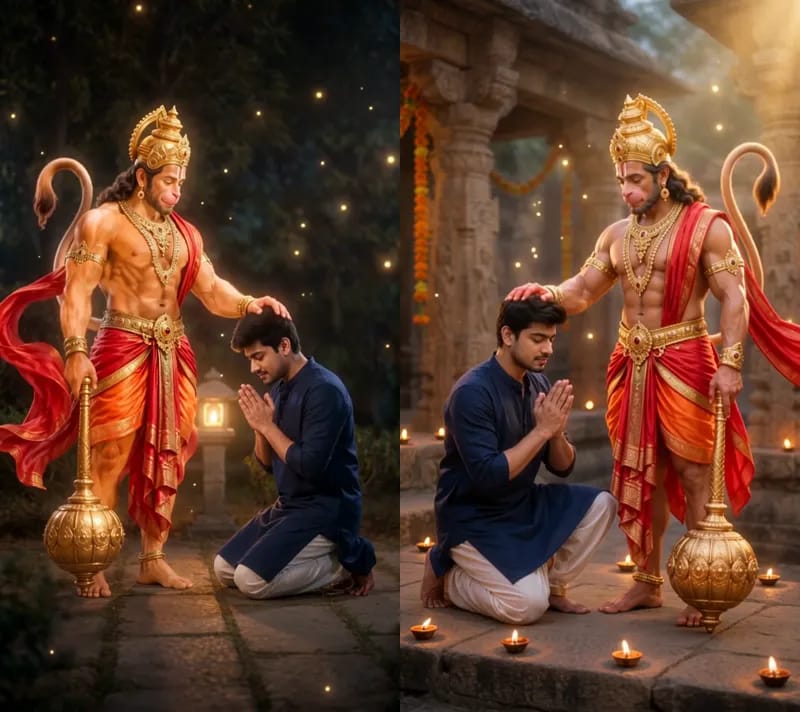
Above is the same photo of the same man in two scenes. The temple version is warmer, with lamps running to the edge of the frame. The garden is darker and quieter, and the gold sparks stand out more against it. If you can't decide, pick Night garden: it is the closest to the clip people have already seen, so your Hanuman Ji AI video is recognisable as the trend at a glance.
Check these spots before you post
First, the flash around six seconds. Hanuman Ji forms gradually inside the light, so if you pause on that frame you'll see a see-through figure. That's expected, and a second later he is solid. Second, his hands. In all three of our clips he rested a hand on the devotee's head, but in the woman's clip it is his left hand on her head and the mace in his right, the mirror image of the man's clip. Both look fine. Third, the ending. The sparks are still drifting in the last second or two, so if you trim the clip, don't cut at the busiest moment; let it settle first.
Sharing it respectfully
Many people post it on a Tuesday or a Saturday, on Hanuman Jayanti, before an exam or a first day at a new job, or straight into the family group. A one-line prayer such as Jai Bajrang Bali or Jai Shri Ram suits it far better than a joke. A Hanuman Ji AI video is built as a quiet moment of prayer, and it reads best that way.
For more photo-to-video trends, browse the trending AI video templates. To write your own story from scratch, try the AI video generator. And if you just want to make one now, open the Hanuman Ji AI Video template and upload a photo.
Frequently asked questions
How many photos do I need for a Hanuman Ji AI video?
One. Use a photo of one person with a clear face, waist-up or full length.
Can a woman make the Hanuman Ji AI video?
Yes, women and men alike. Our cover sample was made from a photo of a woman in a kurta and dupatta.
Do I need to write a prompt?
No. The scene, Hanuman Ji's look and the blessing are already set up. You upload a photo and pick a scene.
How long is the video?
10 seconds, vertical 9:16, with sound, in 480p or 720p.
Can I put my whole family in one video?
No, it is one person per video. For a family, make one clip each and post them together.