Image AI

Image AI

Generate and edit images with GPT Image 2.6, Nano Banana 2.1, Seedream 5.5 and more, then upscale, retouch or restyle them in the same place.

Try AI Image Generator

Image

  • Image Generator
  • Edit Image
  • SVG Generator
  • Meme Generator
  • Image Upscaler
  • Background Remover
  • Object Remover
  • Photo Restorer

Image Models

  • MiniMax H3 ImageNew
  • Grok Imagine Image 2.0New
  • GPT Image 2.6New
  • Seedream 5.5
  • Nano Banana 2.1
  • Nano Banana 2 Lite
  • Muse Image
  • GPT Image 2.5
  • Midjourney V8.2
  • Nano Banana Pro
More Image Models

Photo Effects

  • Virtual Try-On
  • Clothes Changer
  • Hairstyle Changer
  • Headshot Generator
  • Age Changer
  • Style Transfer
  • Portrait Enhancer
  • AI Action Figure
More Image Tools
Video AI

Video AI

Turn text and images into cinematic clips with Seedance 2.5, Gemini Omni 1.2 Flash, MiniMax H3, Kling V4 and Wan 3.0, with native audio.

Try AI Video Generator

Video

  • Video Generator
  • Start / End Frame
  • Motion Control
  • Edit Video
  • Lip Sync
  • Extend Video
  • Video Sound Effects
  • Video Upscaler

Video Models

  • FLUX 3 MaxNew
  • Seedance 2.5 FlashNew
  • Gemini Omni 1.2 FlashNew
  • Kling V4
  • Seedance 2.5
  • MiniMax H3 Max Turbo
  • Vidu Q4
  • MiniMax H3
  • Wan 3.0
  • Grok Imagine V1.5
More Video Models

Video Templates

  • AI Video Maker
  • TikTok AI Video
  • GTA 6 AI
  • Christmas AI Video
  • AI Dance Video
  • AI Funny Video
  • Dog AI Video
  • Cat AI Video
  • AI Pet Video
  • Face Swap Video
More Templates
Audio AI

Audio AI

Lifelike speech, instant voice clones, sound effects and music from ElevenLabs, Gemini, MiniMax and Lyria.

Try Text to Speech

Audio

  • Text to Speech
  • Voice Clone
  • Sound Effect
  • Music Generation
  • Video Sound Effects

Audio Models

  • ElevenLabs V4New
  • Gemini 3.8 Flash TTSNew
  • ElevenLabs Sound Effects V3New
  • Lyria 3 Pro
  • ElevenLabs V3
  • MiniMax Speech 2.8 HD
  • Qwen3-TTS
  • Inworld TTS
  • MiniMax Music 2.6
  • Index TTS 2
More Audio Models
AI Tools

AI Tools

One-click fixes and effects: upscale, remove backgrounds, erase objects, restore old photos, try on outfits and more.

Browse All AI Tools

Image Tools

  • Image Upscaler
  • Background Remover
  • Object Remover
  • Photo Restorer
  • Portrait Enhancer
  • Style Transfer
  • Texture Transform
  • Perspective Changer
  • Meme Generator

Photo Effects

  • Virtual Try-On
  • Clothes Changer
  • Hairstyle Changer
  • Makeup Changer
  • Headshot Generator
  • Age Changer
  • Expression Changer
  • Product Holding
  • City Teleport

Video Tools

  • Video Upscaler
  • Edit Video
  • Extend Video
  • Lip Sync
  • Video Sound Effects
All AI Tools

Trending Templates

The dance, pet and funny videos everyone is making right now. Upload a photo and get a share-ready clip in minutes.

Browse Trending TemplatesTrendingSanta Cam

Template Categories

  • AI Dance
  • AI Pet Video
  • Face Swap Video
  • AI Action Figure
More Templates

Explore

  • TopicsTemplates grouped by theme: pets, dance, holidays.
  • Model LibraryEvery supported AI model — image, video, audio.
  • Infinite CanvasStoryboard, compose, and remix on one shared canvas.
  • BlogAI filmmaking tutorials, model deep-dives, product news.
  • FAQQuick answers to common questions.
  • AboutWho we are, how templates are made, how to reach us.

Developers

  • AI CLIGenerate images & video from your terminal.
  • API DocsREST API for image, video & audio generation.
  • Agent SkillGive Claude Code, Codex or Cursor image & video generation.
AI TemplatesPricing
HomeCanvas
AI Generator
Image GeneratorEdit ImageSVG GeneratorMeme Generator
Text with ReferenceStart/End FrameMotion ControlEdit VideoLip SyncExtend VideoVideo Sound Effects
Text to SpeechVoice CloneSound EffectMusic Generation
Templates
Hot Templates
Tools
AI Tools
Resources
Creations
  1. Home
  2. Templates
  3. Hanuman Ji AI Video

Hanuman Ji AI Video

Make the Hanuman Ji AI video from one photo: you kneel in prayer, a golden flash, and Hanuman Ji appears beside you to bless you. 10-second vertical clip.

Hanuman Ji AI video: pray, and Hanuman Ji appears to bless you

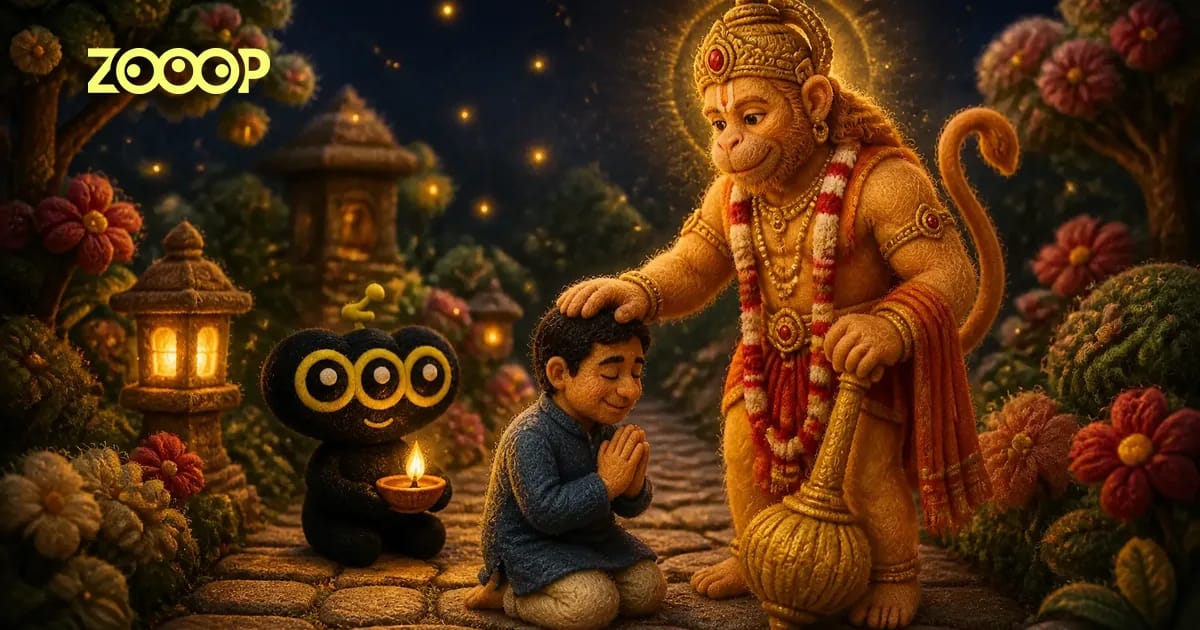
Upload one photo of yourself and get a 10-second vertical Hanuman Ji AI video: you walk in, kneel with folded hands, and after a golden flash Hanuman Ji stands beside you with his hand on your head.

Use cases

Key features

From prayer to blessing in one shot

The camera never moves. You walk slowly into frame, stop, kneel and fold your hands with your eyes closed. One soft golden flash later, Hanuman Ji stands tall beside you, his right hand resting on your head and his golden gada planted on the ground, while gold sparks drift through the air.

Your face, your clothes, four scenes

Your face, hair and the clothes in your photo stay with you for the whole clip, and Hanuman Ji looks the same in every video: golden crown, red-and-saffron dhoti, flowing red sash. Pick where it happens: the night garden of the original trend, a temple courtyard, a river ghat at sunrise or a mountain top.

How to use

  1. 01

    Upload one clear photo of one person, face visible, waist-up or full body, facing the camera in good light.

  2. 02

    Choose a scene: Night garden matches the viral clip, while Temple courtyard, River ghat at sunrise and Mountain top change only the setting.

  3. 03

    Pick 480p (180 credits) or 720p (271 credits) and press Generate. The clip is 10 seconds long, vertical 9:16, with sound.

  4. 04

    When it is ready, download the video and post it straight to Reels, Shorts or your WhatsApp status.

Deep dive

The Hanuman Ji AI video is a devotional trend that took off on Instagram in November 2026. In the clip, a person walks along a garden path at night, kneels and prays, and Hanuman Ji appears beside them in a burst of golden light to bless them with a hand on their head. The reel that started it collected nearly 50,000 likes in two weeks, the #hanumanji tag on TikTok filled with copies, and the most common question under every post was the same: how do I make this Hanuman Ji ki AI video with my own photo? This template answers it with one picture and no prompt to write.

What the Hanuman Ji AI video template makes

Every clip is 10 seconds long, vertical 9:16, with soft temple bells and a low, reverent hum, and it follows the beats of the trend. The camera stays fixed and side-on. In the first half you walk slowly into frame looking down, stop, kneel and join your palms with your eyes closed. Then a single soft golden flash, and Hanuman Ji is standing beside you: tall and calm, golden-orange skin, a tall golden crown and jewellery, a red-and-saffron dhoti, the golden gada resting on the ground in his left hand. His right hand rests on your head in blessing while gold sparks drift through the air. You stay kneeling in prayer to the last frame.

The four scene choices change only the setting, never the beats:

  • Night garden: a stone lantern and warm lamplight on a garden path, like the original reel.
  • Temple courtyard: carved stone pillars and rows of glowing diyas at dusk.
  • River ghat at sunrise: wide stone steps, floating lamps and morning mist.
  • Mountain top: a rocky summit above a sea of clouds at golden hour.

Hanuman Ji keeps the same face, crown and dress in every scene, so a set of clips made by a whole family still looks like one series.

Which photo works best

Use one photo of one person with the face clearly visible, facing the camera, in good light. A waist-up photo is enough: the clip shows you full body, so the legs and feet are filled in to match the rest of the outfit. In our test runs a navy kurta and a maroon kurta with a white dupatta both came through in the same colour and cut, so wear what you want to be seen in. Two more things we noticed: the devotee usually settles onto both knees rather than one, and a long braid stayed exactly as it was in the photo. Sunglasses, a cap pulled low or a heavy beauty filter make the face look less like you. Group photos and pet photos don't work, because the scene has room for one devotee. Use your own photo, or that of an adult family member who has agreed to it.

Ideas for sharing

People post it on a Tuesday or Saturday, on Hanuman Jayanti, before an exam or a new job, or as a WhatsApp status for the family group. A devotional caption such as Jai Bajrang Bali or Jai Shri Ram suits it better than a joke: the clip is built as a quiet moment of prayer, and it reads best that way.

Step-by-step tips and our own sample clips are in the Hanuman Ji AI video guide. For more photo-to-video trends, see the trending AI video templates, or browse every video template on the AI video maker page.

Guides and trends

Hanuman Ji AI Video: How to Make the Blessing Trend From One Photo

Hanuman Ji AI Video: How to Make the Blessing Trend From One Photo

Make the Hanuman Ji AI video from one photo: walk in, kneel in prayer, and Hanuman Ji appears in golden light to bless you. Tips from our own clips.

Featured in these topics

More templates like this one

TikTok AI VideoTemplates: 71AI Video MakerTemplates: 118

Frequently asked questions

What is the Hanuman Ji AI video trend?+

The Hanuman Ji AI video trend is a short devotional clip in which you kneel and pray and Hanuman Ji appears beside you to bless you with his hand on your head. It spread on Instagram and TikTok in November 2026, and this template makes your own version from one photo.

How do I make a Hanuman Ji AI video with my photo?+

Upload one clear photo of yourself, pick a scene and a resolution, and press Generate. There is nothing to write: the walk, the prayer, the golden flash and the blessing are already set up, and the finished 10-second clip downloads as an MP4.

Do I need a Hanuman Ji AI video prompt?+

No. The prompts shared alongside the trend are written for general AI video tools; this template already describes the scene, Hanuman Ji and the blessing, so all you add is your photo and a choice of scene.

Is the Hanuman Ji AI video generator free?+

No, it uses credits. A 480p clip costs 180 credits and a 720p clip costs 271 credits; the price is shown on the Generate button and charged only when you start, and a generation that fails is refunded.

Can a woman or a girl make the Hanuman Ji AI video?+

Yes, women and men alike. The person in the photo keeps their face, hair and clothes, kneels in prayer and receives the same blessing; our cover sample was made from a photo of a woman in a kurta and dupatta. Please use photos of adults only.

Can I put my family, a group or a pet in the video?+

No, it is one person per video. The scene has room for one devotee beside Hanuman Ji, so a group photo or a pet photo will not come out right. For a family, make one clip per person and share them together.

How long is the video and what format is it?+

Each Hanuman Ji AI video is 10 seconds long, vertical 9:16, with sound, in 480p or 720p. The vertical frame fits Instagram Reels, YouTube Shorts and WhatsApp status without any cropping.

Can I choose a different scene instead of the garden?+

Yes. Night garden matches the viral clip, and you can switch to Temple courtyard, River ghat at sunrise or Mountain top. The scene changes only the setting; the walk, the prayer, the golden flash and the blessing stay the same.

Is it respectful to make a Hanuman Ji AI video?+

It is made as a devotional moment, and most people share it that way, with a prayer or Jai Bajrang Bali in the caption. Hanuman Ji is shown calm and blessing, never in a comic role, so keep your photo and caption in the same spirit.

AI ImageImage GeneratorEdit ImageSVG GeneratorMeme Generator

AI VideoText with ReferenceMotion ControlStart/End FrameExtend VideoEdit VideoLip SyncVideo Sound Effects

AI AudioText to SpeechVoice CloneSound EffectMusic Generation

ExploreAll ModelsAll TemplatesAI ToolsGlossaryCompare modelsFree toolsAlternativesAI CLIAPI DocsAgent Skill

CompanyAboutBlogPricingFAQPrivacyTermsReport Infringement

Ask AI about ZOOOP

© 2026 ZOOOP. All rights reserved.