How to Make an AI Pet Video of Your Cat or Dog Stealing Cake
Open the fridge once and the cake looks fine. Open it again and the tray is empty, while someone furry is still holding the spoon. It makes a simple AI pet video: the story needs almost no explanation, and that innocent face at the end delivers the joke.
ZOOOP’s Pet Fridge Cake Heist template turns one cat or dog photo into a vertical clip lasting about ten seconds. We made an orange tabby version and a golden retriever version. Here is what the results look like, which photos to choose, and what to check before sharing yours.
Watch the result: one bite becomes an empty tray
The camera stays inside the refrigerator, looking out. A layered cake sits on a metal tray in the foreground. Your pet peeks through the open door and uses a front paw to lift a spoonful. The door briefly closes and the picture goes dark. When it opens again, the snack raid speeds up until the cake is gone.
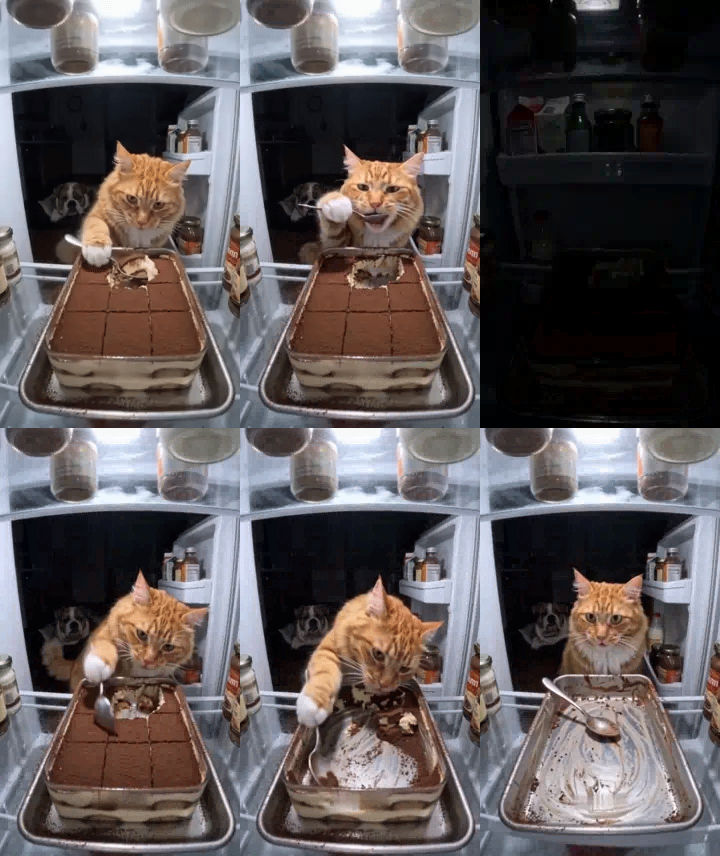
The tabby keeps its orange coat and white front paws. Its spoon-holding gesture is a little exaggerated, but the face and caught-in-the-act expression remain clear. That slightly cartoonish movement helps this AI pet video feel like a small comedy sketch.
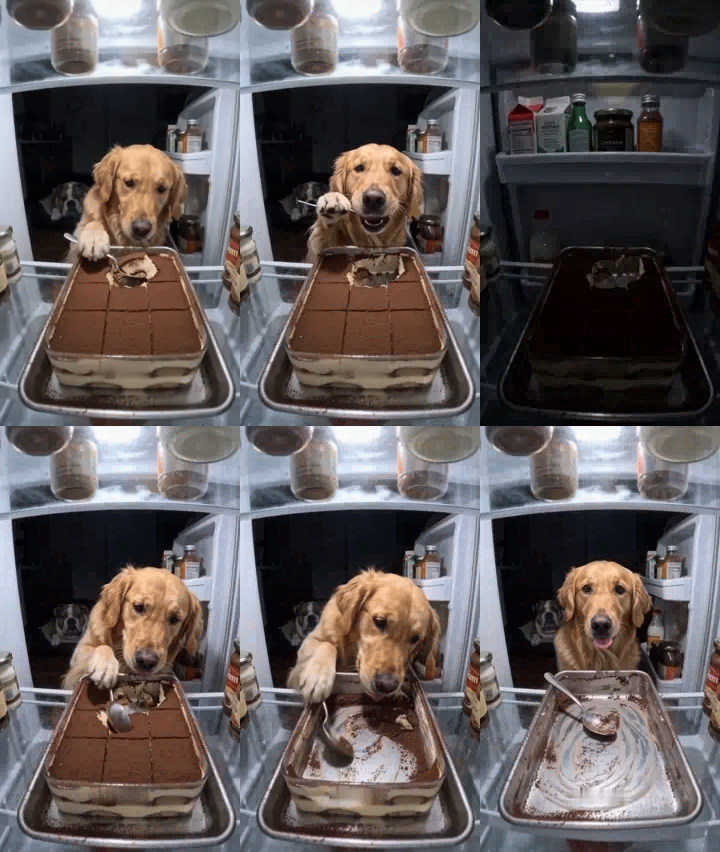
The retriever’s floppy ears, broad muzzle and golden fur are recognizable too. Both clips retain the pause when the door closes and the empty-tray ending. These are generated scenes, not recordings of real pets eating cake.
Choose a photo with a clear face and front paws
In an AI pet video like this, the face attracts attention first. The paws are often where an awkward detail becomes noticeable. A sharp, evenly lit photo with visible coat markings is usually more useful than a blurry action shot with a great expression.
Choose a picture containing just one pet. Try to include both ears, the muzzle and the front paws. A seated pose facing the camera, or turned slightly to one side, works as a starting point. A face buried in a blanket or hidden by clothing leaves fewer recognizable features to work with. For a dark-coated pet, a lighter background can help separate the ears and outline.
The original photo does not need to show a kitchen. A living-room floor or plain wall is fine; a clear subject matters more than the setting. Look through your existing photos before adding filters, changing fur colors or introducing accessories. Heavy smoothing can remove the whiskers, nose texture and fur detail you want to preserve.
Make your AI pet video in three steps
First, open the template and upload your chosen photo. Check that the preview shows a single cat or dog and that its face has not been cropped out. Then choose a resolution. Both options follow the same ten-second vertical scene. The higher option gives you more picture detail, which can help when looking at fur or the edge of the spoon.
Next, start generation and wait for the result. Processing time varies. If the task is still running, keep it open rather than repeatedly starting another one. New submissions create separate results; they do not necessarily make the first task finish sooner. Check the displayed cost before submitting.
Finally, play the entire clip before downloading it. Like other AI video generation, this process uses the photo to guide the subject’s appearance. It does not preserve every whisker or marking unchanged. Think of the result as a little comedy starring a recognizable version of your pet.
Check three things before downloading
Do not judge an AI pet video by its opening frame alone. Watch the moments when the pet raises and lowers its head. Do the ears, muzzle length or coat color suddenly change? If the cat turns into a dog halfway through, or the retriever develops a noticeably different face, the clip needs another attempt before sharing.
Then follow the paw holding the spoon. In our tabby example, the raised white paw looks slightly exaggerated, making this a useful section to watch slowly. Look for extra paws, a spoon passing through the body, or a paw becoming too much like a human hand. One convincing still frame does not guarantee a convincing movement.
Finally, watch the cake and tray. The ending of this AI pet video should clearly communicate that the cake has been eaten. Crumbs and cream smears are fine, but a large untouched slice would weaken the joke. The fridge and camera position should also remain consistent after the door reopens.
If the result looks wrong, try another photo first
If the face is not recognizable enough, start with a sharper photo taken more directly from the front. If the ears or front paws repeatedly look strange, check whether those features were already cropped or obscured in the original picture. Change one thing at a time so you can tell which photo works better for this scene.
A higher resolution adds detail, but it does not guarantee a fix for distorted anatomy. The AI pet video template already supplies the action, so you do not need to write a long set of instructions. Choosing a clear subject photo and reviewing the result gives you a more useful starting point.
Keep the punchline when you share
The finished clip is about ten seconds long and uses a vertical frame. Keep the brief closed-door pause and the empty tray at the end. Together, they make the jump from “just a taste” to “all gone” easy to follow. If you add captions, leave the pet’s face, spoon and tray visible.
“Just one bite. Promise.” would fit, or you can leave the clip without text and let the expression do the work. Label it as AI-created so friends do not mistake it for footage of your pet actually raiding the fridge. For another AI pet video idea, browse the pet video templates, or return to Pet Fridge Cake Heist and try a different photo.