Image AI

Image AI

Generate and edit images with GPT Image 2.6, Nano Banana 2.1, Seedream 5.5 and more, then upscale, retouch or restyle them in the same place.

Try AI Image Generator

Image

  • Image Generator
  • Edit Image
  • SVG Generator
  • Meme Generator
  • Image Upscaler
  • Background Remover
  • Object Remover
  • Photo Restorer

Image Models

  • MiniMax H3 ImageNew
  • Grok Imagine Image 2.0New
  • GPT Image 2.6New
  • Seedream 5.5
  • Nano Banana 2.1
  • Nano Banana 2 Lite
  • Muse Image
  • GPT Image 2.5
  • Midjourney V8.2
  • Nano Banana Pro
More Image Models

Photo Effects

  • Virtual Try-On
  • Clothes Changer
  • Hairstyle Changer
  • Headshot Generator
  • Age Changer
  • Style Transfer
  • Portrait Enhancer
  • AI Action Figure
More Image Tools
Video AI

Video AI

Turn text and images into cinematic clips with Seedance 2.5, Gemini Omni 1.2 Flash, MiniMax H3, Kling V4 and Wan 3.0, with native audio.

Try AI Video Generator

Video

  • Video Generator
  • Start / End Frame
  • Motion Control
  • Edit Video
  • Lip Sync
  • Extend Video
  • Video Sound Effects
  • Video Upscaler

Video Models

  • FLUX 3 MaxNew
  • Seedance 2.5 FlashNew
  • Gemini Omni 1.2 FlashNew
  • Kling V4
  • Seedance 2.5
  • MiniMax H3 Max Turbo
  • Vidu Q4
  • MiniMax H3
  • Wan 3.0
  • Grok Imagine V1.5
More Video Models

Video Templates

  • AI Video Maker
  • TikTok AI Video
  • GTA 6 AI
  • Christmas AI Video
  • AI Dance Video
  • AI Funny Video
  • Dog AI Video
  • Cat AI Video
  • AI Pet Video
  • Face Swap Video
More Templates
Audio AI

Audio AI

Lifelike speech, instant voice clones, sound effects and music from ElevenLabs, Gemini, MiniMax and Lyria.

Try Text to Speech

Audio

  • Text to Speech
  • Voice Clone
  • Sound Effect
  • Music Generation
  • Video Sound Effects

Audio Models

  • ElevenLabs V4New
  • Gemini 3.8 Flash TTSNew
  • ElevenLabs Sound Effects V3New
  • Lyria 3 Pro
  • ElevenLabs V3
  • MiniMax Speech 2.8 HD
  • Qwen3-TTS
  • Inworld TTS
  • MiniMax Music 2.6
  • Index TTS 2
More Audio Models
AI Tools

AI Tools

One-click fixes and effects: upscale, remove backgrounds, erase objects, restore old photos, try on outfits and more.

Browse All AI Tools

Image Tools

  • Image Upscaler
  • Background Remover
  • Object Remover
  • Photo Restorer
  • Portrait Enhancer
  • Style Transfer
  • Texture Transform
  • Perspective Changer
  • Meme Generator

Photo Effects

  • Virtual Try-On
  • Clothes Changer
  • Hairstyle Changer
  • Makeup Changer
  • Headshot Generator
  • Age Changer
  • Expression Changer
  • Product Holding
  • City Teleport

Video Tools

  • Video Upscaler
  • Edit Video
  • Extend Video
  • Lip Sync
  • Video Sound Effects
All AI Tools

Trending Templates

The dance, pet and funny videos everyone is making right now. Upload a photo and get a share-ready clip in minutes.

Browse Trending TemplatesTrendingSanta Cam

Template Categories

  • AI Dance
  • AI Pet Video
  • Face Swap Video
  • AI Action Figure
More Templates

Explore

  • TopicsTemplates grouped by theme: pets, dance, holidays.
  • Model LibraryEvery supported AI model — image, video, audio.
  • Infinite CanvasStoryboard, compose, and remix on one shared canvas.
  • BlogAI filmmaking tutorials, model deep-dives, product news.
  • FAQQuick answers to common questions.
  • AboutWho we are, how templates are made, how to reach us.

Developers

  • AI CLIGenerate images & video from your terminal.
  • API DocsREST API for image, video & audio generation.
  • Agent SkillGive Claude Code, Codex or Cursor image & video generation.
AI TemplatesPricing
HomeCanvas
AI Generator
Image GeneratorEdit ImageSVG GeneratorMeme Generator
Text with ReferenceStart/End FrameMotion ControlEdit VideoLip SyncExtend VideoVideo Sound Effects
Text to SpeechVoice CloneSound EffectMusic Generation
Templates
Hot Templates
Tools
AI Tools
Resources
Creations
  1. Home
  2. Templates
  3. AI Pet Video
  4. Zombie Love Story

Zombie Love Story

Make the viral zombie couple video from two photos: your partner, friend or pet comes back infected, you can't shoot, and their charge ends in a hug.

Zombie couple video: do the AI zombie trend with someone you love

Two photos in, one 13-second zombie love story out. Your partner, friend or pet walks out of the fog infected, you cannot pull the trigger, and their charge ends in a hug.

Use cases

Key features

A four-shot story, not a filter

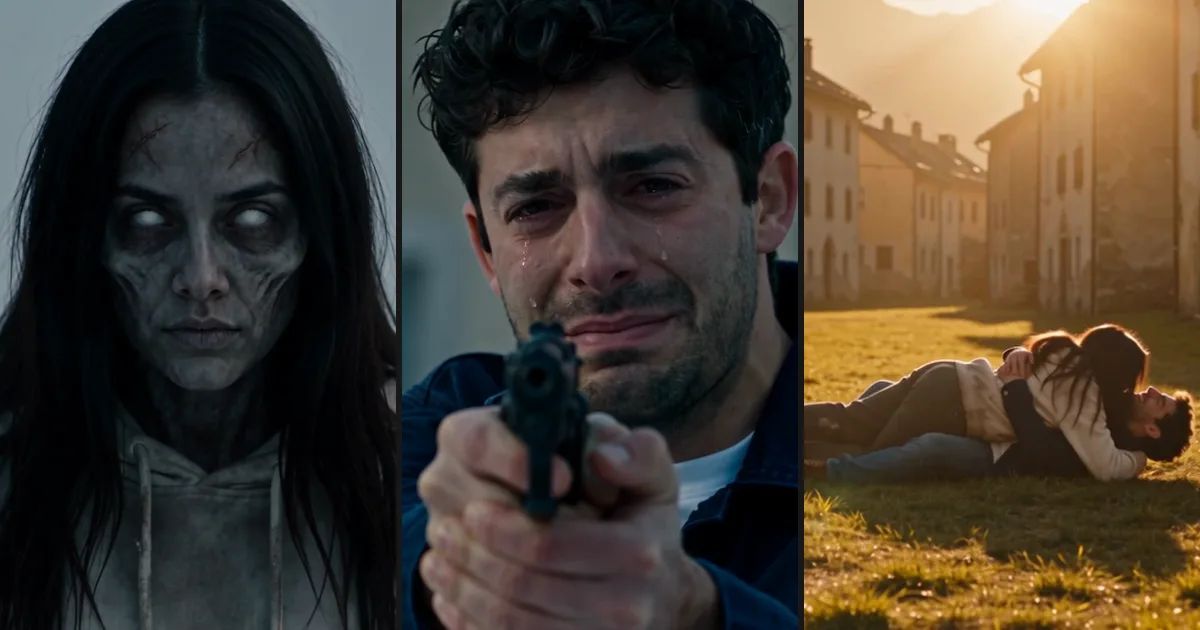
A close-up as they come out of the fog, a standoff you cannot finish, a ten-metre charge with arms flung wide, then a cut to a sunny day where the same run knocks you both to the ground, laughing. Thirteen seconds with sound, tense up to the cut and warm after it.

Still recognizably them

The infected one keeps the face, hair and clothes from your photo, with ashen skin and milky white eyes on top, so everyone watching knows who it is. Dogs and cats come back as dusty, clouded-eyed versions of themselves, same coat, same collar.

How to use

  1. 01

    Upload the photo of the one who turns first: a partner, friend, parent or pet.

  2. 02

    Upload a photo of yourself second, then pick a world: a ruined city, a snowy town or an empty highway.

  3. 03

    Generate the 13-second vertical clip with sound and download it.

Deep dive

At the end of September a new kind of AI clip started spreading on short-video apps. It opens in a grey, empty world after an outbreak. A survivor raises a gun at a figure coming out of the fog, and it is the person they love most, or their dog, already infected. They cannot pull the trigger. They lower the gun, the infected one charges at them, and at the moment of impact the clip cuts to a warm memory of the two of them together. People call it the AI zombie trend or the zombie love story. The zombie couple video, where one partner is the one who turns, and the pet version, where an owner faces their infected dog or cat, are the two most shared.

What the zombie couple video template makes

This template makes that clip from two photos. The first is the one who turns: your partner, a best friend, a parent or a pet. The second is you. The model builds four shots around them: a close-up as they come out of the fog, your tearful standoff, their charge across the street with arms flung wide, and a cut on the very same camera angle to a sunny day before the outbreak, where the same run knocks you both to the ground in a laughing hug.

We kept the gun-down moment and left out the gore. The shot is never fired, and there is no blood and no biting. The infected one keeps their own face, hair and clothes under ashen skin and milky eyes, which is the point: the clip only works if you can still tell who it is.

Pick the world it happens in: a ruined city street, a snowy mountain town or a highway full of abandoned cars. The result is a 13-second vertical video with sound, ready for Halloween posts, a couple's story or a tribute to a pet.

Which photos work best for the AI zombie trend

The twist only lands if everyone knows who the infected one is the moment the face comes into focus. In our sample runs, clothes and hair carried as much of that as the face: the dad in the father and daughter clip kept his plaid shirt, and the girlfriend in the couple clip charged through the snowy town in the cream hoodie from her photo. So show a bit of the outfit, not just a tight crop of the face. Use clear photos of adults or pets, and only of people who are happy to star in it.

Pets keep their own markings: our golden retriever came back with greyed fur, white eyes and its red collar, leapt at its owner at the end of its charge, and after the cut bowled her over on a sunny lawn in a park instead of the same street.

Ideas for your zombie love story

Make it with a partner as a Halloween love story, choosing the snowy town for the most film-like look, or with a parent: our father and daughter clip goes from fog straight to sunset on the same highway. Pet owners can cast a dog or cat as the one who comes home. The 9:16 clip posts to TikTok, Instagram Reels or YouTube Shorts without cropping.

For a step-by-step walkthrough, with the four shots broken down and the mistakes we made while building this template, read our guide: How to do the AI zombie trend. For more Halloween ideas, browse the Halloween templates, let your pet lead a zombie dance in Thriller Dance, or try Costume Reveal.

Guides and trends

How to Do the AI Zombie Trend: A 13-Second Zombie Love Story From Two Photos

How to Do the AI Zombie Trend: A 13-Second Zombie Love Story From Two Photos

What the viral AI zombie trend is, what happens in each of its four shots, which two photos to use, and the four things that went wrong while we built our zombie love story template.

Featured in these topics

More templates like this one

TikTok AI VideoTemplates: 72AI Pet VideoTemplates: 60AI HalloweenTemplates: 14AI Video MakerTemplates: 119

Frequently asked questions

How do I make the zombie couple video?+

To make the zombie couple video, upload a photo of your partner first and one of yourself second, pick a world and generate. Your partner walks out of the fog infected, you lower the gun, they charge at you, and the clip cuts to a sunny day where the same run turns into a laughing hug. A clip takes about four to five minutes.

Which photo goes first?+

The order decides who is who. Photo 1 is the one who has been infected; photo 2 is the survivor holding the gun, usually you. Swap them and you become the infected one instead.

Can I use my dog or cat?+

Yes, as photo 1. Your pet comes out of the fog with dusty fur and clouded eyes, races toward you, and in the sunny version knocks you over for a cuddle. Pets vary a little more than people, so use a clear photo where the whole animal is visible.

Is it gory?+

No. The gun is never fired: the survivor lowers it and lets it drop. There is no blood and no biting. The infected look is ashen, veined skin and milky eyes on a face you still recognize, and the clip ends in a warm, laughing hug. It is a tearjerker, not a horror clip.

How long is it, and what shape?+

Thirteen seconds, vertical 9:16, with sound that stays tense until the cut and turns warm after it. It renders at 720p by default; you can drop to 480p or go up to 1080p.

How many credits does it cost?+

310 credits at 480p, 695 at 720p and 1,450 at 1080p. The exact price shows on the Generate button before you start.

Is the zombie love story AI free?+

No, each clip costs credits, from 310 at 480p. Uploading your photos and picking a world cost nothing: credits are charged only when you start the clip, and they come back automatically if a clip fails.

Will it look exactly like them?+

Close enough to tell who it is, but not pixel-perfect. The infected look makes a face paler and a little gaunter, and small accessories such as glasses pushed up on the head can drop out. Clear, front-facing photos keep the likeness best.

What is the AI zombie trend?+

A short-video format that went viral at the end of September. In a grey world after an outbreak, someone raises a gun at the person they love most, who is already infected, cannot shoot, and gets pulled into a hug as the clip cuts to a happier day. It is also called the zombie love story, and couples and pet owners make it most.

Is this the "my zombie lover" AI video?+

Yes. "My zombie lover" is another name people search for the same AI zombie trend. This template makes it with no prompt to write: you upload the one who turns and yourself, pick a world, and the four shots are already set up.

Whose photos can I use?+

Adults and pets only, and only people who are happy to star in it. Clear, front-facing photos with the face fully visible work best. Sunglasses, masks and backlit night shots hide the features that make the infected one recognizable, so avoid them.

AI ImageImage GeneratorEdit ImageSVG GeneratorMeme Generator

AI VideoText with ReferenceMotion ControlStart/End FrameExtend VideoEdit VideoLip SyncVideo Sound Effects

AI AudioText to SpeechVoice CloneSound EffectMusic Generation

ExploreAll ModelsAll TemplatesAI ToolsGlossaryCompare modelsFree toolsAlternativesAI CLIAPI DocsAgent Skill

CompanyAboutBlogPricingFAQPrivacyTermsReport Infringement

Ask AI about ZOOOP

© 2026 ZOOOP. All rights reserved.