Image AI

Image AI

Generate and edit images with GPT Image 2.6, Nano Banana 2.1, Seedream 5.5 and more, then upscale, retouch or restyle them in the same place.

Try AI Image Generator

Image

  • Image Generator
  • Edit Image
  • SVG Generator
  • Meme Generator
  • Image Upscaler
  • Background Remover
  • Object Remover
  • Photo Restorer

Image Models

  • MiniMax H3 ImageNew
  • Grok Imagine Image 2.0New
  • GPT Image 2.6New
  • Seedream 5.5
  • Nano Banana 2.1
  • Nano Banana 2 Lite
  • Muse Image
  • GPT Image 2.5
  • Midjourney V8.2
  • Nano Banana Pro
More Image Models

Photo Effects

  • Virtual Try-On
  • Clothes Changer
  • Hairstyle Changer
  • Headshot Generator
  • Age Changer
  • Style Transfer
  • Portrait Enhancer
  • AI Action Figure
More Image Tools
Video AI

Video AI

Turn text and images into cinematic clips with Seedance 2.5, Gemini Omni 1.2 Flash, MiniMax H3, Kling V4 and Wan 3.0, with native audio.

Try AI Video Generator

Video

  • Video Generator
  • Start / End Frame
  • Motion Control
  • Edit Video
  • Lip Sync
  • Extend Video
  • Video Sound Effects
  • Video Upscaler

Video Models

  • FLUX 3 MaxNew
  • Seedance 2.5 FlashNew
  • Gemini Omni 1.2 FlashNew
  • Kling V4
  • Seedance 2.5
  • MiniMax H3 Max Turbo
  • Vidu Q4
  • MiniMax H3
  • Wan 3.0
  • Grok Imagine V1.5
More Video Models

Video Templates

  • AI Video Maker
  • TikTok AI Video
  • GTA 6 AI
  • Christmas AI Video
  • AI Dance Video
  • AI Funny Video
  • Dog AI Video
  • Cat AI Video
  • AI Pet Video
  • Face Swap Video
More Templates
Audio AI

Audio AI

Lifelike speech, instant voice clones, sound effects and music from ElevenLabs, Gemini, MiniMax and Lyria.

Try Text to Speech

Audio

  • Text to Speech
  • Voice Clone
  • Sound Effect
  • Music Generation
  • Video Sound Effects

Audio Models

  • ElevenLabs V4New
  • Gemini 3.8 Flash TTSNew
  • ElevenLabs Sound Effects V3New
  • Lyria 3 Pro
  • ElevenLabs V3
  • MiniMax Speech 2.8 HD
  • Qwen3-TTS
  • Inworld TTS
  • MiniMax Music 2.6
  • Index TTS 2
More Audio Models
AI Tools

AI Tools

One-click fixes and effects: upscale, remove backgrounds, erase objects, restore old photos, try on outfits and more.

Browse All AI Tools

Image Tools

  • Image Upscaler
  • Background Remover
  • Object Remover
  • Photo Restorer
  • Portrait Enhancer
  • Style Transfer
  • Texture Transform
  • Perspective Changer
  • Meme Generator

Photo Effects

  • Virtual Try-On
  • Clothes Changer
  • Hairstyle Changer
  • Makeup Changer
  • Headshot Generator
  • Age Changer
  • Expression Changer
  • Product Holding
  • City Teleport

Video Tools

  • Video Upscaler
  • Edit Video
  • Extend Video
  • Lip Sync
  • Video Sound Effects
All AI Tools

Trending Templates

The dance, pet and funny videos everyone is making right now. Upload a photo and get a share-ready clip in minutes.

Browse Trending TemplatesTrendingSanta Cam

Template Categories

  • AI Dance
  • AI Pet Video
  • Face Swap Video
  • AI Action Figure
More Templates

Explore

  • TopicsTemplates grouped by theme: pets, dance, holidays.
  • Model LibraryEvery supported AI model — image, video, audio.
  • Infinite CanvasStoryboard, compose, and remix on one shared canvas.
  • BlogAI filmmaking tutorials, model deep-dives, product news.
  • FAQQuick answers to common questions.
  • AboutWho we are, how templates are made, how to reach us.

Developers

  • AI CLIGenerate images & video from your terminal.
  • API DocsREST API for image, video & audio generation.
  • Agent SkillGive Claude Code, Codex or Cursor image & video generation.
AI TemplatesPricing
HomeCanvas
AI Generator
Image GeneratorEdit ImageSVG GeneratorMeme Generator
Text with ReferenceStart/End FrameMotion ControlEdit VideoLip SyncExtend VideoVideo Sound Effects
Text to SpeechVoice CloneSound EffectMusic Generation
Templates
Hot Templates
Tools
AI Tools
Resources
Creations
  1. Home
  2. Templates
  3. AI Pet Video
  4. Doorbell Cam Arrest

Doorbell Cam Arrest

Make an AI arrest video from one photo: doorbell camera footage of two officers cuffing you, a friend or your pet on the porch and leading them away.

AI arrest video: get busted on your own doorbell camera

Upload one photo of a person or a pet and get an 8-second vertical AI arrest video that looks like doorbell camera footage: two officers walk up, make the arrest on the doormat and lead them down the path.

Use cases

Key features

Doorbell camera AI video, beat by beat

A fisheye camera fixed above the front door watches the whole scene without moving. The officers climb the porch, cuff a person behind the back or clip a leash on a pet, then walk them toward the street until they are tiny in the frame.

Recognizably you, your friend or your dog

The face, hairstyle, skin tone and outfit from the photo carry over, and a dog or cat keeps its breed, coat colors and markings on its own four paws. Whatever stands behind you in the photo is swapped for the porch.

How to use

  1. 01

    Upload one clear photo of one person or one pet with the face visible. A waist-up shot is enough, and a full-length one works too.

  2. 02

    Choose 480p or 720p. Every clip is 8 seconds long, vertical 9:16, with porch sounds.

  3. 03

    Press Generate. The officers, the porch and the street are built into the template, so there is nothing to type.

  4. 04

    Download the video when it finishes and post it to TikTok, Reels or Shorts.

Deep dive

An AI arrest video is a short fake clip in which someone gets arrested, and the doorbell camera version is the most convincing kind: the picture looks like it came off a smart doorbell, with the warped fisheye view, the soft compressed image and the porch ceiling bending across the top. Doorbell clips are already a genre of their own online (package thieves, raccoons, dancing delivery drivers), so a friend or a dog getting "busted" on their own front step reads instantly as a joke. This template turns one photo into that clip.

What the AI arrest video template makes

The camera stays fixed above the front door for all 8 seconds. It never zooms or follows anyone, which is exactly what makes the clip look like real doorbell footage rather than a movie scene.

  • 0-2 seconds: the person or pet from your photo is on the doormat right under the camera, large in the lower half of the frame. Two officers in plain dark navy uniforms come up the front path.
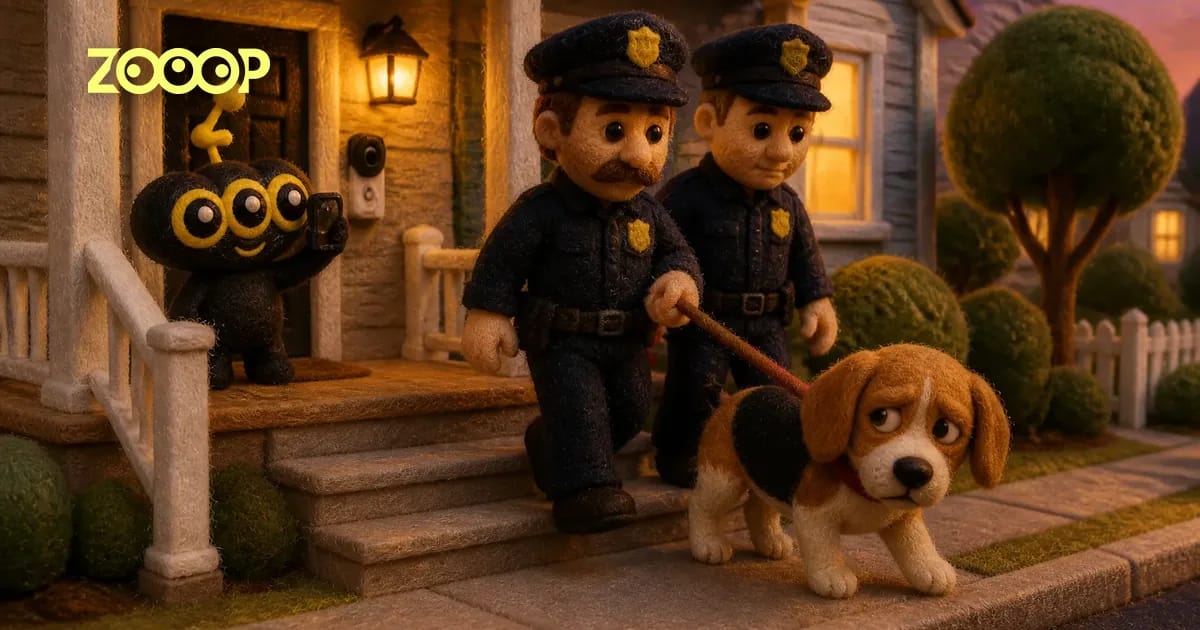
  • 2-5 seconds: the arrest happens on the doormat. A person is turned around and handcuffed behind their back while the second officer holds their arm. A pet stays sitting while one officer bends down and clips a leash onto its collar, looking about as guilty as a dog can look.
  • 5-8 seconds: both officers walk the subject down the steps and along the path toward the street, smaller with every step, a pet trotting between them on its leash.

The clip is vertical 9:16 and has sound: footsteps on the wooden porch, the click of the cuffs or the leash and quiet street ambience, with no music and no dialogue. The setting is a daytime suburban street with bare trees and parked cars. The uniforms carry no readable writing, badge numbers or department names, so the clip is not tied to any real police force.

Which photo works best for a doorbell cam arrest

  • One subject, face visible. One person or one pet per photo. In a group photo the template has to guess who gets arrested.
  • Waist-up is fine. In our test runs a waist-up photo of a man in a grey hoodie came out head to toe, with jeans and sneakers that matched an outfit the photo only half showed.
  • The background does not matter. A park and a living room both disappeared completely; only the porch and the street remain.
  • The outfit carries over. Whatever someone wears in the photo is what they wear on the porch, so the outfit is the one choice worth making.
  • Pets start big. Because a pet begins right under the camera, its face fills a good part of the screen before the officers arrive. In our beagle sample the tricolor coat and floppy ears stayed clear from the first frame until it walked away.

Ideas for an AI arrest prank video

Drop a friend's arrest into the group chat and let everyone ask what they did. "Arrest" the dog that ate the sofa cushion, or the cat that knocks glasses off the table. Make one of yourself for a birthday or a farewell, or post your pet's big moment as a Reel. Keep it to adults who have agreed to be in it, and share it as the joke it is, never as footage of a real event.

Want more clips with this look? In Caught Dancing at the Window a camera across the street catches someone dancing alone, and GTA 6 Wanted Level turns the police into a getaway. For more pranks see AI funny videos, and for pet versions AI pet videos. For a step-by-step walkthrough with our tested examples, read the AI arrest video guide.

Guides and trends

AI Arrest Video: Make a Doorbell Cam Arrest Prank From One Photo

AI Arrest Video: Make a Doorbell Cam Arrest Prank From One Photo

Turn one photo of a person or pet into an 8-second AI arrest video shot from a doorbell camera. See tested results, photo tips and how to share it safely.

Featured in these topics

More templates like this one

TikTok AI VideoTemplates: 71AI Funny VideoTemplates: 47Dog AI VideoTemplates: 51Cat AI VideoTemplates: 45AI Pet VideoTemplates: 60AI Video MakerTemplates: 118

Frequently asked questions

What is an AI arrest video?+

An AI arrest video is a generated clip in which someone appears to get arrested. This template makes the doorbell camera version: two officers cuff the person, or leash the pet, from your photo on their own porch and walk them away, all in 8 seconds of fisheye security footage.

How do I make an AI arrest video from a photo?+

Upload one photo of one person or one pet, pick 480p or 720p and press Generate. The scene, the officers and the camera look are already set, so you don't write a prompt, and the finished clip downloads as a vertical video.

Can I make a doorbell cam arrest video of my dog or cat?+

Yes. Upload a pet photo and the officers clip a leash onto its collar instead of using handcuffs, then lead it down the path. The pet keeps its breed and markings and walks on its own four paws.

Is the AI arrest video generator free?+

No. One video costs 180 credits at 480p or 271 credits at 720p. The price is shown on the Generate button, and credits are only charged when you start a video.

Does the doorbell camera AI video have sound?+

Yes. You hear footsteps on the porch boards, the click of the handcuffs or leash and quiet outdoor ambience. There is no music and nobody speaks.

How long is the video, and in what format?+

Every clip is 8 seconds and vertical 9:16, which fits TikTok, Reels and Shorts without cropping. 720p gives a sharper picture, while 480p costs less and looks fine on a phone screen.

Is it okay to make an AI arrest prank video of a friend?+

Only with their agreement, and only of adults. Share it clearly as a joke: an arrest video passed off as real footage can hurt someone's reputation, so never use it to deceive anyone.

Does the video show a real police department?+

No. The officers wear plain dark navy uniforms and caps with no readable names, numbers or department patches, so the clip is not linked to any real police force.

What if my photo shows more than one person?+

Crop it to one person first. The template is built for a single subject, and with two faces in the photo it may arrest the wrong one or blend the two together.

AI ImageImage GeneratorEdit ImageSVG GeneratorMeme Generator

AI VideoText with ReferenceMotion ControlStart/End FrameExtend VideoEdit VideoLip SyncVideo Sound Effects

AI AudioText to SpeechVoice CloneSound EffectMusic Generation

ExploreAll ModelsAll TemplatesAI ToolsGlossaryCompare modelsFree toolsAlternativesAI CLIAPI DocsAgent Skill

CompanyAboutBlogPricingFAQPrivacyTermsReport Infringement

Ask AI about ZOOOP

© 2026 ZOOOP. All rights reserved.