Image AI

Image AI

Generate and edit images with GPT Image 2.6, Nano Banana 2.1, Seedream 5.5 and more, then upscale, retouch or restyle them in the same place.

Try AI Image Generator

Image

  • Image Generator
  • Edit Image
  • SVG Generator
  • Meme Generator
  • Image Upscaler
  • Background Remover
  • Object Remover
  • Photo Restorer

Image Models

  • MiniMax H3 ImageNew
  • Grok Imagine Image 2.0New
  • GPT Image 2.6New
  • Seedream 5.5
  • Nano Banana 2.1
  • Nano Banana 2 Lite
  • Muse Image
  • GPT Image 2.5
  • Midjourney V8.2
  • Nano Banana Pro
More Image Models

Photo Effects

  • Virtual Try-On
  • Clothes Changer
  • Hairstyle Changer
  • Headshot Generator
  • Age Changer
  • Style Transfer
  • Portrait Enhancer
  • AI Action Figure
More Image Tools
Video AI

Video AI

Turn text and images into cinematic clips with Seedance 2.5, Gemini Omni 1.2 Flash, MiniMax H3, Kling V4 and Wan 3.0, with native audio.

Try AI Video Generator

Video

  • Video Generator
  • Start / End Frame
  • Motion Control
  • Edit Video
  • Lip Sync
  • Extend Video
  • Video Sound Effects
  • Video Upscaler

Video Models

  • FLUX 3 MaxNew
  • Seedance 2.5 FlashNew
  • Gemini Omni 1.2 FlashNew
  • Kling V4
  • Seedance 2.5
  • MiniMax H3 Max Turbo
  • Vidu Q4
  • MiniMax H3
  • Wan 3.0
  • Grok Imagine V1.5
More Video Models

Video Templates

  • AI Video Maker
  • TikTok AI Video
  • GTA 6 AI
  • Christmas AI Video
  • AI Dance Video
  • AI Funny Video
  • Dog AI Video
  • Cat AI Video
  • AI Pet Video
  • Face Swap Video
More Templates
Audio AI

Audio AI

Lifelike speech, instant voice clones, sound effects and music from ElevenLabs, Gemini, MiniMax and Lyria.

Try Text to Speech

Audio

  • Text to Speech
  • Voice Clone
  • Sound Effect
  • Music Generation
  • Video Sound Effects

Audio Models

  • ElevenLabs V4New
  • Gemini 3.8 Flash TTSNew
  • ElevenLabs Sound Effects V3New
  • Lyria 3 Pro
  • ElevenLabs V3
  • MiniMax Speech 2.8 HD
  • Qwen3-TTS
  • Inworld TTS
  • MiniMax Music 2.6
  • Index TTS 2
More Audio Models
AI Tools

AI Tools

One-click fixes and effects: upscale, remove backgrounds, erase objects, restore old photos, try on outfits and more.

Browse All AI Tools

Image Tools

  • Image Upscaler
  • Background Remover
  • Object Remover
  • Photo Restorer
  • Portrait Enhancer
  • Style Transfer
  • Texture Transform
  • Perspective Changer
  • Meme Generator

Photo Effects

  • Virtual Try-On
  • Clothes Changer
  • Hairstyle Changer
  • Makeup Changer
  • Headshot Generator
  • Age Changer
  • Expression Changer
  • Product Holding
  • City Teleport

Video Tools

  • Video Upscaler
  • Edit Video
  • Extend Video
  • Lip Sync
  • Video Sound Effects
All AI Tools

Trending Templates

The dance, pet and funny videos everyone is making right now. Upload a photo and get a share-ready clip in minutes.

Browse Trending TemplatesTrendingPet Taxi

Template Categories

  • AI Dance
  • AI Pet Video
  • Face Swap Video
  • AI Action Figure
More Templates

Explore

  • TopicsTemplates grouped by theme: pets, dance, holidays.
  • Model LibraryEvery supported AI model — image, video, audio.
  • Infinite CanvasStoryboard, compose, and remix on one shared canvas.
  • BlogAI filmmaking tutorials, model deep-dives, product news.
  • FAQQuick answers to common questions.
  • AboutWho we are, how templates are made, how to reach us.

Developers

  • AI CLIGenerate images & video from your terminal.
  • API DocsREST API for image, video & audio generation.
  • Agent SkillGive Claude Code, Codex or Cursor image & video generation.
AI TemplatesPricing
HomeCanvas
AI Generator
Image GeneratorEdit ImageSVG GeneratorMeme Generator
Text with ReferenceStart/End FrameMotion ControlEdit VideoLip SyncExtend VideoVideo Sound Effects
Text to SpeechVoice CloneSound EffectMusic Generation
Templates
Hot Templates
Tools
AI Tools
Resources
Creations
  1. Home
  2. Templates
  3. AI Pet Video
  4. Christmas Pet Makeover

Christmas Pet Makeover

Make an AI Christmas pet video from one photo of your dog or cat. Watch a Santa hat fall, a red coat appear and snow drift past a lit tree.

AI Christmas Pet Video With a Santa Hat Reveal

Upload a photo of your dog or cat and make a ten-second vertical holiday card with a falling Santa hat, a red coat and a glowing Christmas tree.

Use cases

Key features

A Santa hat reveal, then a room full of Christmas lights

The holiday outfit arrives in stages. Look for the falling red hat first, then the white cuffs and belt, followed by gifts, tree lights and drifting snow.

A familiar face in the Christmas scene

The photo sets the pet’s appearance, including the shape of its ears and muzzle. The dog or cat stays in the center of the shot throughout the change.

How to use

  1. 01

    Upload one well-lit photo of a single dog or cat. Leave room above the ears and keep the front paws visible if possible.

  2. 02

    Choose 480p for a smaller file or 720p for more detail in the fur and Christmas lights.

  3. 03

    Select Generate, then download the ten-second vertical video with sound.

Deep dive

An AI Christmas pet video shows your dog or cat going from a quiet moment on the living room rug to a Santa outfit in front of a lit tree. This template takes one pet photo and gives you a short holiday greeting with room for the little reactions that make your pet recognizable.

What the AI Christmas Pet Video shows

The opening is a low, straight-on view of a pet resting on a rug. A Santa hat drops into the frame and lands above its eyes. The red coat takes shape over its shoulders, the window and the tree come into view, and snow starts to drift across the picture. The pet pushes up from a lying position and sits facing the camera for the final beat.

The familiar framing makes the reveal easy to follow on a phone. You can watch the hat settle, track the changes around the pet and still see its expression near the end. The video lasts ten seconds and uses a 9:16 frame with sound. Choose between 480p and 720p before generating.

Which photo works for a Santa hat pet video?

Use a clear photo of a single dog or cat, ideally facing the camera around its eye level. Leave some space at the top of the picture and look for an angle that shows the forehead, both eyes and the line of the muzzle. A photo that also shows the front paws gives the sitting movement more room. Soft daylight near a window works well for pets with dark coats or subtle stripes.

In the bulldog sample, the white blaze and the broad muzzle stay easy to pick out after the red coat appears. The orange tabby has a different silhouette, and the hat sits at an angle that leaves one pointed ear visible. Both pets sit up on the rug, and the cat reaches that pose a little earlier.

Send a moving Christmas card

A ten-second pet Christmas video is short enough to send in a family chat on Christmas morning. If you share it as a Reel or Short, leave the center clear so people can see the hat land and spot the change in the room. A caption with the pet’s name also works well as the opening to a holiday photo roundup.

Explore more Christmas templates or give your pet a stage of its own with Christmas Pet Concert.
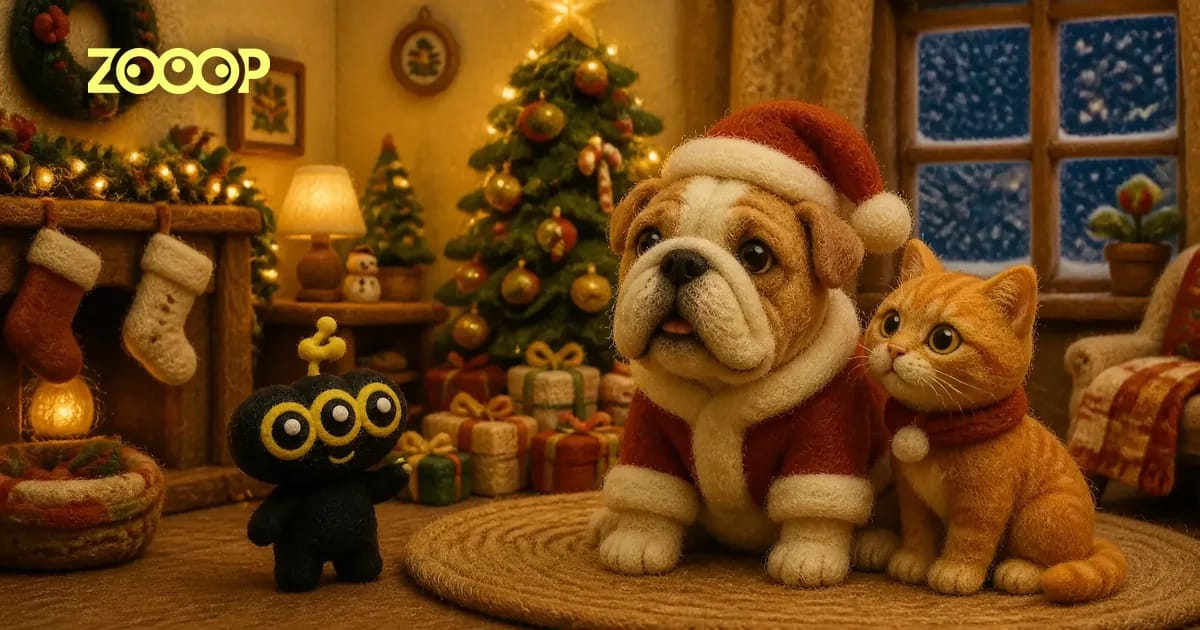
Read the Christmas pet video guide

Guides and trends

Christmas Pet Video: Turn One Photo Into a Santa Makeover

Christmas Pet Video: Turn One Photo Into a Santa Makeover

Upload one dog or cat photo to make a 10-second Christmas pet video in ZOOOP. See the bulldog and tabby examples and learn which photo works best.

Featured in these topics

More templates like this one

Christmas AI VideoTemplates: 9SeasonalDog AI VideoTemplates: 56AI Pet VideoTemplates: 65AI Video MakerTemplates: 127

Frequently asked questions

What is an AI Christmas pet video?+

An AI Christmas pet video turns a single photo of your dog or cat into a ten-second holiday scene. Your pet wears a Santa hat and a red coat as the tree lights and the snow come into view.

Can I make a Santa hat video with my cat or dog?+

Yes, the same template works for a dog or a cat. Upload one picture per video so the eyes, ears and markings of that pet can guide the clip.

Which pet photo should I upload?+

Choose one sharp picture with the pet’s eyes and the top of its head in view. A front-facing photo with visible paws gives the costume and the final sitting pose more room.

Do I need Christmas decorations or a pet costume?+

An ordinary pet photo is enough. The video adds the red outfit, lit tree, gifts and falling snow around your dog or cat during the reveal.

Is the AI Christmas pet video free?+

The video costs 180 credits in 480p or 271 credits in 720p. The Generate button displays the credit charge for the selected resolution before you start.

Can I use this video as a Christmas card or Reel?+

Yes, the ten-second video is vertical and includes sound. Download the clip to send in a message or post on a service that accepts 9:16 video.

AI ImageImage GeneratorEdit ImageSVG GeneratorMeme Generator

AI VideoText with ReferenceMotion ControlStart/End FrameExtend VideoEdit VideoLip SyncVideo Sound Effects

AI AudioText to SpeechVoice CloneSound EffectMusic Generation

ExploreAll ModelsAll TemplatesAI ToolsGlossaryCompare modelsFree toolsAlternativesAI CLIAPI DocsAgent Skill

CompanyAboutBlogPricingFAQPrivacyTermsReport Infringement

Ask AI about ZOOOP

© 2026 ZOOOP. All rights reserved.