Image AI

Image AI

Generate and edit images with GPT Image 2.5, Nano Banana 2.1, Seedream 5.0 Pro and more, then upscale, retouch or restyle them in the same place.

Try AI Image Generator

Image

  • Image Generator
  • Edit Image
  • SVG Generator
  • Image Upscaler
  • Background Remover
  • Object Remover
  • Photo Restorer

Image Models

  • Nano Banana 2 LiteNew
  • Seedream 5.0 FlashNew
  • Nano Banana 2.1New
  • Muse Image
  • GPT Image 2.5
  • Seedream 5.0 Pro
  • Midjourney V8.2
  • Nano Banana Pro
  • Flux 2 Pro
  • Grok Imagine
More Image Models

Photo Effects

  • Virtual Try-On
  • Clothes Changer
  • Hairstyle Changer
  • Headshot Generator
  • Age Changer
  • Style Transfer
  • Portrait Enhancer
  • AI Action Figure
More Image Tools
Video AI

Video AI

Turn text and images into cinematic clips with Seedance 2.5, Gemini Omni 1.1 Flash, MiniMax H3, Kling V4 and Wan 3.0, with native audio.

Try AI Video Generator

Video

  • Video Generator
  • Start / End Frame
  • Motion Control
  • Edit Video
  • Lip Sync
  • Extend Video
  • Video Sound Effects
  • Video Upscaler

Video Models

  • Kling V4New
  • MiniMax H3 Max TurboNew
  • Gemini Omni 1.1 FlashNew
  • MiniMax H3 Max
  • Vidu Q4
  • Seedance 2.5
  • MiniMax H3
  • Wan 3.0
  • Kling O3
  • Grok Imagine V1.5
More Video Models

Video Templates

  • AI Dance Video
  • AI Funny Video
  • Dog AI Video
  • Cat AI Video
  • AI Pet Video
  • Face Swap Video
  • Halloween
More Templates
Audio AI

Audio AI

Lifelike speech, instant voice clones, sound effects and music from ElevenLabs, Gemini, MiniMax and Lyria.

Try Text to Speech

Audio

  • Text to Speech
  • Voice Clone
  • Sound Effect
  • Music Generation
  • Video Sound Effects

Audio Models

  • Gemini 3.1 Flash TTSNew
  • Lyria 3 ProNew
  • ElevenLabs V3
  • MiniMax Speech 2.8 HD
  • Qwen3-TTS
  • Inworld TTS
  • MiniMax Music 2.6
  • ElevenLabs Sound Effects
  • Index TTS 2
More Audio Models
AI Tools

AI Tools

One-click fixes and effects: upscale, remove backgrounds, erase objects, restore old photos, try on outfits and more.

Browse All AI Tools

Image Tools

  • Image Upscaler
  • Background Remover
  • Object Remover
  • Photo Restorer
  • Portrait Enhancer
  • Style Transfer
  • Texture Transform
  • Perspective Changer

Photo Effects

  • Virtual Try-On
  • Clothes Changer
  • Hairstyle Changer
  • Makeup Changer
  • Headshot Generator
  • Age Changer
  • Expression Changer
  • Product Holding
  • City Teleport

Video Tools

  • Video Upscaler
  • Edit Video
  • Extend Video
  • Lip Sync
  • Video Sound Effects
All AI Tools

Trending Templates

The dance, pet and Halloween videos everyone is making right now. Upload a photo and get a share-ready clip in minutes.

Browse Trending TemplatesTrendingDougie Clone Dance

Template Categories

  • AI Dance
  • AI Pet Video
  • Face Swap Video
  • Halloween
  • AI Action Figure
More Templates

Explore

  • Model LibraryEvery supported AI model — image, video, audio.
  • Infinite CanvasStoryboard, compose, and remix on one shared canvas.
  • BlogAI filmmaking tutorials, model deep-dives, product news.
  • FAQQuick answers to common questions.

Developers

  • AI CLIGenerate images & video from your terminal.
  • API DocsREST API for image, video & audio generation.
  • Agent SkillGive Claude Code, Codex or Cursor image & video generation.
AI TemplatesPricing
HomeCanvas
AI Generator
Image GeneratorEdit ImageSVG Generator
Text with ReferenceStart/End FrameMotion ControlEdit VideoLip SyncExtend VideoVideo Sound Effects
Text to SpeechVoice CloneSound EffectMusic Generation
Templates
Hot Templates
Tools
AI Tools
Resources
Creations
  1. Home
  2. Templates
  3. AI Pet Video
  4. Closing Door Prank

Closing Door Prank

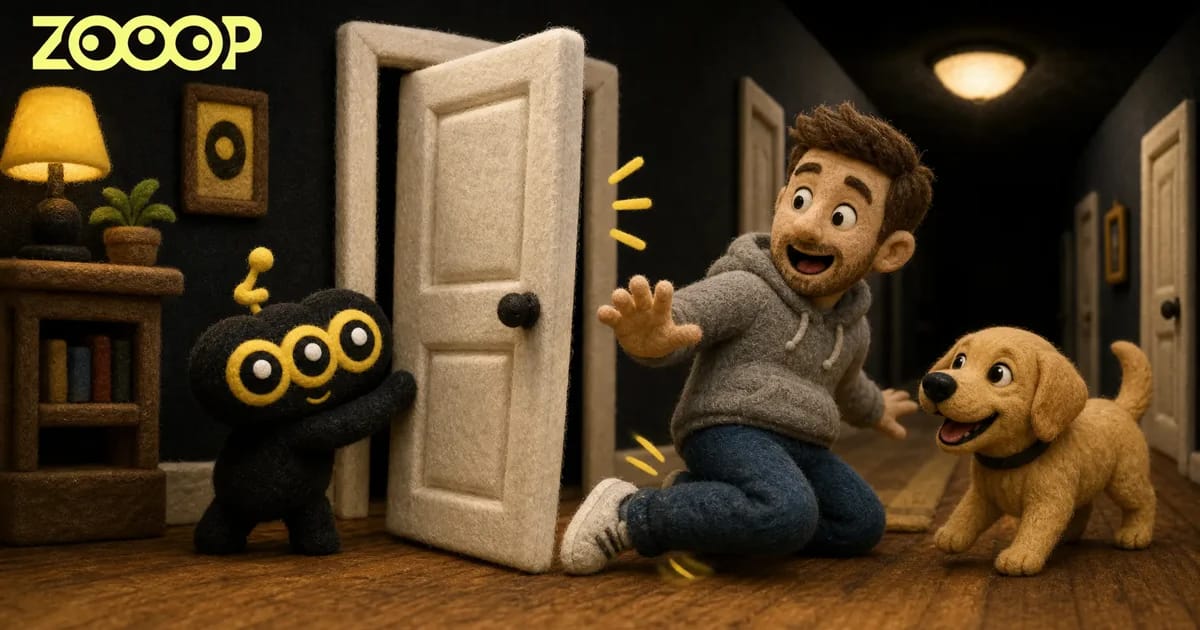
Upload one person or dog photo to star in a closing door prank: a hallway sprint, a narrow escape and a sliding finish in a 9-second vertical video.

AI Funny Video

Closing Door Prank AI Video

One photo, one hallway sprint and a last-second escape through the door.

Use cases

Key features

The hallway prank sequence

Run toward the door, slip through as it swings shut, then slide across the wooden floor and look back.

A person or your dog

Use your own photo for the runner. Choose Person for an adult or Dog for a natural four-legged sprint and a playful sliding stop.

How to use

  1. 01

    Choose Person or Dog, then upload one clear photo of one adult or one dog.

  2. 02

    Choose 480p or 720p and generate the 9-second video.

  3. 03

    Download the generated video and share it.

Deep dive

Make the closing door prank from one still photo. Your runner starts at the far end of a bright hallway, races toward a white door and slips through as it swings shut. The final slide across the wooden floor gives the clip its comic finish.

Choose Person to put an adult in the runner’s place, or Dog for a four-paw version featuring your own dog. Upload one clear photo with the face visible and as much of the body in view as possible. The template supplies the hallway scene and action, so you can generate the video without writing a prompt or filming a real prank. Generate, download and share your 9-second vertical clip.

For photo tips and both tested examples, read our Closing Door Prank guide.
Frequently asked questions

How many photos do I upload?+

Upload exactly one photo of one adult or one dog. The photo supplies the runner; the woman holding the door stays in the scene.

Which photo works best?+

Use a sharp full-body or knee-up adult photo, or a full-body dog photo. Keep the face visible and the lighting clear. Use your own photo or a consenting adult’s photo.

What changes in Dog mode?+

The dog runs on four paws, passes through the doorway and slides to a natural sitting finish. Its breed, coat and markings come from your photo.

How long is the video and what does it cost?+

The video is 9 seconds in vertical 9:16 format. It costs 180 credits at 480p or 271 credits at 720p. The generation button shows the price before you start.

Will the runner look exactly like my photo?+

Your photo guides the face, hair or fur and clothing. Results vary, and the runner starts small at the far end of the hallway. A clear photo helps preserve recognizable details.

Guides and trends

How to Make a Closing Door Prank AI Video from One Photo

How to Make a Closing Door Prank AI Video from One Photo

Turn one person or dog photo into a 9-second hallway prank with ZOOOP. See the tested results, choose your runner and make a vertical video without filming.

AI ImageImage GeneratorEdit ImageSVG Generator

AI VideoText with ReferenceMotion ControlStart/End FrameExtend VideoEdit VideoLip SyncVideo Sound Effects

AI AudioText to SpeechVoice CloneSound EffectMusic Generation

ExploreAll ModelsAll TemplatesAI ToolsGlossaryCompare modelsFree toolsAlternativesAI CLIAPI DocsAgent Skill

CompanyBlogPricingFAQPrivacyTermsReport Infringement

Ask AI about ZOOOP

© 2026 ZOOOP. All rights reserved.