MiniMax H3 Image Tested: Native 4K, 16 Reference Images, and Image to Video With H3
MiniMax H3 Image vs Seedream 5.5 on the same prompts: product, portrait, poster text, night market, then 4K detail, 6-image compositing, edits and video.
On November 11, MiniMax released H3 Image, a sibling of its MiniMax H3 video model. The pitch in the official blog post is blunt: native 4K, up to 16 reference images in one request, and a single model for both generating and editing. The less usual part is that the weights are out in the open on Hugging Face.
ZOOOP added MiniMax H3 Image to the AI Image Generator today. Before it went live, I ran it and Seedream 5.5 through the same set of prompts, then handed one of the results to H3 video to see whether a still from it could start moving right away.
What MiniMax H3 Image is
There aren't many settings, but each one is generous. Prompts can run to 32,000 characters, enough for a full page of storyboard notes. You get eight aspect ratios: 21:9, 16:9, 3:2, 4:3, 1:1, 3:4, 2:3 and 9:16. Resolution comes in just two steps, 2K and 4K. At 4K the long side is roughly 5,120 pixels, so a 16:9 image comes out at 5120×2891.
Leave the reference slot empty and it's text-to-image. Drop in anywhere from 1 to 16 images and it edits or combines them instead. What it can't do is a transparent background, so for stickers or icons that need a clean cut-out, you'll want a different model.
On price, the 2K option sits in the cheaper bracket, the same one as Seedream 5.5. 4K costs more.
How I tested it
The comparison model is Seedream 5.5. It tops out at 2K, so both ran at 2K, one image per prompt each:
- Product shot: a handmade speckled ceramic coffee mug on a linen tablecloth, next to a croissant with one bite taken out and a sprig of rosemary, morning light, 4:3
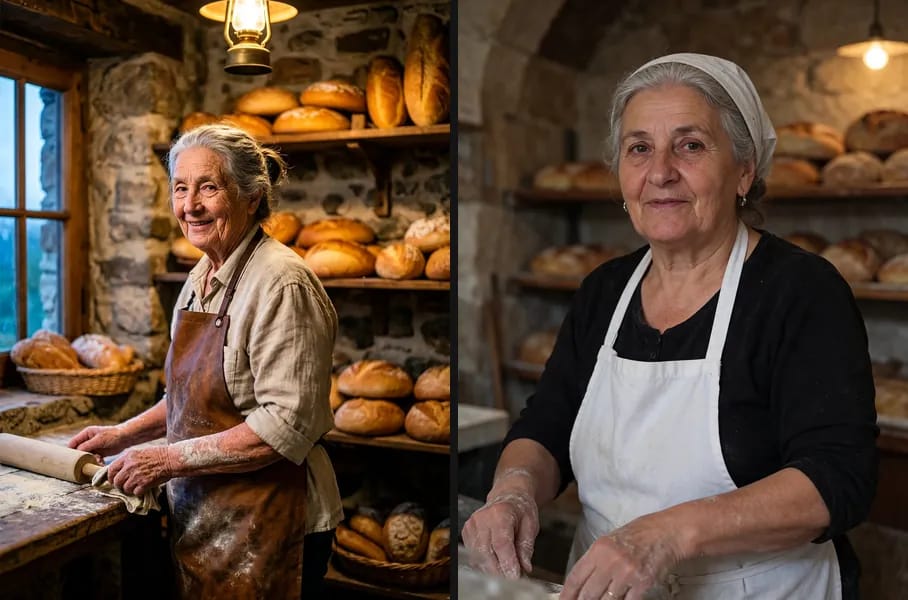
- Environmental portrait: an elderly baker with flour-dusted arms in a stone bakery at dawn, 3:4
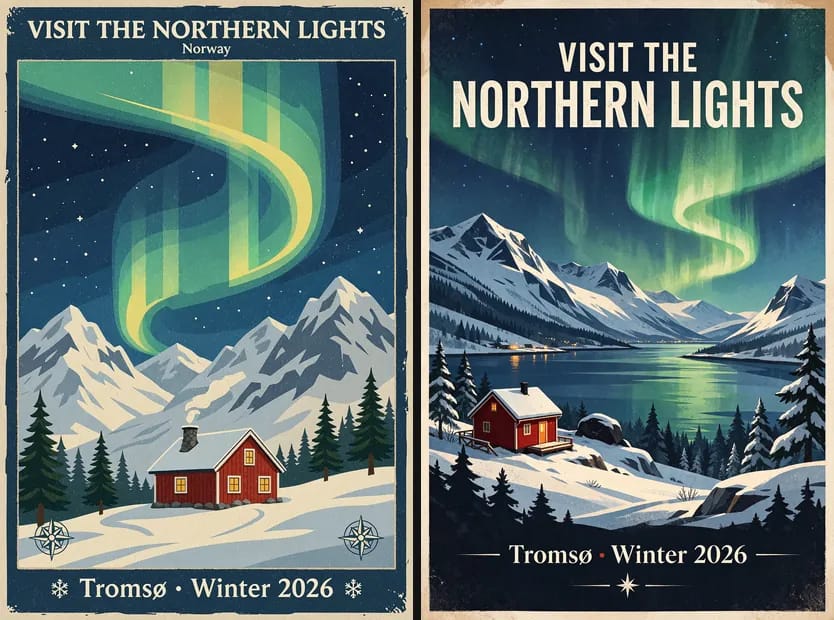
- Vintage travel poster: the headline "VISIT THE NORTHERN LIGHTS", "Tromsø · Winter 2026" along the bottom, a little red cabin under the aurora, 2:3
- Aerial shot of a night market in the rain: hundreds of lanterns, steaming food stalls, reflections on the wet pavement, people under umbrellas, 16:9
Then I added a few extras. The night market went through again at 4K, which only MiniMax H3 Image can do. Six reference images were combined into one coffee shop window, a corgi photo was turned into a snowy day, and finally the coffee mug image went to H3 video for a 5-second clip.
Product shots and portraits vs Seedream 5.5
Both mug images could be used as they are. The difference is mood. MiniMax H3 Image went with warmer light and a big croissant close to the lens, its cut face and crumbs right in the foreground. That's an ad layout. Seedream 5.5 put the croissant on a small plate and pushed it back, gave the tablecloth a grey-green cast, and kept the whole frame quieter.

Left: H3 Image, right: Seedream 5.5
The portrait shows a bigger gap. H3 gave me a scene with a story in it: an old woman working at the bench, a rolling pin by her hand, flour all over her forearms, shelves of bread behind her and window light coming in from the left. Seedream 5.5 made it a straight-on portrait, the baker looking squarely into the camera while the bakery fades into the background. For brand storytelling, the H3 version is more useful. If all you need is a clean picture of a person, Seedream's is perfectly fine.
Left: H3 Image, right: Seedream 5.5
Poster text and a big night scene
The poster is a lettering test. Both models got the headline right, and the "Tromsø · Winter 2026" line at the bottom too. MiniMax H3 Image, though, slipped an extra line reading "Norway" in under the headline. Tromsø really is in Norway, but that line wasn't in the prompt. If this were a client's signed-off copy, that kind of improvising means a redo.
Left: H3 Image, right: Seedream 5.5
Both handled the night market beautifully. The lanterns, the steam and the reflections on the ground are all there. H3 shot it closer to straight down, like a drone hanging over the street. Seedream 5.5 tilted the angle and let the buildings in the distance show, which gives it more depth. Call this one a draw. It comes down to which view you want.
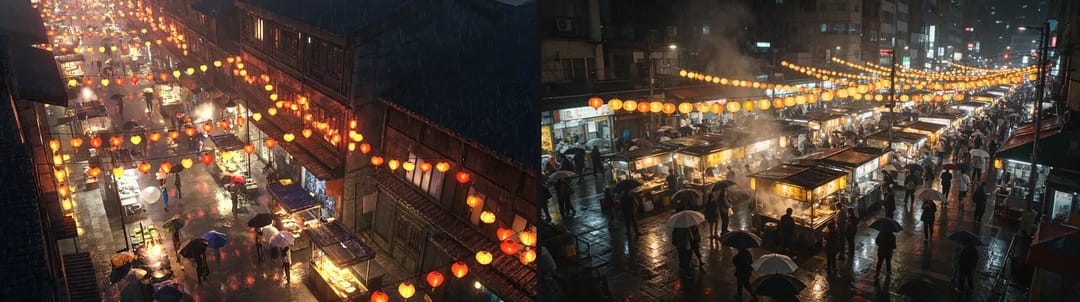
Left: H3 Image, right: Seedream 5.5
What 4K actually gets you
I ran the night market prompt again on MiniMax H3 Image at 4K, and the file came out at 5120×2891. Scaled down, it looks about the same as the 2K version. Zoom to 100% and you see what it's for.
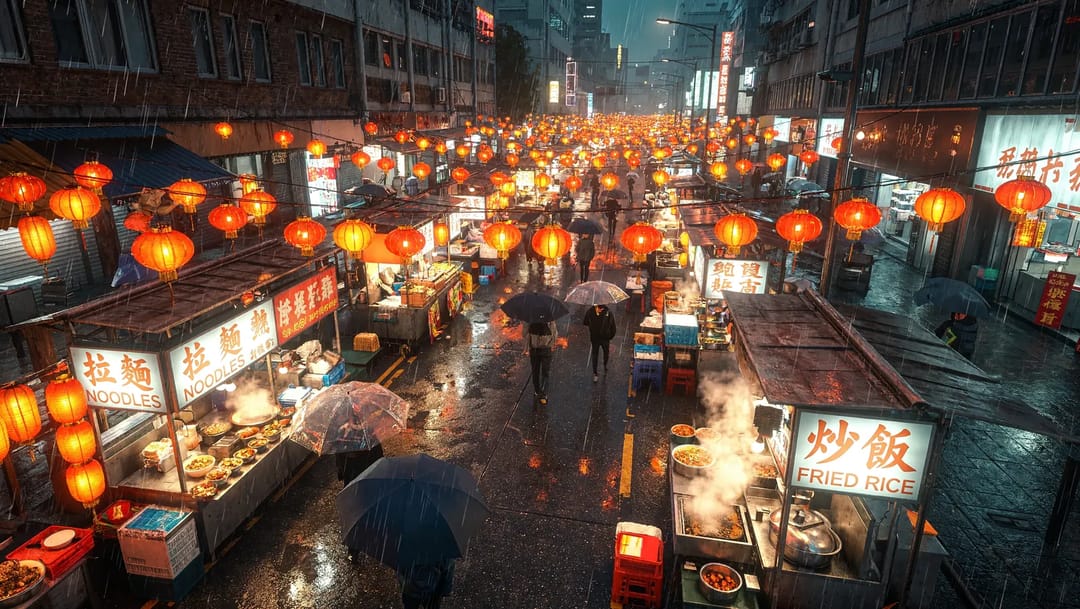
The full 4K night market image, scaled down here
Crop out the noodle stall on the left and everything holds up: the steam over the pots, the rows of bowls, the reflections on the clear umbrellas, none of it smeared together. The big signs, "拉麵 NOODLES" and "炒飯 FRIED RICE", are lettered cleanly. Small text is where it breaks down. The little Chinese characters next to the sign turn out to be gibberish once you zoom in.
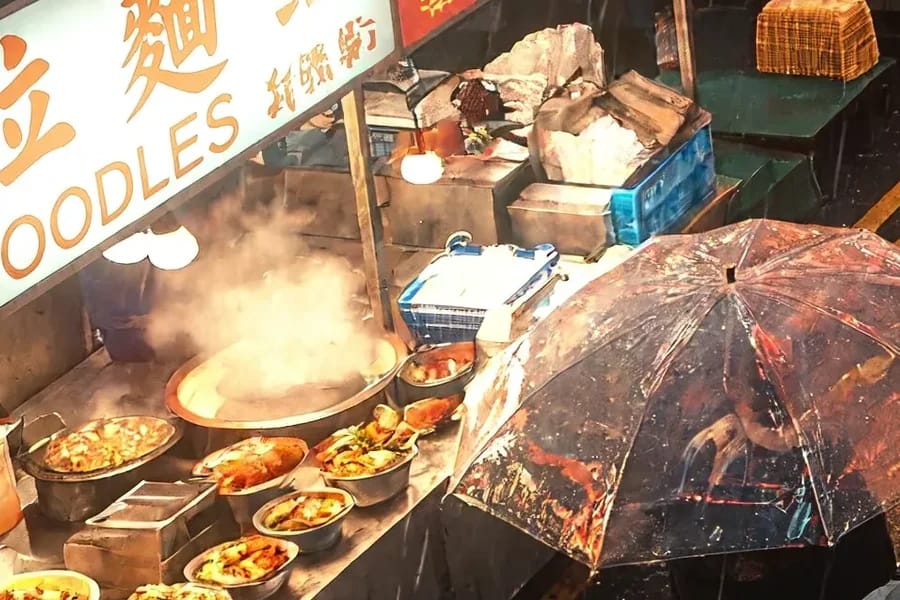
The noodle stall on the left of the 4K original, cropped at 100%, with the sign at top left
So 4K suits realistic scenes you plan to enlarge or crop later, like pulling several social posts out of one wide shot. Don't count on it to get small text right. It also isn't much slower than 2K. In this round, H3 took about 28 to 50 seconds per image at 2K and about 28 to 61 seconds at 4K. Seedream 5.5 at 2K ran 24 to 35 seconds, a little quicker.
Six images into one, plus an edit
MiniMax H3 Image accepts up to 16 reference images, while Seedream 5.5 takes up to 10. I used six and asked for a coffee shop window: the first few items set out on a wooden counter, the red bicycle from the mood board parked outside the window, and the three posters hung on the back wall.

The six reference images, left to right: tea tin and tea bags, mug and croissant, felt robot toy, white teapot, mood board, three illustrated posters
Both got all six in, and the flowers on the tea tin, the robot and the posters all match the references. Where they differ is placement. H3 brought the bike into the shop and leaned it against a table. Seedream 5.5 did as asked and left it on the sidewalk outside. In this test H3 didn't follow the spatial instructions in a multi-image composite, so check your composites once they come out. On time, H3 took 51 seconds for this one and Seedream 39.
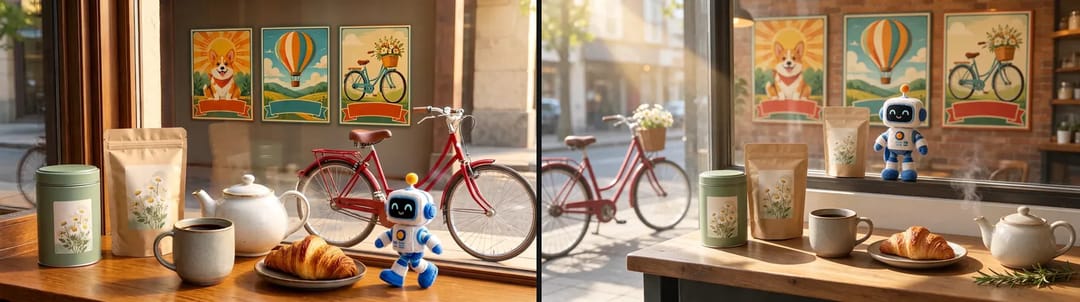
Left: H3 Image, right: Seedream 5.5
For editing, I tried the most common request in the AI Image Editor: a phone photo of a corgi with its paws up on a counter next to a yellow bottle, turned into a snowy day with the dog and the bottle left alone. Both managed it, and the corgi's pose and the bottle stayed put. H3 laid the snow on thicker and went colder, while Seedream kept more of the original's warmth. Either one is usable. H3 took about 71 seconds on this edit, slower than it is at text-to-image.
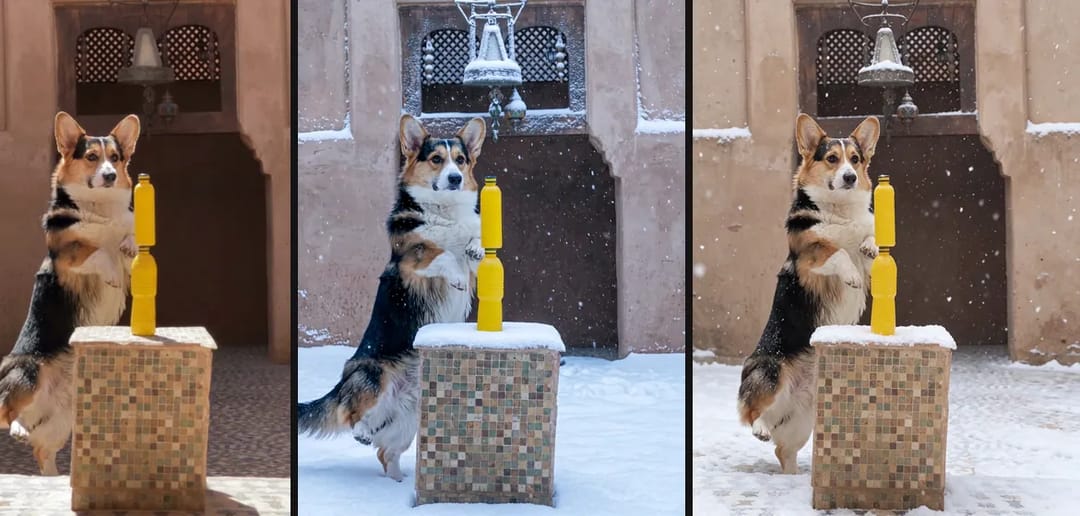
Left to right: the original photo, the H3 Image snow edit, the Seedream 5.5 snow edit
From image to video with H3
MiniMax H3 Image comes from the same family as the MiniMax H3 video model, so to finish I gave the coffee mug image to H3 video as the first frame: 480p, 5 seconds, with the prompt "steam rises, slow push-in, a hand reaches in from the right and picks up the croissant". On ZOOOP that's first and last frame to video with only the first frame filled in.
All three things happened. The steam rises, the camera pushes in, and a hand comes in from the right and lifts the croissant with natural-looking movement. There's one continuity slip, though. The croissant with a bite out of it is whole again once it's picked up, which you can see by comparing the first frame with the last two. The model remembered the croissant and forgot the bite. You could try repeating "one bite taken" in the video prompt, or just start from a frame with an untouched croissant.

Five frames from the H3 video clip in time order, left to right; in the last two the croissant is whole again
The video took about 171 seconds to generate.
Which one to use
Pick MiniMax H3 Image when you need 4K, large realistic images you'll enlarge and crop, or a lot of references in one go. Its product shots and portraits have a strong sense of place and look more like real ad shoots and documentary photos.
For transparent backgrounds, steady round-after-round edits of the same picture, or objects placed exactly where you asked, Seedream 5.5 is the safer bet. It was the only one that put the bicycle in the right spot this time. For text-heavy layouts like menus and infographics, neither is the first choice; go to GPT Image 2.6 instead.
One more thing that's handy: whatever you make can go straight to H3 video as a first frame. To try it, open MiniMax H3 Image, run a few at 2K to find a direction, then switch to 4K once you like what you see.
FAQ
How many reference images can MiniMax H3 Image take?
Up to 16. With no image it's text-to-image; add images and it edits or combines them. Seedream 5.5 takes up to 10.
Can MiniMax H3 Image make transparent backgrounds?
No. For stickers, icons or product cut-outs on a transparent background, use Seedream 5.5.
How big are the 4K images?
The long side is about 5,120 pixels, so 16:9 comes out at 5120×2891. Both 2K and 4K offer all eight aspect ratios.
Can I run MiniMax H3 Image locally?
The weights are public on Hugging Face, so you can download and run them yourself; check the official notes for hardware requirements. On ZOOOP there's nothing to set up: open the model page and write a prompt.
How do H3 Image and H3 video work together?
Make an image first, then hand it to H3 video as the first frame and describe how the scene should move. Details can shift in the video, like the croissant here losing its bite mark when it was picked up.