Two people start with their backs to the camera. They turn almost together, catch the rhythm, and bounce side by side. Then the dancer on the left lifts a hand and sways, and the dancer on the right joins in. By the last shot, they’re leaning toward each other and swinging their arms like friends filming a quick clip at home.
The ZOOOP Barbie Girl dance template puts the people in your photos into that living-room duet. Upload one clear photo for each dancer, choose who goes on the left and right, then generate and download a vertical clip about 13 seconds long.
What does the duet look like?
In our Barbie Girl dance example, the dancer on the left has a short bob and a mustard knit top. The dancer on the right wears a forest-green overshirt. After the opening turn, they bounce together, briefly lean into a pose, and raise their arms. Near the end they fold their arms and turn back toward one another for the final playful gesture.
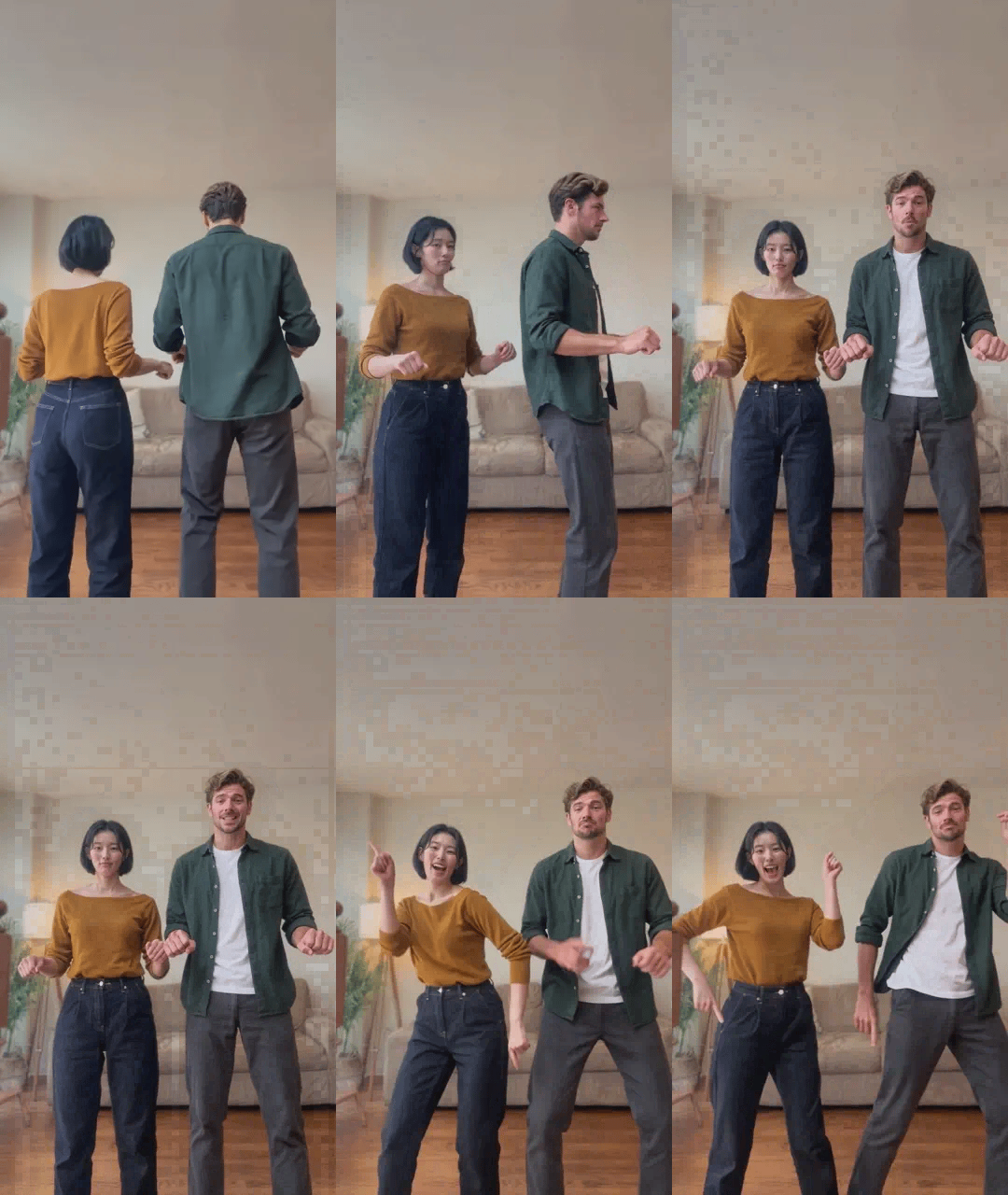
A pale sofa, wood floor, and warm lamp give the clip the feel of a living-room video. The camera stays in place and keeps both dancers in the vertical frame as the routine moves through its quick cuts.
Which two photos work best?
Pick two solo photos where you can see each person's face clearly. Even light and a face turned toward the camera are good starting points. A waist-up photo that includes the shoulders works well. A full-body photo also works when the person is close enough for their face and hair to be clear.
The photos can come from different places. If you want the clip to feel like two friends dancing at home, try photos in clothes they actually wear. In the example, the mustard top and green overshirt make it easy to tell the dancers apart when they move closer. Choosing different top colors can help your own Barbie Girl dance video read just as clearly.
Skip a blurry crop from a group picture, dark sunglasses, or a selfie with a phone across the face. Get permission before using someone else’s photo.
How to make and download the video
- Open the ZOOOP templates and select Barbie Girl Dance Duo. Add the first photo to Left dancer and the second to Right dancer. Swap the photos to switch positions.
- Choose 480p or 720p. The default 480p works for a quick phone clip. Pick 720p if you want more detail in the outfits and room.
- Click Generate once both photos are in place. When the video is ready, download the vertical clip.
Each slot takes one photo. To make a Barbie Girl dance with another friend, keep your photo in the same slot and change the other one.
Try it with your own photos
The dancers brush close, turn, and swing their arms within a few seconds. When choosing a photo, look for a clear outline around the face, hair, and shoulders. If one picture is especially dark or soft, start by replacing that one. Small details such as sleeves and hands can vary in fast movements. To try another routine, browse the AI dance video templates and pick one with the moves you want.
Frequently asked questions
Can I upload one photo of two people?
The template takes two separate photos, each showing one adult. There’s one upload slot for each dancer.
Do both photos have to show the whole body?
No. A well-lit waist-up photo with a clear face works. For a full-body photo, choose a shot in which the face is still easy to see.
How long is the Barbie Girl dance video?
About 13 seconds in vertical 9:16, with 480p and 720p options.