Nano Banana 2.1 vs Nano Banana Pro vs Nano Banana 2: Same Prompts, Honest Results
Google released Nano Banana 2.1 on October 6, and the model card looks great on paper: higher human-preference scores than both Nano Banana 2 and Nano Banana Pro in overall quality, general editing and multi-character consistency.
Benchmarks are one thing. What we wanted to know is simpler: if you paste the same prompt into all three, how different are the pictures? So we ran them side by side, changed nothing but the model, and posted every result as it came out. The short version: the gap is smaller than the scores suggest, but Nano Banana 2.1 does two things the older models can't.
What Nano Banana 2.1 is
Nano Banana 2.1 is the successor to Nano Banana 2, now built on Gemini 3.6 Flash. In Google's human-preference ratings it scores 1050 for overall preference, against 990 for Nano Banana 2 and 935 for Nano Banana Pro. On multi-character consistency it scores 1106, against 978 and 1011. That last one, keeping several people recognizable in one image, is where Google reports the biggest jump.
On ZOOOP, all three are a click apart in the AI Image Generator. What Nano Banana 2.1 adds is concrete: up to 14 reference images instead of 10, and 14 aspect ratios plus Auto instead of 10, including 8:1 and 4:1 panoramic banners and 1:4 and 1:8 tall formats. It is also cheaper per image than both Nano Banana 2 and Nano Banana Pro.
How we tested
The rules were simple:
- The same English prompt for every model, one run each, no cherry-picking and no re-rolls
- 2K for everything, with a fixed aspect ratio per test (poster 3:4, infographic 16:9, photo 3:2)
- Default thinking level, Web Search and Image Search turned off
In every comparison image the order is Nano Banana 2.1, Nano Banana 2, Nano Banana Pro, left to right, labeled underneath.
Posters and infographics: all three pass, in different styles
Test one was a Swiss-grid poster for a fictional jazz festival, with the headline, date line and three small info boxes spelled out in the prompt.
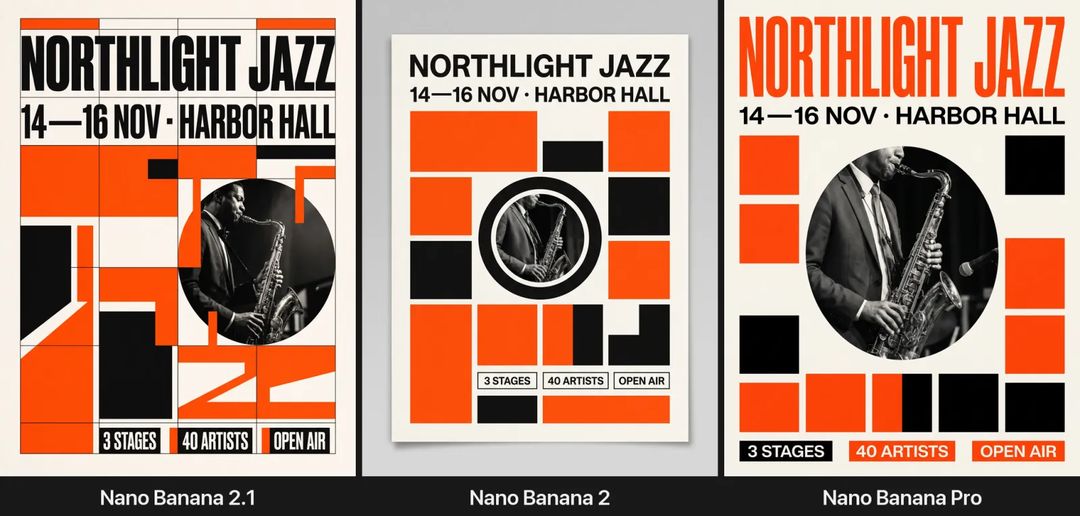
Every word is correct in all three, which is no longer news for this family. The difference is layout. Nano Banana 2.1 actually drew the grid and snapped its color blocks to it, so it looks the most like a designer's deliverable, though it is a little crowded. Nano Banana 2 handed back a framed poster hanging on a wall, tidy but safe. Nano Banana Pro went for the boldest headline and the most white space. Google says 2.1 is better at visual design, and you can see it here, but it is not a knockout.
Test two checked facts: an infographic of the solar system with all eight planets in order and labeled.
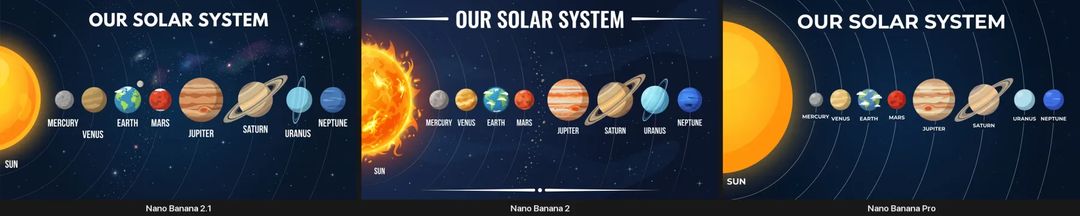
All three got the order and the names right, with Jupiter's Great Red Spot and Saturn's rings. The 2.1 version added Earth's moon and tilted Uranus's ring upright, which is accurate. Honestly, though, a school-level prompt like this no longer separates these models. To see the factuality gains the model card talks about, you'd need a more obscure topic and Web Search turned on.
A realistic photo and a four-person group shot
Test three was a documentary-style photo of an old fisherman mending a net on a pier.
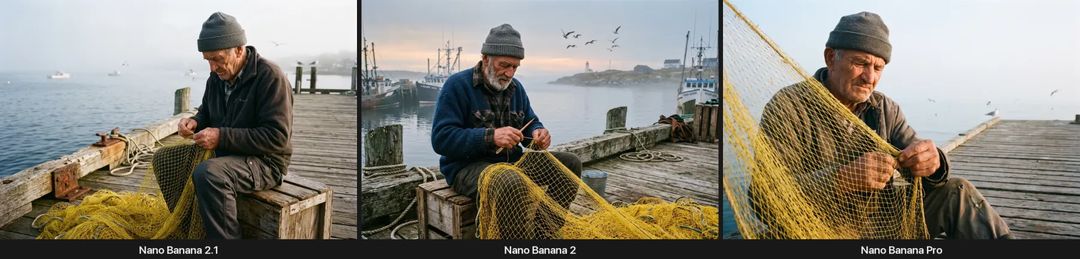
This is where Google's "more natural-looking images" claim shows. The 2.1 frame is the most restrained: the fog, the light and the pose read like a candid shot. Nano Banana 2 packed a lighthouse, trawlers and gulls into the background, closer to a postcard. Nano Banana Pro framed tightest, with the net filling the foreground for the most drama. All three are usable, but if the brief is "doesn't look AI-made", the 2.1 image gets closest.
Test four was about consistency. We first generated four fictional people as plain headshots:
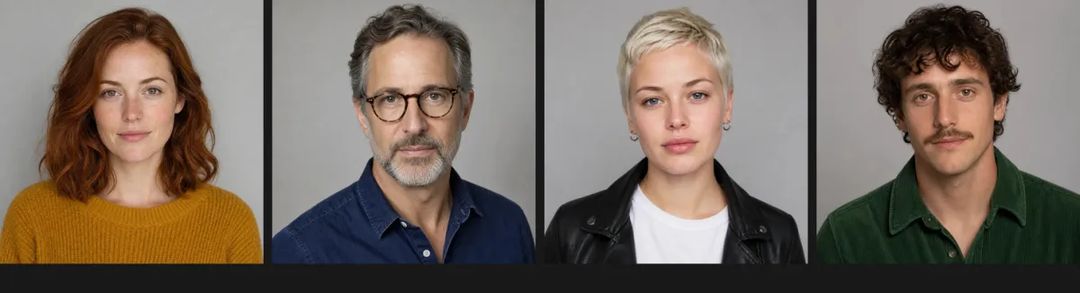
Then we asked each model to put all four in one café photo, each keeping their own face, hair and clothes.
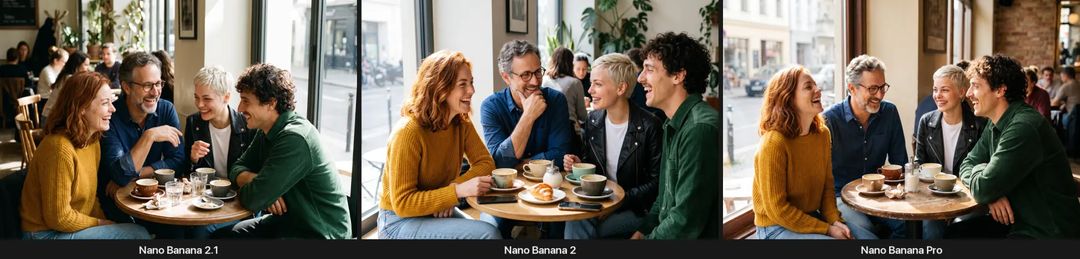
You can recognize all four people in every version. The one slip we found: Nano Banana 2 faded the grey beard on the man with glasses, while 2.1 and Pro kept it. Four people isn't enough to show the full 2.1 advantage, since the model card's biggest gap comes from larger casts. Six people is the next test.
Two things only Nano Banana 2.1 can do
The first is ultra-wide formats. Below is an 8:1 website header made at 1K in one go, with the headline spelled correctly. Nano Banana 2 and Nano Banana Pro stop at 21:9, so a banner like this means cropping or stretching a 21:9 image.

The second is 14 reference images. The older models top out at 10, and those extra four help when one image has to combine a product line, a few models and a location.
We also tried the masked editing Google is promoting. In the AI Image Editor we uploaded a photo of a white mug, circled the mug in red, and asked for a glass mug of green tea in its place with nothing else changed.
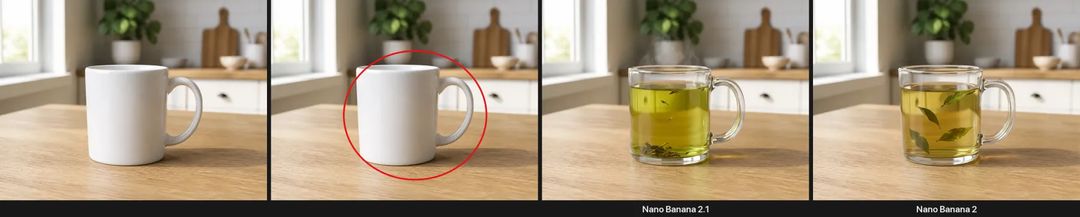
From left to right: the original, the circled input, Nano Banana 2.1 and Nano Banana 2. Both changed only the mug, both removed the red circle, and the background barely moved. For a simple one-object swap, Nano Banana 2 does fine too; the big gains Google reports for masked editing should show up on harder local edits.
Where all three still fail
This one was a deliberate trap: a woman holding a red umbrella in her left hand and a blue cup in her right, with a black dog sitting on her right side, camera facing her.
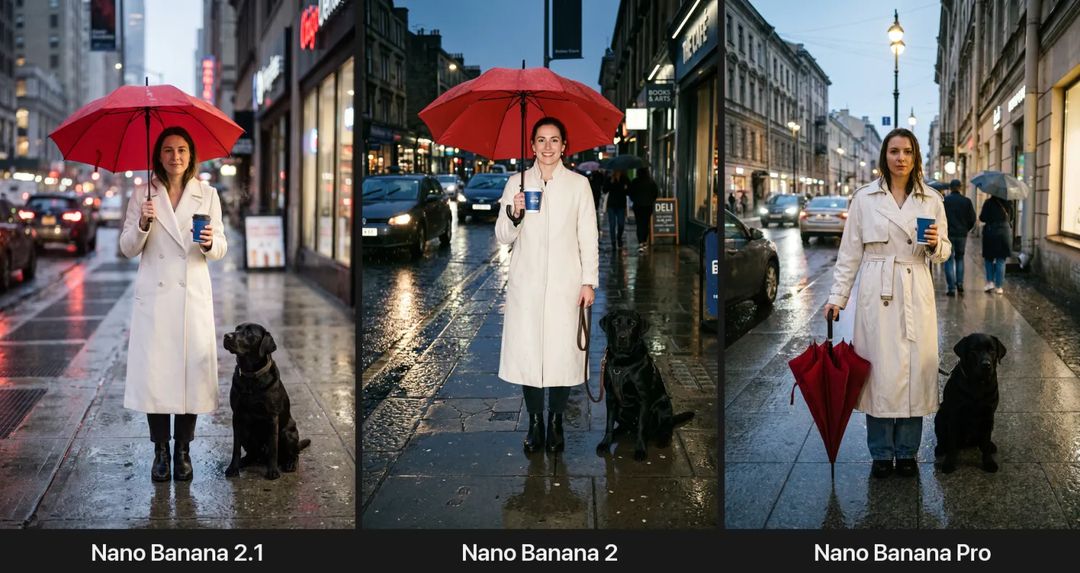
All three got it wrong in exactly the same way: they read "her left hand" as "the left side of the picture", so the umbrella, the cup and the dog are all mirrored. Nano Banana Pro also decided to close the umbrella in the rain. Google's own model card for 2.1 admits it occasionally confuses left and right. In practice, write "on the left side of the frame" instead of "in her left hand".
The other weakness Google lists is small text going blurry at 1K. At 2K, a chalkboard menu with eight drinks came out clean in all three:
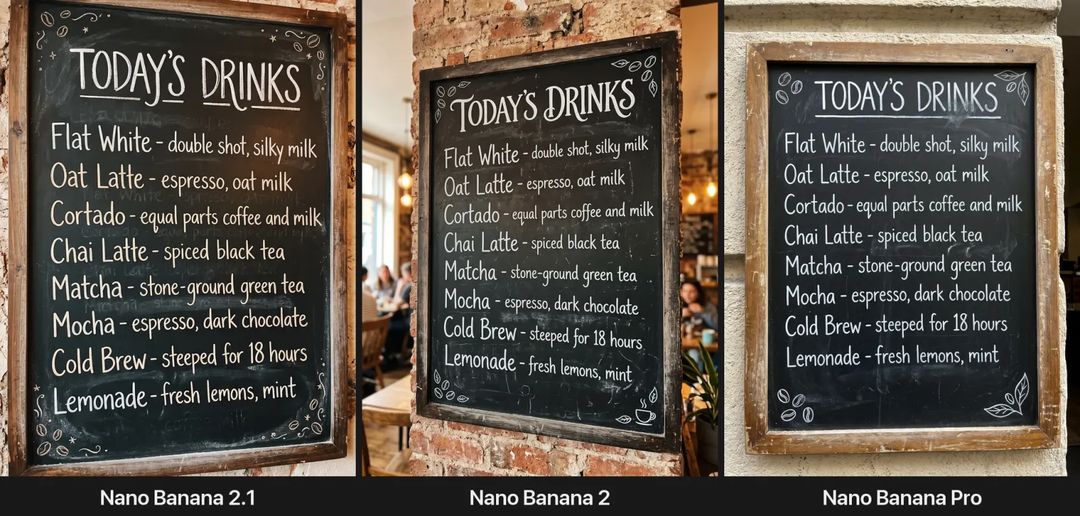
So if an image carries a lot of small type, render it at 2K or higher.
One surprise: from submit to finished image on ZOOOP, the median across these six tests was about 67 seconds for Nano Banana 2.1, about 43 for Nano Banana 2 and about 48 for Nano Banana Pro. That is one run per test, so a small sample, but in our run 2.1 was not the fastest.
Which one should you use
After this round, our take:
- Start new work on Nano Banana 2.1. It is cheaper, its photos look more natural, and it adds ultra-wide formats and 14 reference images. It didn't clearly lose any of the seven tests.
- If you have a set of prompts tuned for Nano Banana Pro and you like the results, there's no rush. We didn't find anything that only Pro could do, but we didn't see Pro fall behind either.
- Move off Nano Banana 2 when you can. Google marked it as deprecated the day 2.1 launched, with no shutdown date announced yet. Nano Banana 2 still works on ZOOOP today, and your prompts should carry over to 2.1 without changes.
For the full specs and best uses, see the Nano Banana 2.1 model page. For how Pro and Nano Banana 2 compare with each other, we ran the same kind of test in August. Or skip the reading: open the AI Image Generator and run your favorite prompt through all three.