Vidu Q4 Review: We Tested Vidu AI's New Model on 4 References, a Voice Clip and 2K
Vidu Q4 is the model Vidu AI released in October 2026, still labeled a preview. The pitch is two things: put many reference subjects into one shot, and lock a character's voice with an audio clip.
That sounds good on a slide. Does it hold up? After adding Vidu Q4 to ZOOOP we built one fixed set of inputs and ran it through four questions.
The short version
- Multi-subject references really work. We gave it two people, a scooter and a street, and all four showed up in one shot without the people swapping or the scooter changing color.
- The voice reference does its job. The speech in the clip lands at almost the same pitch as the reference audio.
- Against Vidu Q3 Pro, a simple start-frame shot looks nearly identical, while Vidu Q4 costs noticeably less.
- 2K is far sharper than 540p, but a higher resolution gives you a new clip rather than an enlarged copy.
- No text-only mode and no end frame. You always start from at least one image.
What Vidu Q4 is
Vidu Q4 is the newest video model from Vidu AI, and it works in two ways. Start-frame mode animates a single image, and the output keeps the image's aspect ratio. Reference mode takes up to 12 reference images plus up to three MP3 voice clips of 3 to 12 seconds, and builds one scene around those subjects and voices.
Both modes run 3 to 16 seconds, offer five resolutions from 540p to 4K, and generate native audio that you can switch off. On ZOOOP, start-frame mode lives in first and last frame to video and reference mode in the AI video generator; pick Vidu Q4 in either.
Test 1: four reference subjects in one shot
We made four reference images with the AI image generator: a woman in a red coat, a bearded man with glasses, a mint-green vintage scooter, and a cobblestone street in a European old town.

The prompt: he rides the scooter with her on the back down the street at golden hour, and she waves at the camera. 720p, 5 seconds.

Pause on the last second and every reference checks out. The red coat and auburn hair are hers, the glasses and beard are his, the scooter is that mint green, and the street is the one from the reference, café tables on the left included.

The weak spot: for the first half the riders are far away and their faces are small. If you need faces readable throughout, say "medium shot" or "the riders fill half the frame" in the prompt.
Test 2: a voice reference for the character
This is where Vidu Q4 is most distinctive, and it is the headline new ability in this generation of Vidu AI. We used text to speech to make a 5.7-second clip of a woman introducing herself, then gave the model that clip with the red-coat photo and asked her to say the line to camera on the street. 540p, vertical 9:16, 6 seconds.
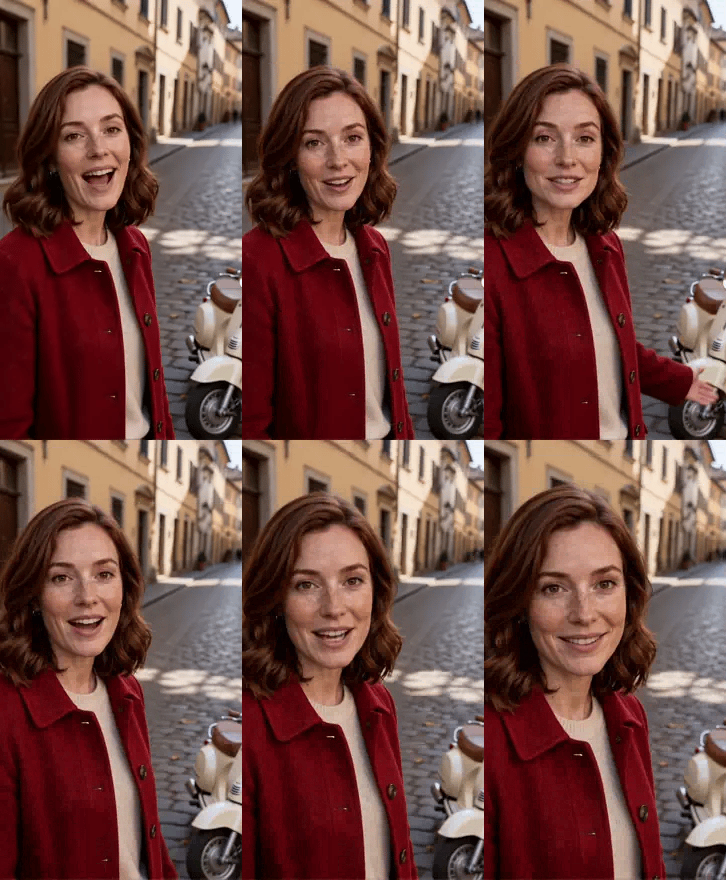
Mouth movement and pacing line up with the speech. To judge the voice we didn't rely on our ears alone and measured pitch instead: the reference clip sits around 219 Hz at the median, the generated speech around 225 Hz, less than 3% apart with nearly the same spread. In other words, Vidu Q4 really follows the reference voice.
Anyone making a series will like this: the same character can sound the same from clip to clip.
Test 3: same start frame, Vidu Q4 vs Vidu Q3 Pro
A common question is what Vidu Q4 does better than Vidu Q3. We took one photo of a woman with coffee by a café window and one prompt (she lifts the cup, takes a sip, smiles and turns toward the camera), and ran it on both at 720p for 5 seconds.

Honestly, the difference is tiny. The motion is almost the same in both: a sip, the cup lowers a little, a turn and a smile. Light, hair and the cup hold up equally well.
So if all you need is to animate one image, Vidu Q3 Pro and Vidu Q4 both deliver, and Q4 is clearly the cheaper of the two here. Where Q4 pulls away is the multi-subject, voice-driven reference work from tests 1 and 2, which the Vidu Q3 line doesn't offer.
Test 4: how much 540p vs 2K matters
Same scooter image, same prompt ("slow push-in as sunlight glints off the chrome mirrors"), 3 seconds at 540p and at 2K. Here is the same area cropped from each:
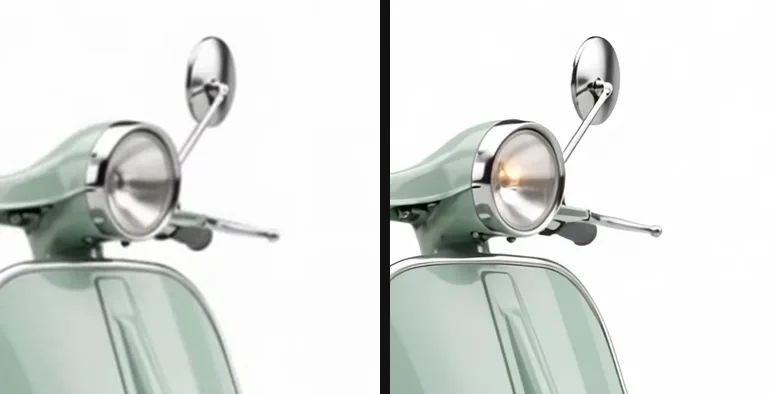
At 540p the mirror rim and brake lever are soft; at 2K the chrome highlights and the lever's metal read cleanly. Start-frame mode also keeps the image's shape: this 4:3 product shot came back as 4:3 video.
One catch: the headlight is on in the 2K clip and off in the 540p one. Changing the resolution gives you a different clip, not the 540p take scaled up. Use 540p to test prompts, not to pick a take and "upgrade" it.
What broke, and the limits
- No text-only generation. Start-frame mode needs an image and reference mode needs at least one reference image. For pure text-to-video, use a different model.
- No end frame. "Turn A into B" transitions are out of scope.
- Reference mode is slower. Our start-frame clips came back in a minute or two; reference clips took several minutes.
- It is still a preview. Behavior may change between versions, so test small before a big project.
- Voice references must be MP3, 3 to 12 seconds each.
Getting the most out of Vidu Q4
Here is the order that worked for us with Vidu AI's new model:
- Test prompts and reference combinations at 540p for 3 to 5 seconds, and check that every person and object is recognized;
- Once the direction is right, render the final at 1080p, 2K or 4K;
- For several clips of one character, reuse the same voice reference so the voice stays consistent;
- Assemble the pieces on the Generative Canvas.
If you only need to bring a photo to life and don't need multiple subjects or a voice, Q3 Pro and Q4 land close together, so either works.
The bottom line
Vidu Q4 isn't better than the previous generation at everything; on a simple start-frame shot it ties Vidu Q3 Pro. Its value is putting several fixed people and objects into one shot and pinning the voice with an audio clip, two things that used to be impossible or needed fixing in post. For brand characters, episodic shorts and multi-person ads, Vidu AI's new model is worth a try.
Specs and more examples are on the Vidu Q4 model page.