Seedream 5.0 Pro vs Nano Banana Pro: Three Tests That Show Where They Differ
Ever since Seedream 5.0 shipped, the question I keep getting is whether it's worth switching over from Nano Banana Pro. You can't answer that from official sample galleries — those images were picked. So I put both models side by side and ran three tests, using the exact same prompt text each time and changing nothing but the model.
The short version: asking which one is stronger doesn't really work. These two AI image models obey different parts of your instructions, and they do it consistently enough to plan around.
What Seedream 5.0 Pro is, and where Lite sits
Seedream 5 is ByteDance's current AI image model, available on ZOOOP in a Pro and a Lite version. Pro is the one built for "here is a complicated description, do as much of it as you can." Lite is cheaper and faster, which makes it good for throwing out a dozen rough compositions before you commit. Everything below used Pro, since following complex instructions is exactly what I wanted to measure.
One difference that's easy to trip over: Seedream 5.0 Pro currently tops out at 2k, while Nano Banana Pro goes to 4k. If your final image gets printed or heavily cropped, that single line may matter more than all three tests. Per-image cost is close between them, with Seedream 5.0 Pro slightly cheaper — not enough to decide anything.
The test: same prompts, only the model swapped
Three tests, one prompt each, one run per model. Aspect ratio fixed at 16:9 (3:2 for the portrait test), resolution fixed at 2k. No re-rolling until something nice came out, because a cherry-picked image tells you nothing about how a model behaves.
The three tests target where AI image generation most reliably falls apart: several subjects in one frame, the same face across different scenes, and legible text inside the picture.
Test one: four subjects in one frame
The prompt described a late-night ramen stall on a rainy backstreet, with four subjects each pinned to a position: the chef behind the counter wiping a bowl, a woman in a yellow raincoat on the leftmost stool looking at her phone, a courier standing in the doorway on the right with a helmet under his arm, and a ginger cat on a stack of crates at the far right edge. Lighting: warm lanterns, wet asphalt catching neon.
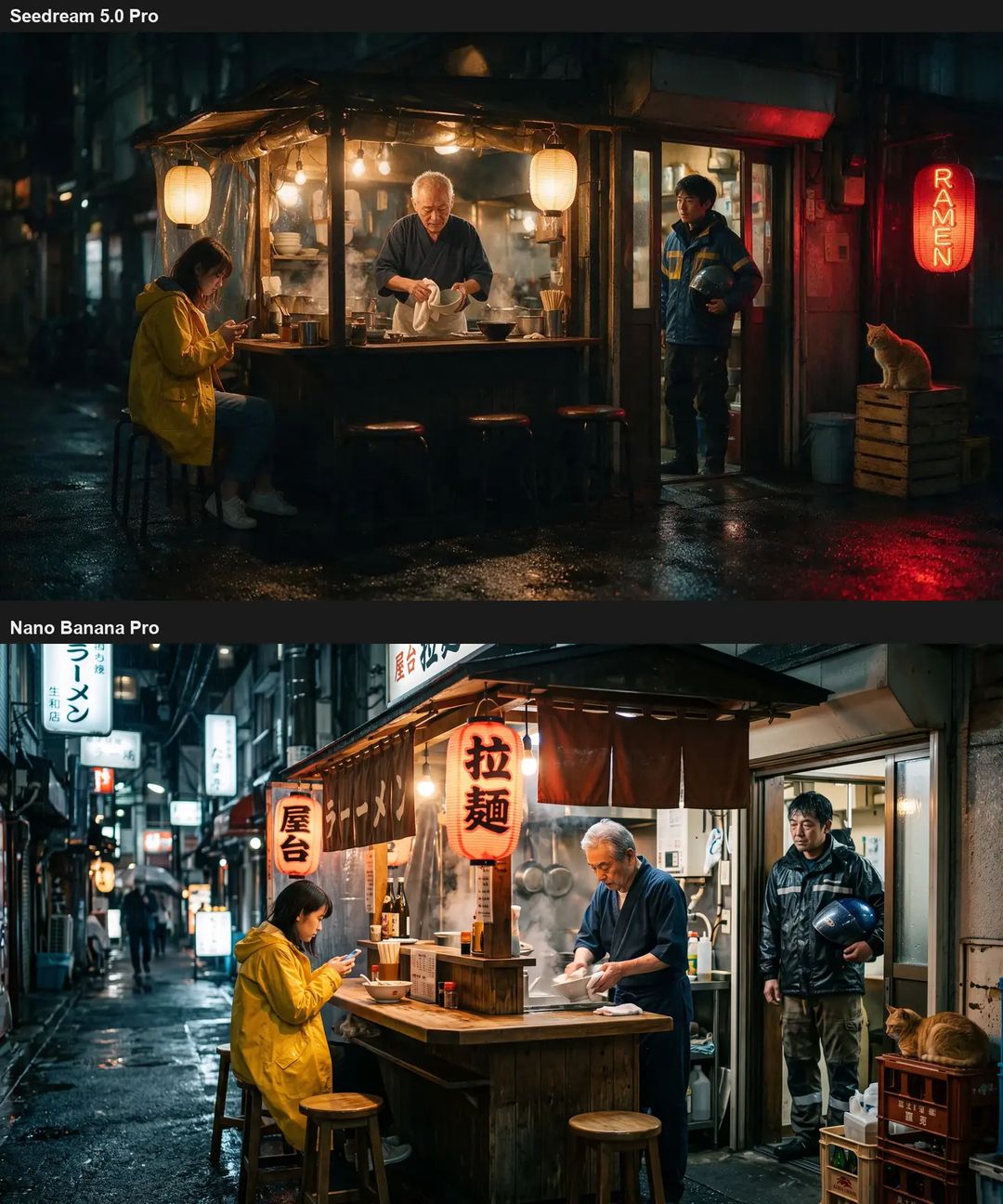
Both models drew all four subjects, in roughly the right places. A year ago AI image generation would routinely just drop one. The interesting part is elsewhere.
Seedream 5.0 Pro got the small gesture right — the helmet is genuinely tucked under the arm — and spelled RAMEN correctly on the sign. Its frame reads like a laid-out poster: clean gaps between subjects, everyone instantly readable. Nano Banana Pro handed back something closer to street photography, with the alley actually receding into depth, a passerby under an umbrella, legible Japanese on the lanterns. The price it paid: the courier holds the helmet in front of his chest instead of under his arm, and the small print on the crates is gibberish.
Test two: one face, two scenes
Character consistency is probably the most expensive lesson in AI image work. I started with a clean baseline from GPT Image 2: frontal, grey backdrop, even light, no makeup — basically a casting photo. That image then went in as the reference for both models, with the same person asked to appear on a rooftop at dusk and in a daylit library.
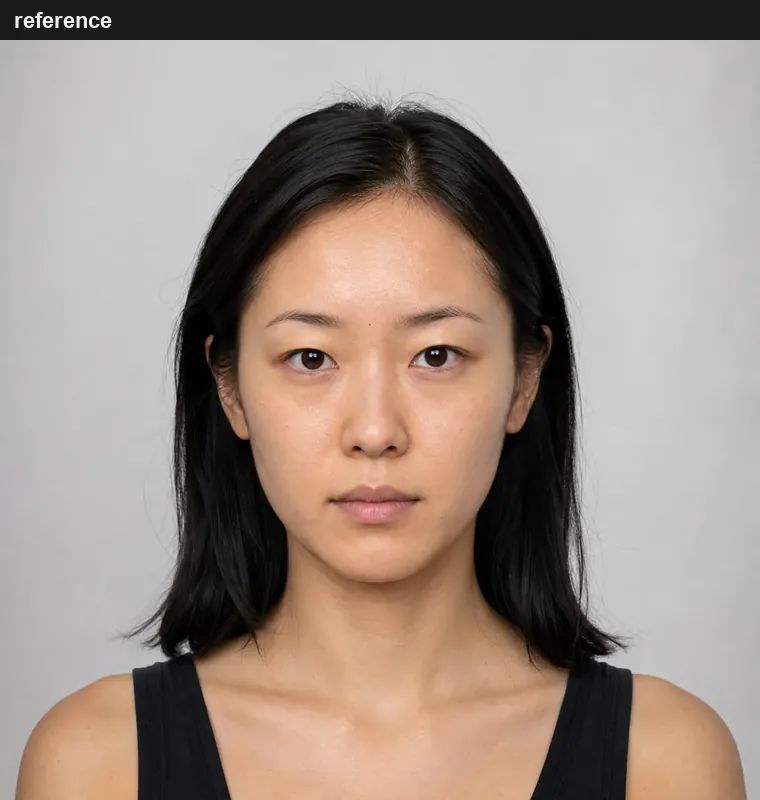
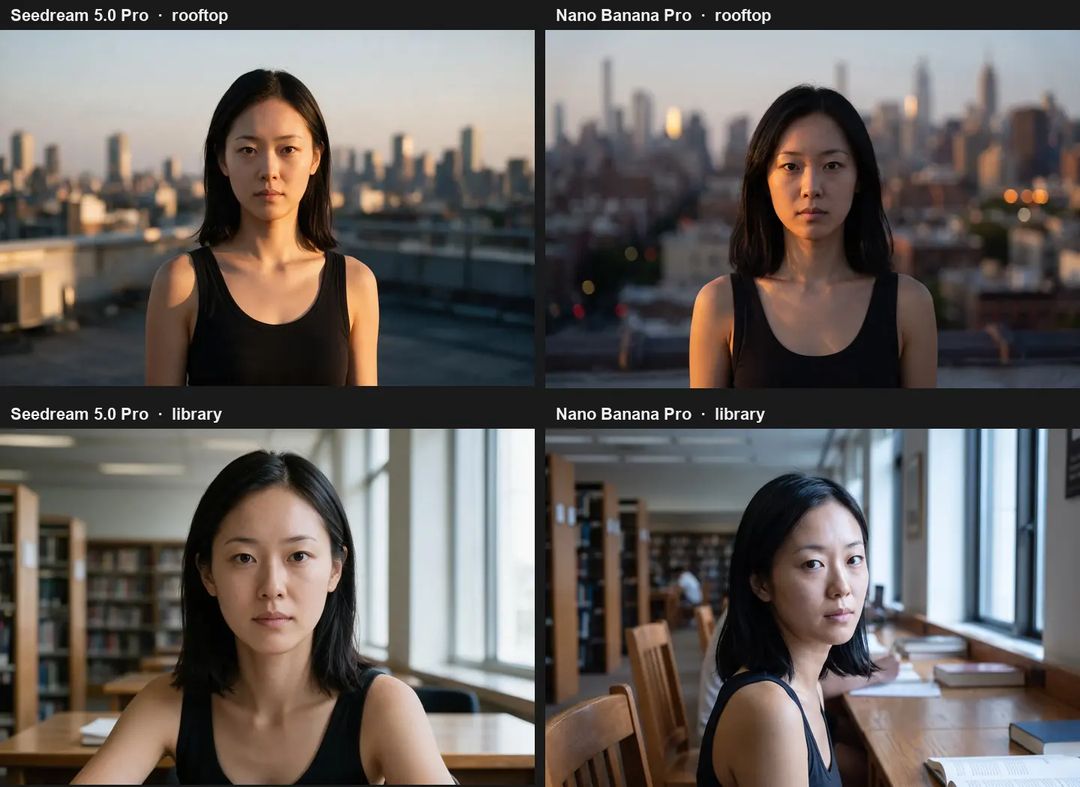
Both held the face. That box is ticked either way. Look closer and it gets interesting.
Seedream 5.0 Pro tracked the bone structure most closely — brow, nose bridge and lip shape are near copies of the baseline. But it gave me flat frontal lighting both times, when the prompt explicitly asked for a three-quarter view and low side light from the left. It simply ignored that. Nano Banana Pro went the other way: camera angle and light direction both landed, and the library frame added a second reader and open books in the background on its own. Its bone structure drifted a little, though it still reads as the same person, and it added freckles that aren't on the baseline.
Both models did one thing worth writing down: each of them inherited the black tank top from the reference photo. A reference image carries more than a face — it carries wardrobe, hair length, even posture. If you don't want that, say so in the prompt. For targeted changes to an existing image, AI image editing beats describing the whole thing again.
Test three: making it write text in the picture
This was the test I most wanted to run. The prompt asked for a chalkboard menu outside a bakery with exactly three lines, spelled out word for word: SOURDOUGH 4.50 / CROISSANT 3.20 / CLOSED MONDAYS.
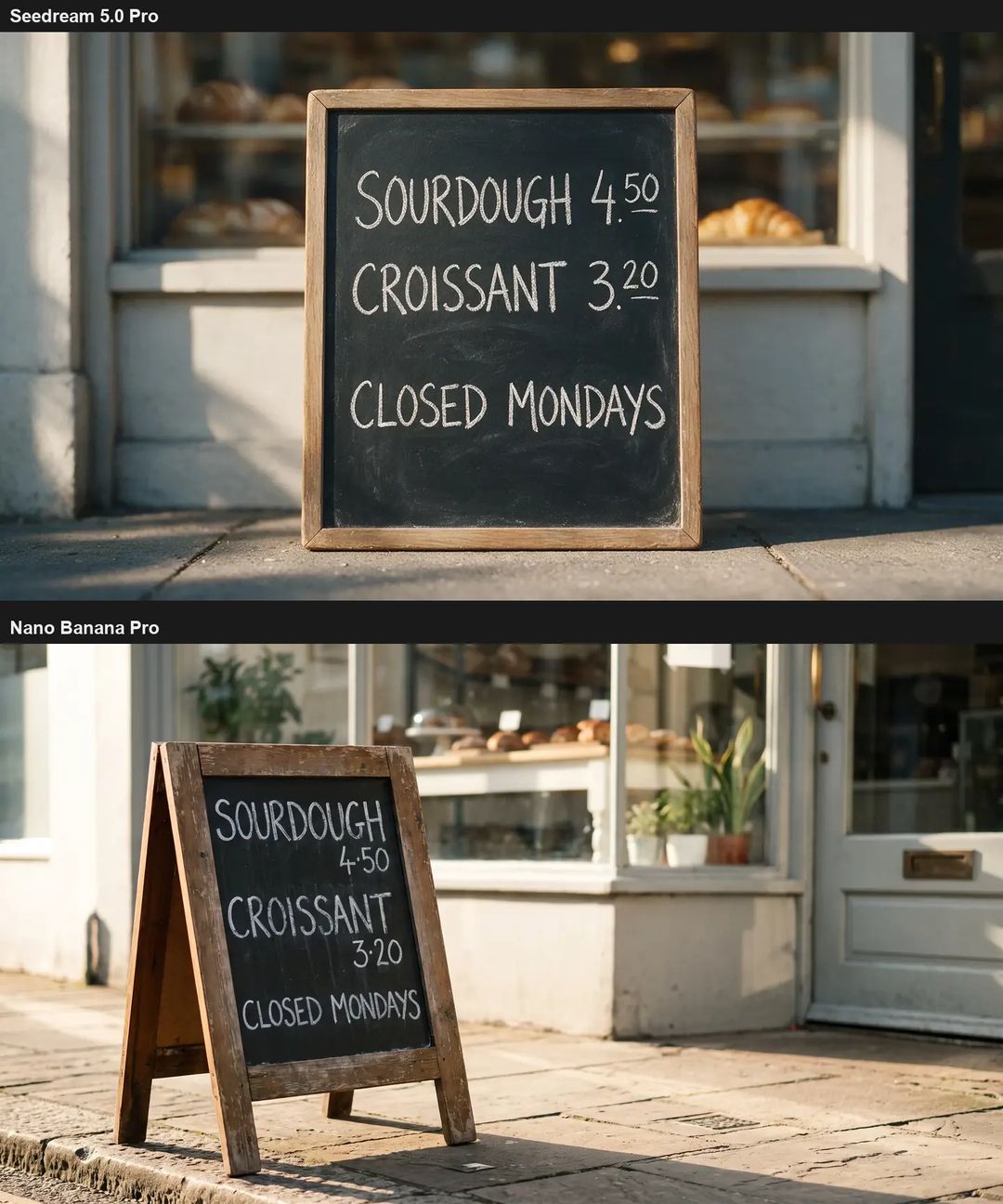
Both spelled it correctly. Not one wrong letter. The old rule that AI image models can't render readable text no longer holds, at least for short English strings.
Layout is a separate question. Seedream 5.0 Pro gave three lines as three lines, item and price on the same row, exactly as asked. Nano Banana Pro got every character right but broke each item across two rows — three lines became five — and wrote the decimal point as a raised dot. If that picture is going straight into a card or a thumbnail, wrong layout means running it again.
Which one for which job
After three tests the dividing line is clear enough to act on.
When you want an image that looks designed — a poster, a cover, a thumbnail, any layout carrying words — reach for Seedream 5.0 Pro. It takes structural instructions seriously: text content, line counts, where each subject sits. When you want an image that looks photographed — camera angle, light direction, real depth, incidental detail in the background — Nano Banana Pro behaves more like a camera than a paintbrush.
Two practical notes on top of that. Either model can handle character work, but spend one generation on a clean frontal baseline first and feed it as the reference every time after; that beats re-describing someone's face in every prompt. And if you need a 4k deliverable there's no choice to make — only Nano Banana Pro gets there.
The cheapest way to settle it for your own work is to run one prompt through both models side by side on the Generative Canvas and look at the two results together. ZOOOP also carries Nano Banana 2, Seedream 5.0 Lite, GPT Image 2, Flux 2… switching models per job is normal, not a sign you picked wrong.
What I didn't test
Worth being straight about the limits. This corner of AI image generation moves fast enough that this piece probably has a shelf life of months. Each test ran once, with no repeat sampling, so "won this time" isn't "wins every time." Also untested: stability across several rounds of editing the same image, consistency on non-human subjects like products and buildings, non-Latin text in frame (passing in English proves nothing about Chinese), and extreme aspect ratios.
Seedream 5.0 Pro and Nano Banana Pro are both still moving. If any of those cases is your actual work, don't inherit my conclusions — pick two models from the tools overview and run your own material through each once. One prompt's worth of cost buys you an answer you don't have to guess at.