How to Make the I Need a Girl Dance Video with Two Photos
Make a 15-second I Need a Girl dance duet in ZOOOP. See two examples, choose who leads the opening, and pick a photo for each dancer.
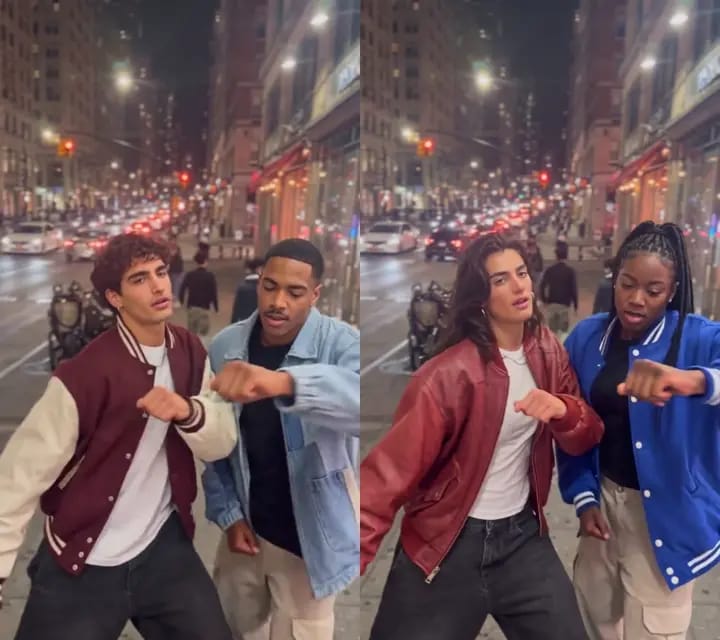
The guy in the burgundy jacket looks at the camera, then turns toward his dance partner. On the right, his friend throws a peace sign toward the lens. A moment later, both are swinging their arms and bending their knees, with lit storefronts and a line of headlights behind them. With the I Need a Girl Dance template in ZOOOP, two photos are enough to make your own 15-second vertical clip.
One street corner, two pairs of dancers
The first I Need a Girl dance example features two men in a burgundy varsity jacket and a light blue denim jacket. The second features two women in a red leather jacket and a bright blue varsity jacket. The street is the same in both clips. The handheld camera sways as the dancers move forward, and the warm shop lights help their faces and outfits stand out.
Watch the sleeves as they cross in front of each other. The pale denim reads differently from the brighter blue varsity jacket even against the same headlights. If you want that streetwear feel in your own clip, start with jackets you and your friend already like wearing.
Give each dancer a side
In the I Need a Girl dance, the left dancer opens the scene and turns toward their partner. The right dancer answers with a peace sign, then the two dance side by side. Put your friend's photo in the left slot if you want them to lead the opening. Put yours in the right slot if you want to take the cue.
Use one photo per slot. Choose your own photo or ask an adult friend who agrees to appear. You can take the pictures in different places and wear different outfits. Each photo gives its dancer a face and a look.
Pick photos that show faces and outfits
A well-lit waist-up photo is a good starting point. A straight-on shot or a slight turn both work if the eyes, jawline, and hairline are visible. Try to keep the shoulders and jacket in the frame. A close selfie gives you a clear view of the face, while a wider photo also shows what the sleeves and neckline look like when the dancers move.
Put the two photos next to each other before uploading. The red and blue outfits in the examples are easy to distinguish when the dancers' arms overlap. A light jacket on one person and a dark jacket on the other can have the same effect. If sunglasses, a hat brim, or a hand covers the face, choose a clearer photo.
Upload the photos and generate in ZOOOP
Open the I Need a Girl dance template. Upload one photo under Left dancer and another under Right dancer. Choose 480p or 720p and select Generate. The button shows the credit cost. Download the video when it's ready, or find it later in My Creations.
The two-men example is 480p and shows the dancers' positions and gestures clearly. The two-women example is 720p. Choose that resolution if you want more detail in braids and jacket textures or plan to crop the clip. Both settings make a 15-second vertical 9:16 video. For a different routine or camera angle, browse the AI dance templates.
FAQ
How many photos do I upload?
Exactly two, one for each dancer. Use a clear photo of one adult per slot.
Do we need a photo together or a recording of us dancing?
Separate photos are enough. The I Need a Girl dance template supplies the street scene and the routine.
Can I use people who look different from the examples?
Yes. Upload photos of yourself and your dance partner. The two examples show how different people and outfits look in the same setting.
How long is the video and what resolutions can I choose?
The video is 15 seconds long in vertical 9:16 format. You can choose 480p or 720p.