I Made 8 YouTube Thumbnails With AI: Sizes, Framing, and the Four I Threw Out
Whether a video gets clicked depends on its thumbnail more than most people assume. I spent an afternoon making a full set of 8 YouTube thumbnails with AI image generation. Four got thrown out along the way, one result contradicted advice I had taken for granted, and I made a more fundamental mistake that is worth its own section.
Measure the specs before you generate anything
The recommended YouTube thumbnail size is 1280×720, which is 16:9. Plenty of people know that number. Two other things matter more for how the finished image actually performs.
First, the bottom-right corner gets covered by the video duration badge. Scaled to 1280×720 it sits at roughly 132×36, and anything parked there loses half of itself.
Second, and easier to forget: thumbnails are never displayed at full size in a feed. The desktop home page shows them around 360px wide, and the mobile recommendation feed often gives you about 168px. I scaled the same YouTube thumbnail down to all three sizes and put them side by side. At 360px the props and the expression still read. At 168px all that survives is a blob of colour and a human shape.
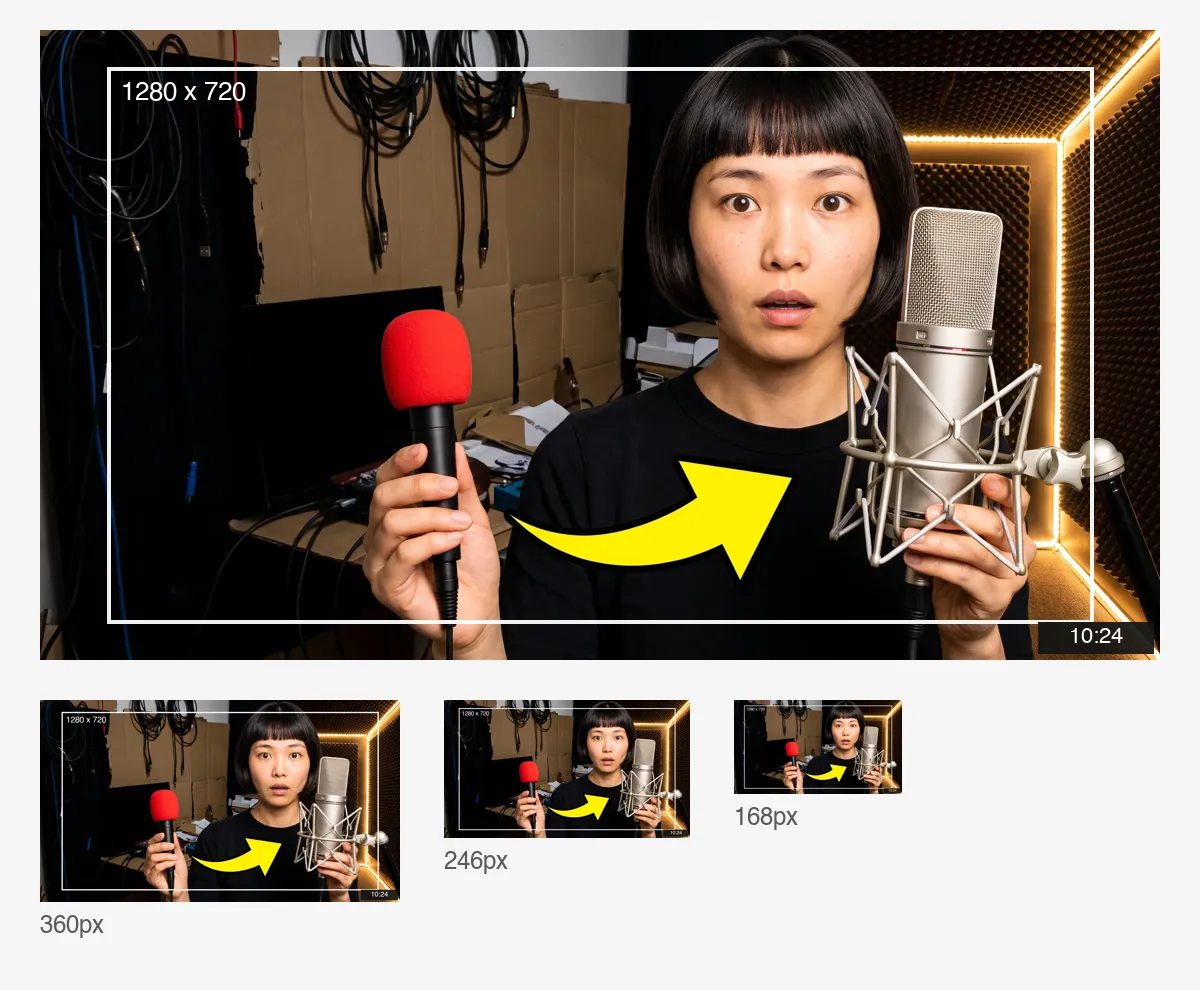
So I set two rules before generating anything. Keep the subject and everything that matters inside a centre safe area with a 6% margin on all sides, and leave the bottom-right corner empty. Then leave one clean region in the frame for a headline to be laid on later.
Start with a casting photo — it is the foundation of the set
The hardest part of the whole job is that the person in all eight thumbnails has to be the same person.
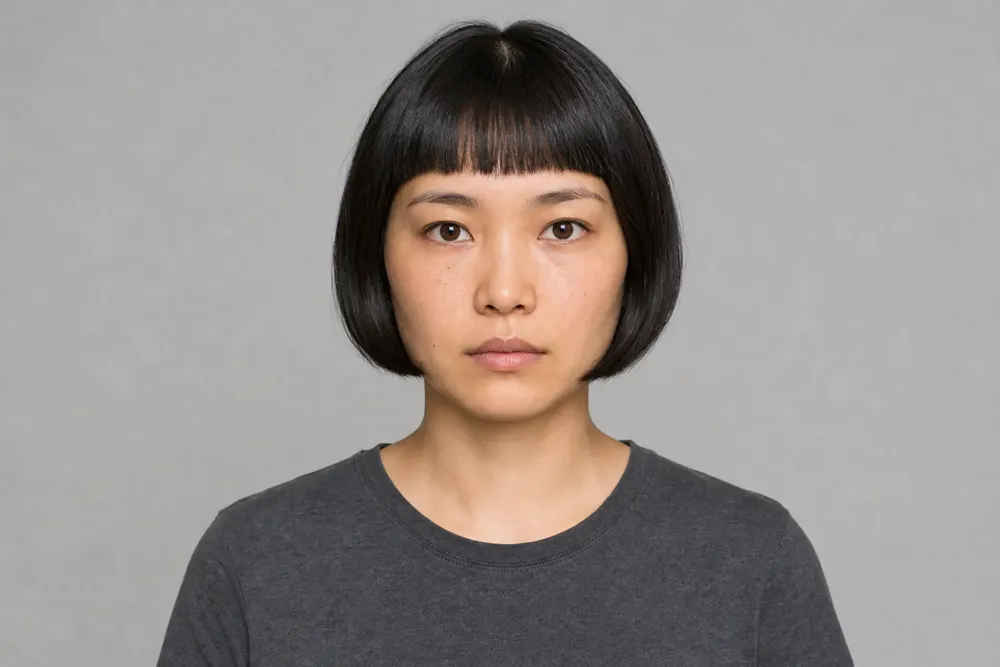
My approach was to use AI image generation for one clean reference frame first: front on, eye level, no makeup, no expression, grey background, flat even light, like a casting photo. That image is not attractive and was never meant to be published. Its only job is to be the reference for every frame that follows.
And then comes the mistake.
In my first pass I pinned down the composition too. Subject in the left third, a white sticker outline around her, a starburst behind her head, a flat block of colour filling the right half. The only things allowed to change were her expression and the background colour. Eight images later her face had not drifted at all, and the set looked like a chart of emotions rather than eight thumbnails. Different face, different colour, nothing else.
The reason is simple. Real thumbnails are designed around what the video is about, and the only variable I had given the model was a facial expression. There was nothing to design, so it repeated my template eight times.
The fix was to hand the design back. The fixed block now locks only what has to be locked: the same person, her face lit and unobstructed, upper body in shot. Setting, props, graphic elements, palette, lighting, depth and framing are all the model's call. The variable block became a single sentence — what this video is about.
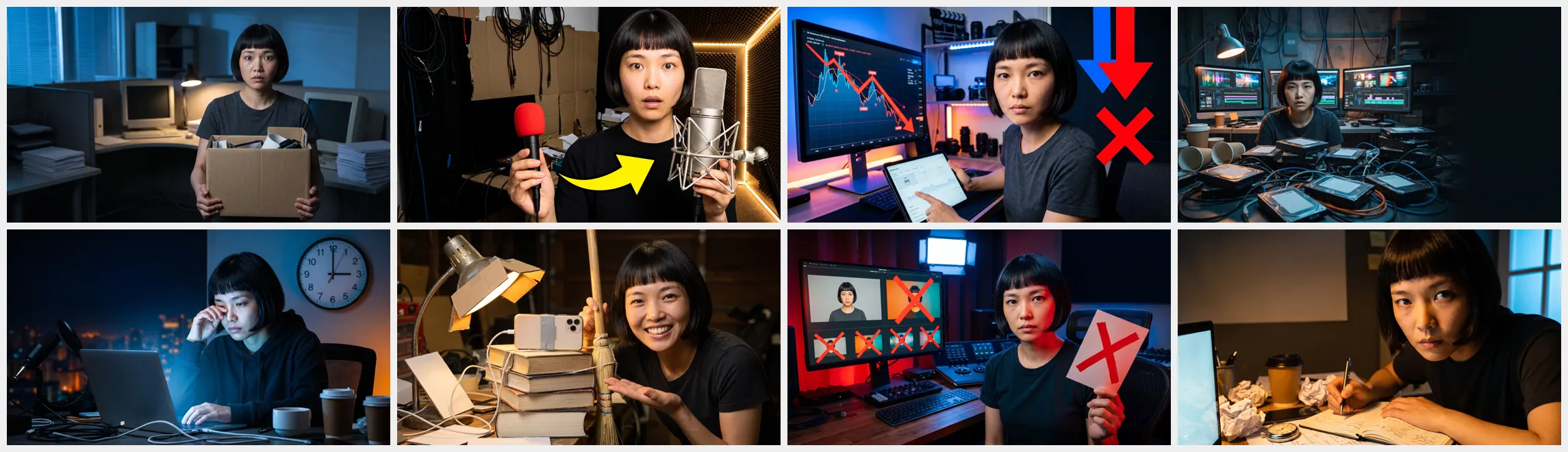
The eight variables were: quitting the day job, a thirty-dollar mic beating a three-hundred-dollar one, being stuck at two hundred views, editing a hundred videos in a week, uploading at 3am for a month, a whole filming setup that costs less than a phone, five colour presets to stop using, and writing a script in twelve minutes.
What came back was not in the same league as the first pass. A yellow arrow between a cheap handheld mic and a condenser. A red line collapsing across a monitor with a red cross beside it. A row of preset thumbnails each struck through. A wall clock against a city skyline at 3am. None of that graphic language was in my prompt — the AI image model invented all of it.
I assumed it could not render text. It could.
There is a widely repeated piece of advice about AI image generation: models cannot write legible text, so any lettering in the output will be garbled. I had been following it, and every prompt ended with an instruction to keep text out of the frame.
At the end I tested it, and asked the model to put the headline straight into the empty region.
It got it right. Not one wrong letter, clean glyphs, sensible weight, sensible line breaks across three lines. That old rule no longer really holds for today's AI image models.
I did not change my mind though, because the second test exposed the real problem. I changed 200 to 500 in the headline, left every other word alone, and re-ran it. The text was still correct, but the entire frame had been re-staged: she went from sitting in profile to facing the camera dead centre, the monitor moved from the far left to directly behind her, and the type changed size and position to match. Put the two side by side and they do not belong to the same set.
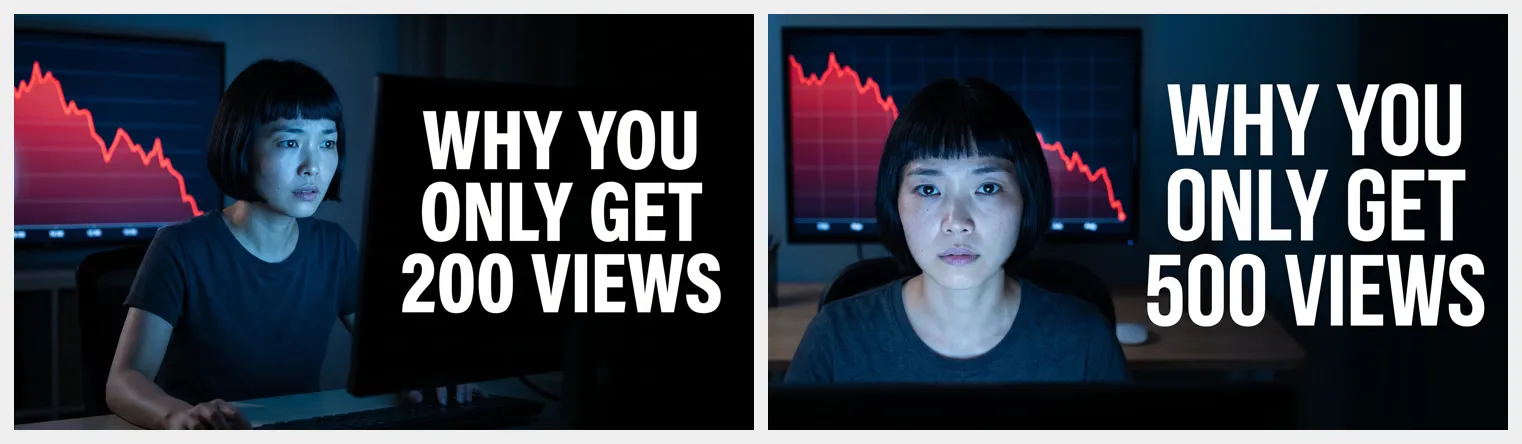
So the conclusion survives but the reasoning changed. The problem is not that it cannot write. The problem is that the layout is not reproducible. If you are making a whole set of YouTube thumbnails, and you expect to swap headlines or A/B test them later, keep text out of the image and lay it on separately. For a one-off you never intend to touch again, letting the model write it saves you a step.
The four I threw out
Handing design control to an AI image model costs you something: it will cheerfully put things in the frame you never asked for. Four reshoots, three distinct failures.
Real trademarks. In the quitting-the-job frame it handed her a microphone with a real manufacturer's name printed down the side. In the hundred-edits frame it put two instantly recognisable energy drink cans on the desk. Neither belongs in an image you are about to publish.
A duplicated subject. I added a no-branding clause and re-ran the quitting frame, and got two of her — one at a desk typing, one standing beside it holding a cardboard box. The model had read "leaving the office" as a scene that needs two actors.
Text appearing on props. In the cheap-setup frame it wrote two English words neatly across the cardboard box. That one matters most here: these images are shared across 21 languages, so text in any single language is noise for readers of the other twenty.

All three became clauses in the fixed block, and they have to be specific. "No text" is not enough — it has to say no lettering on screens, packaging, labels, equipment or signage. "One person" is not enough either; you have to rule out a second version of her, a reflection, and a portrait of her in the background.
A prompt structure you can copy
The fixed block is pasted unchanged into every prompt, and reads roughly like this.
Use the same person from the reference image, same hair. She must be instantly recognisable as the same person, her face lit, unobstructed and roughly facing camera, upper body in shot. You are the art director designing a YouTube thumbnail that has to earn a click at 168 pixels wide — everything except her identity is yours to decide: setting, props, graphic elements, palette, lighting, depth and framing. Make it bold, high contrast and specific to this topic rather than a portrait on a coloured background. Leave one clean region in the frame for a headline to be added later. No text, letters or numbers anywhere, including on screens, packaging, labels, equipment or signage. No brand logos or recognisable trademarks; all props unbranded. Exactly one person in the frame.
The variable block is one sentence — what this video is about.
Those last three prohibitions were all added after a reshoot, one clause per failure. The structure carries over to other AI image models unchanged; only the phrasing habits differ.
One thumbnail, used twice
Once the eight were locked, the AI image stills had one more job in them. I took the 3am frame as a start frame and used first and last frame to video to generate a five-second intro.

There is a genuine catch here too. The generated clip re-framed the shot, and the clean region I had carefully reserved for a headline was mostly eaten. For an intro that does not matter. For an end card you would have to lay it out again.
To run a whole batch at once, spreading the eight AI image jobs across the Generative Canvas beats going one at a time — you can see at a glance which to keep and which to redo. If you would rather not write prompts from scratch, Templates has portrait looks you can apply directly.
Eight finals in an afternoon
The whole set of YouTube thumbnails took an afternoon from first submission to eight locked frames, with four thrown away. The slow part was neither generating nor retouching. It was working out what to hand over to the model — I gripped too tightly at first, nailed down the composition, and got eight images that all looked alike.
If you want to reproduce this, the order is: measure the safe area and the three real display sizes, generate one unglamorous but clean reference frame, keep the fixed block down to the person plus those few prohibitions, and treat each frame's topic as the only variable. As for text — add it afterwards for a set, let the model write it for a one-off.
The whole set of YouTube thumbnails used exactly two AI image tools, AI image generation and AI image editing.