Can One Person Make an AI Short Film? Storyboards, Character Consistency and Shot Continuity
Yes. Not every part of it, though.
I tested solo AI filmmaking on a deliberately tiny story: a man finds a folded note in the pocket of an old coat. Eight shots, one person, from a single sentence to something you can watch end to end. Below is what worked, where I got stuck, and what it actually cost.
What one person can finish, and what they can't
Conclusions first, so you don't read on with the wrong expectations.
What a single person can now do alone: the storyboard, the character's look and character consistency, every shot's frame, the joins between shots, voice and lip sync. Work that used to need a camera operator, a gaffer, an art department and an actor genuinely fits on one desk now.
What still doesn't work: continuous complex action beyond about five seconds, performance timed precisely to a line of dialogue, any shot with readable text in frame (more on that below), and anything that needs a real location or a real person reacting.
So the sweet spot for AI filmmaking today is 30 seconds to 2 minutes, assembled from several short shots. Don't attempt a three-minute unbroken take — that isn't a prompt-writing problem, it's the current ceiling of the whole approach.
How do you turn a paragraph into a storyboard?
The storyboard is the step to do first and the cheapest one in the entire AI filmmaking process. It's fast, it costs almost nothing, and it exposes story problems before you spend real money on finished frames.
The method is blunt: break the story into one sentence per shot, and write three things in each sentence — shot size, action, light. Then run a pencil-thumbnail pass through AI image generation.
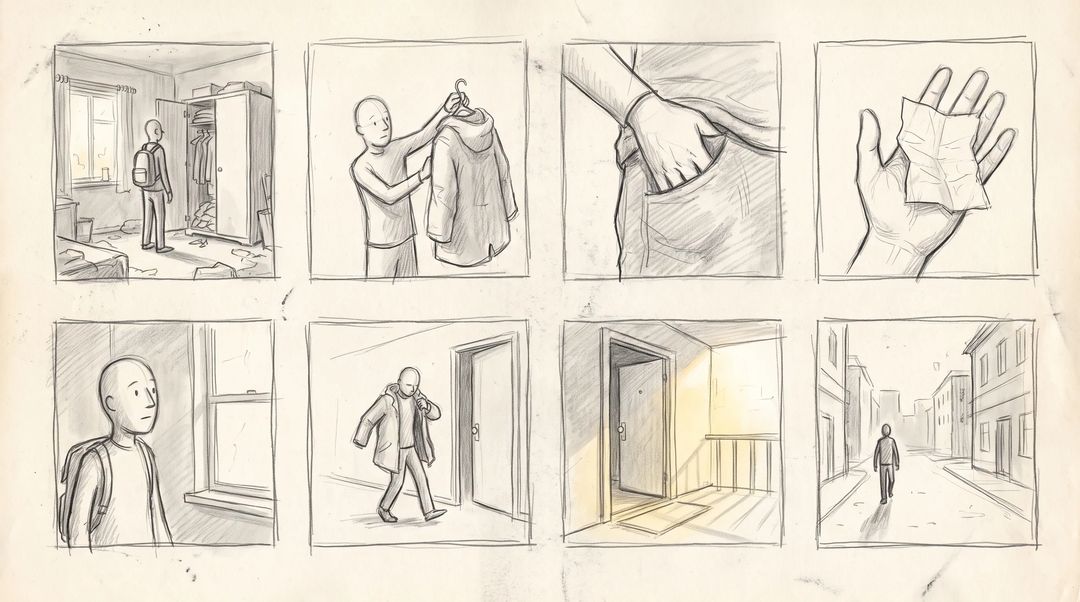
Mine broke down like this: wide to establish the room → medium, the coat lifted off the hanger → close-up, a hand pushing into the pocket → close-up, the note opened in a palm → medium, his head lifting toward the window → wide, coat on, walking to the door → the stairwell door opening into morning light → long shot, his back going up the street.
One counterintuitive piece of advice at this stage: don't try to draw well. You're checking three things only — does the story hold, do the shot sizes vary, is any shot redundant. The rougher the sketch, the easier it is to cut. My first pass had 11 panels; the rhythm only worked after I got it down to eight.
How do you keep the same face in every shot?
Character consistency is where AI filmmaking breaks most often, and it's the step that took me the longest.
The answer is a character sheet: build one, then reference it in every shot instead of describing the face in words. Consistency comes from reusing one reference image, not from writing a more detailed description.
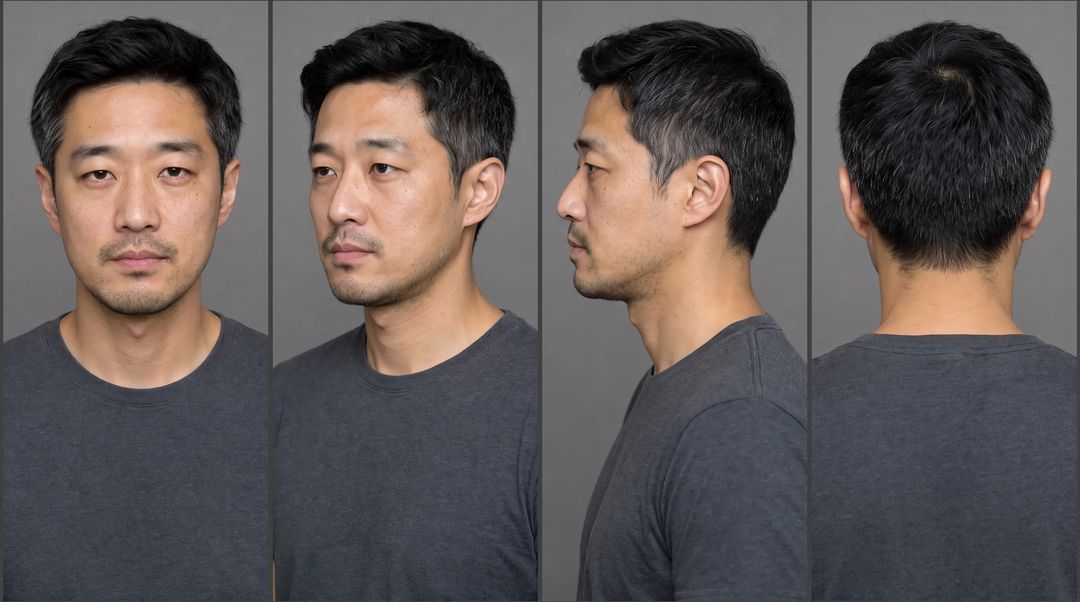
I generated one clean front-on shot first — grey backdrop, even light, no styling, no expression, essentially a casting photo. Then I built the three-quarter, profile and back views from it. Those four images are this film's "actor", and every subsequent shot gets fed that sheet.
Three practical notes:
Don't describe the face in text. "Mid-thirties, short black hair, light stubble" will generate a hundred different people. Leave the face to the reference image; the prompt only carries what changes in this shot.
Generate the back and profile up front. If you wait until you reach the walking-away shot, odds are it won't be the same man as the front view.
Put the clothes in every prompt. Character consistency isn't only the face — let the coat's colour or cut drift and the audience still sees the join. Get those three right and the character consistency in an AI short film is basically solved.
How do shots join without jumping?
The least effortful method is to make the last frame of one shot the first frame of the next.
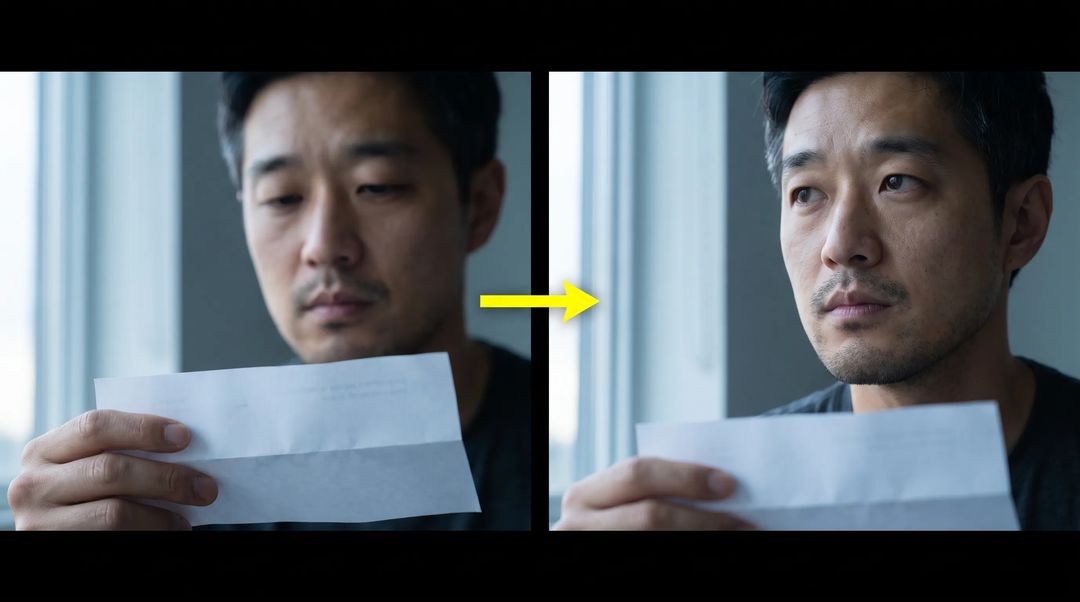
Those two frames are the front and back half of the same beat: on the left he's looking down at the note, on the right his head has come up toward the window. The framing hasn't moved, the light direction hasn't moved, the grade hasn't moved — only the angle of his head and where he's looking. Cut together, that reads as one continuous reaction.
Feed both into first & last frame to video as the start and end points and let the model fill the middle. That's far steadier than asking a model to "perform" a whole action, and it protects character consistency too, since you've fixed both ends and the model only handles the gap.
Two details in joins get overlooked, and both cost more in AI filmmaking than in live action because you can't fix them on set. Light direction has to match. If the light came from the left in one shot it can't come from the right in the next — the audience won't be able to name what's wrong, but it will feel wrong. The grade has to match. All eight of my shots carry "cool dawn" in the prompt itself; I didn't plan to fix it later.
How do you review every shot at once and only redo the bad ones?
Opening images one at a time will lie to you. Each one looks fine alone; only in sequence do you notice the face drifted in shot three.
I lay all eight out on the Generative Canvas, in order, in a single row, and step back. Character consistency problems are easiest to catch in a row — a drifted face or wrong light jumps out on one sweep. This single habit removed most of the rework from my AI filmmaking process: rerun only the cell that's wrong instead of rebuilding the sequence.
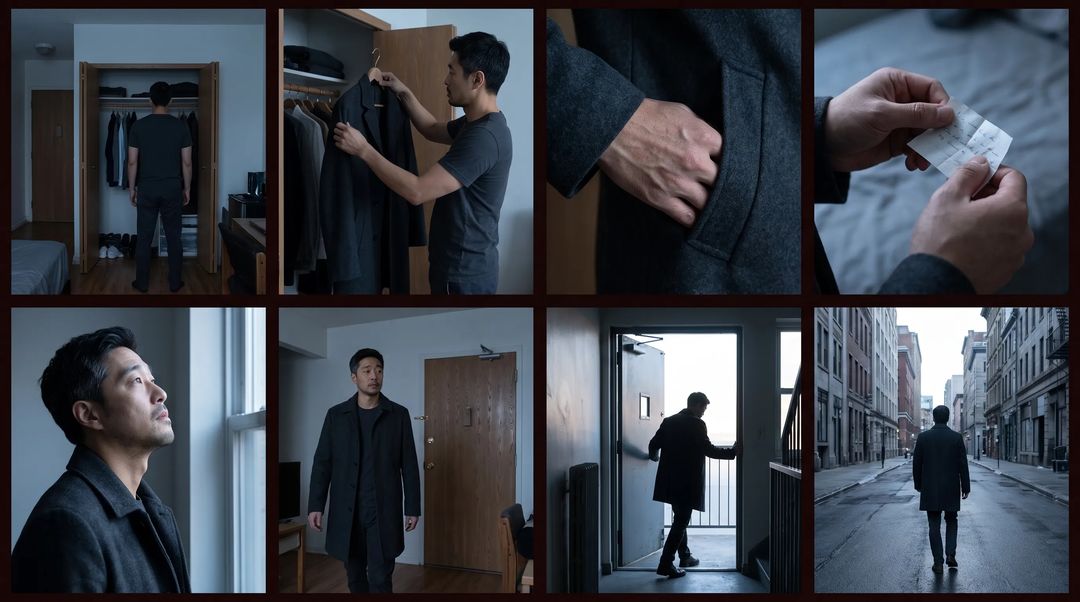
These are my final eight. Shot three's hand was rerun twice; shot seven's backlight got one exposure adjustment.
What about sound?
The pictures are done at this point, but an AI short film with no sound won't hold anyone past 30 seconds.
Mine has no dialogue, so it only needed ambience. With dialogue, the order is: generate the voice with text to speech, or clone a fixed voice with voice clone, then run lip sync to fit the mouth to it.
Don't reverse that order. Make the pictures first and you'll find the mouth shapes and the line lengths don't agree; lock the audio duration first and generate frames to match it, and you'll rework far less. Audio-last is the most common sequencing mistake in AI filmmaking.
Where's the limit on making a frame move?
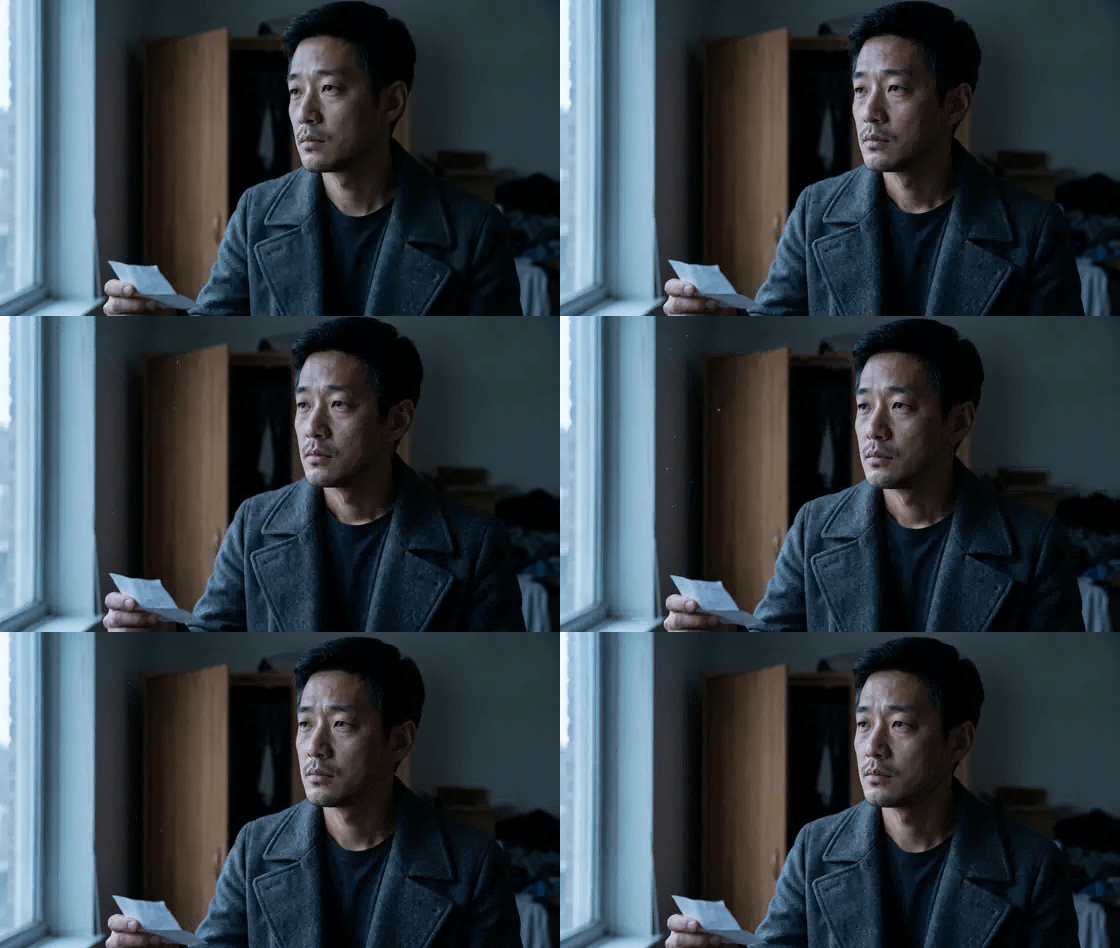
Those five seconds came from the shot above: breathing, one blink, the gaze moving slightly, a small tightening of the brow.
I tried asking him to "turn and walk to the door" three times, and it deformed every time — two steps in and it isn't him any more. So the boundary is clear: small in-place reactions are reliable; asking a character to travel or perform complex action isn't there yet. For shots that need movement I generate the end frame first and interpolate, rather than letting the model act it out.
Three failures, reported honestly
Text in frame is fake. Zoom into my close-up of the note and the "handwriting" on the paper is gibberish — generation models can't produce readable text, which quietly rules out a whole category of shots in AI filmmaking. Either don't shoot it sharp (throw it out of focus, cover half of it) or paste real text in afterwards. This is one of the hardest current limits.
Hands still need checking one by one. In the shot of the hand going into the pocket, the first version had a knuckle in the wrong place; it took two reruns. Any shot with hands in frame gets zoomed into.
Continuous action loses the face. As above — travel beyond two or three seconds almost always breaks, and character consistency is the first thing to go.
The copyable eight-shot list
Work in this order and you won't backtrack:
- Break the story into one sentence per shot, each carrying shot size, action, light
- Generate a rough storyboard and cut it down to only the necessary shots
- Build the character sheet to lock character consistency: front, three-quarter, profile, back
- Generate shot by shot from the board, feeding the sheet every time, with the grade written into every prompt
- Where shots need to join, produce the end frame first, then the first frame
- Lay everything out on the canvas and compare across the row; rerun only what's broken
- Lock the audio duration, then match frames to the audio
- Zoom into hands, ears, and any text in frame
The whole eight-shot piece took me about three hours, most of it writing prompts and choosing takes rather than waiting on generation. Character consistency and shot joins get roughly twice as fast once you've done them a few times.
This is already good enough for titles, concept pieces and pitch material. For a finished commercial deliverable I'd still shoot for real and use AI to fill in shots. If you want to walk the AI filmmaking process yourself, AI video generation is the place to start — one sentence is all you need to begin.