How to Make a Car Jump AI Video From One Selfie
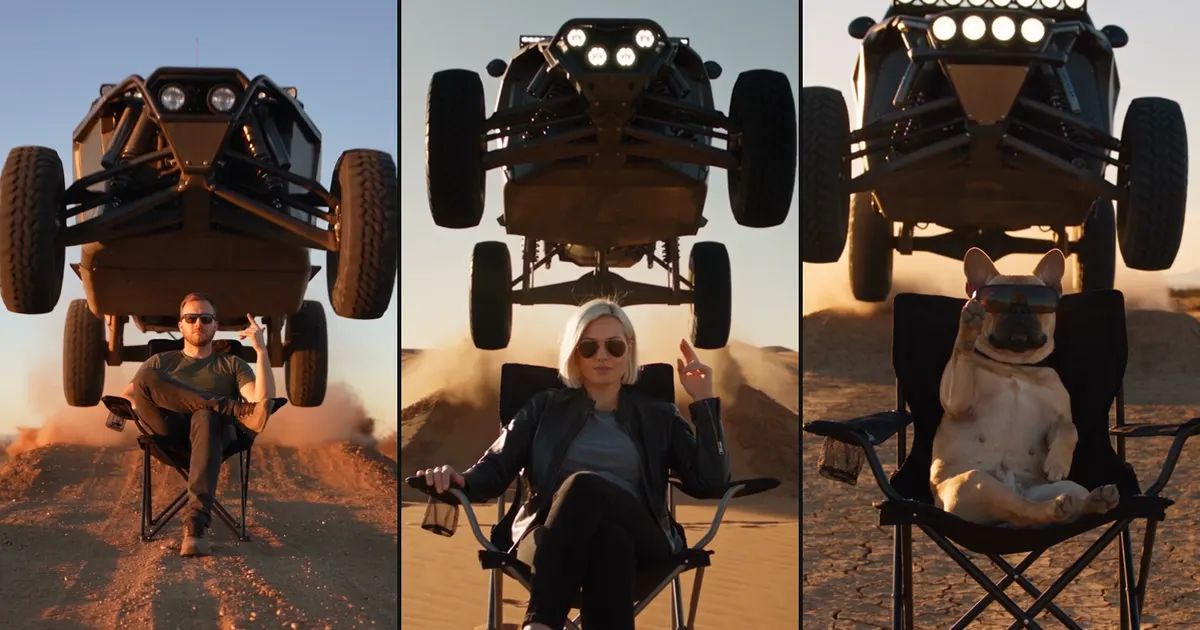

A dirt field at golden hour. A folding camping chair. Someone in sunglasses sits with their legs crossed and lazily snaps their fingers. Behind them an off-road truck hits a mound, launches into the air and sails right over their head, and when it lands the whole frame fills with dust. They don't even look up.
That's the car jump AI video, and it's everywhere right now. The person in the photo has never been anywhere near that field, and the truck isn't real either. This post covers why the car jump trend took off, what a good one gets right, and how to make your own car jump AI video from a single selfie.
What is the car jump trend?
The car jump trend started in India's short-video scene. New tutorials were turning up more than ten a week, and almost all of them were titled some version of "Trending Car Jump AI Video". The format never changes: the person sits still, the vehicle flies behind them, and the calmer they look, the better.
It works because of the contrast. Nobody can actually film that shot, and nobody sane would sit in that chair. A car jump AI video hands all the danger to the model, and your only job is one expression: unbothered.
What a good car jump AI video gets right
We went through a pile of these clips, and the good ones nearly all do these four things:
- Low camera, person in the lower half of the frame. Shooting up from near the ground makes the truck look huge and the jump look high.
- Golden-hour light. Low, warm sun makes the dust glow and gives the whole clip texture.
- The truck really flies. It takes off from the mound behind the chair and peaks above the person's head, ideally in slow motion.
- The person doesn't flinch. As the truck passes overhead they're still mid-gesture, not a hair out of place. That's the punchline.
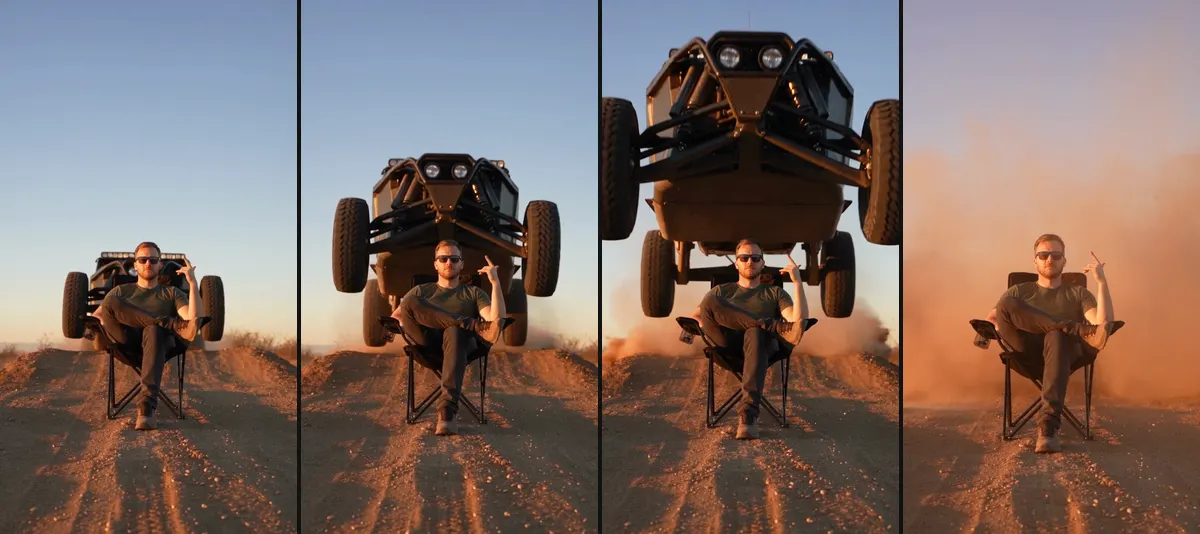
Our Car Jump template is built around those four: a 6-second vertical clip, one continuous shot, with engine roar, the thud of the landing and a beat drop at the jump.
Why copied prompts so often go wrong
There are plenty of prompts for this floating around, and we started from something similar ourselves. It went wrong several times.
Real brand names showed up on the grille. This was the big one. Our first prompt asked for "a dark off-road pickup truck" and explicitly said no badges and no licence plates. Five clips came back, and all five had a real car maker's name spelled out across the grille. No amount of "don't" could stop it, because to the model an off-road pickup just means a few specific real trucks. In the end we changed the vehicle: a matte-black custom desert racing truck with an exposed steel tube frame and a row of round spotlights up front. It has no grille, so there's nowhere for lettering to go. Every clip since has been clean.
Backlight turned the person into a silhouette. In our first test the sun was right behind the chair. Beautiful frame, but the face was black and you couldn't tell who it was. Later runs had the light coming more from the side, and faces were bright again.
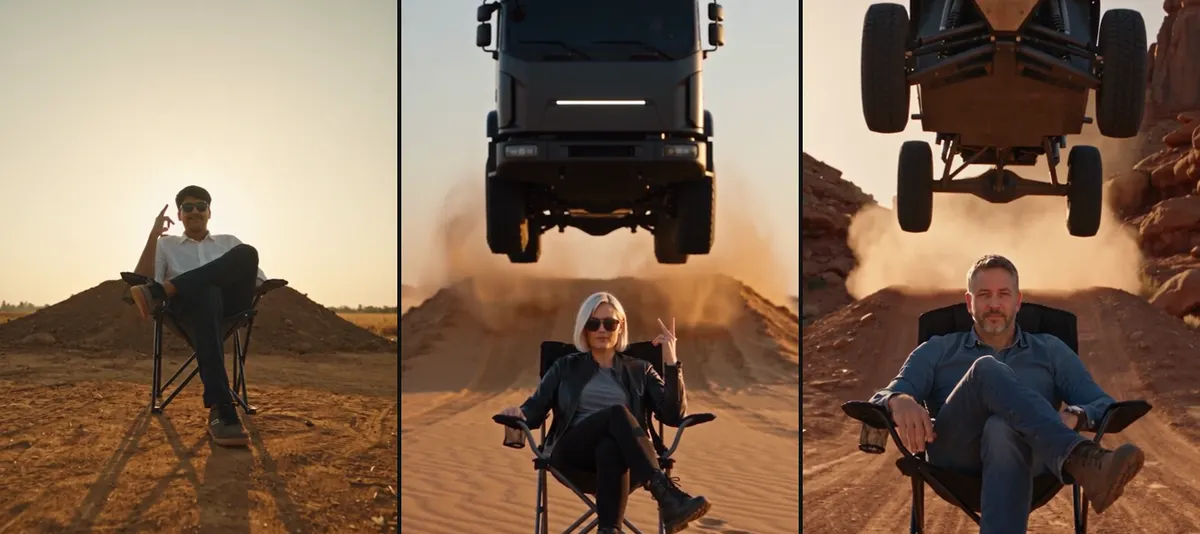
The truck became a delivery van. We tried asking for a front made of one smooth black panel, to rule out lettering completely. The lettering went away, and so did the cool: it turned into a boxy cargo truck that looked like a moving company's van hanging in mid-air.
The truck hopped and parked. In a few versions it didn't clear the person's head at all. It jumped once and landed right behind the chair, and the clip fell flat. Writing "flies right over their head" helped, but not enough: later one clip still rose above the person and dropped back down behind the chair. What fixed it was spelling out where it lands: over the person, over the camera and out of frame, never back behind the chair. In the six runs we did after that, it cleared every time.
Picking your photo, and whether to wear sunglasses
You don't need a photo of yourself sitting down. A clear half-body selfie is enough; the model sits you in the chair, crosses your legs and raises one hand. Your clothes and hair carry over from the photo.
Sunglasses are part of the look, so the template puts them on by default. With them on, people recognize you mostly by your hair, face shape and clothes. If you want your eyes to show, switch them off; the canyon example with the older guy is the no-sunglasses version. The model picks the hand gesture, and we've seen finger snaps, peace signs and rock horns.
Use your own photo, or one of an adult who knows about it and is happy to take part.
Make a car jump AI video on ZOOOP in three steps
- Open the template and upload one clear photo of a person or a pet.
- Pick a place, a dirt field, a desert or a red canyon, and decide on sunglasses.
- Choose a resolution and hit generate.
There are three resolutions. 720p is the default, and higher resolutions cost more. The template runs on Seedance 2.5, with the camera, the slow motion and the sound already written in, so all you do is upload a photo. Each clip takes a few minutes.
Your dog can take the chair
This is our favorite one. Upload a photo of a French bulldog and it sits up straight in the folding chair wearing sunglasses (the default sunglasses work on dogs too), one paw raised, while the racing truck roars over its head. It stays a real dog, with no human body.

And here's the human version. The animations are silent; the real clips have sound.
What to do with your car jump AI video
The car jump trend is made for beat-synced posts. The clip already has a drum hit at the jump, so a caption like "me facing Monday" is all it needs. For a different mood, try AI Crying, which turns one selfie into a night-street clip of you crying and walking away. To make other stunt shots from scratch, go to AI Video Generator. More ideas are in Templates.
Pick a well-lit selfie and make your own car jump AI video with the Car Jump template. The calmer, the better.