Image AI

Image AI

Generate and edit images with GPT Image 2.6, Nano Banana 2.1, Seedream 5.5 and more, then upscale, retouch or restyle them in the same place.

Try AI Image Generator

Image

  • Image Generator
  • Edit Image
  • SVG Generator
  • Image Upscaler
  • Background Remover
  • Object Remover
  • Photo Restorer

Image Models

  • GPT Image 2.6New
  • Seedream 5.5New
  • Nano Banana 2.1New
  • Nano Banana 2 Lite
  • Seedream 5.0 Flash
  • Muse Image
  • GPT Image 2.5
  • Midjourney V8.2
  • Nano Banana Pro
  • Grok Imagine
More Image Models

Photo Effects

  • Virtual Try-On
  • Clothes Changer
  • Hairstyle Changer
  • Headshot Generator
  • Age Changer
  • Style Transfer
  • Portrait Enhancer
  • AI Action Figure
More Image Tools
Video AI

Video AI

Turn text and images into cinematic clips with Seedance 2.5, Gemini Omni 1.2 Flash, MiniMax H3, Kling V4 and Wan 3.0, with native audio.

Try AI Video Generator

Video

  • Video Generator
  • Start / End Frame
  • Motion Control
  • Edit Video
  • Lip Sync
  • Extend Video
  • Video Sound Effects
  • Video Upscaler

Video Models

  • Gemini Omni 1.2 FlashNew
  • Kling V4New
  • MiniMax H3 Max TurboNew
  • MiniMax H3 Max
  • Vidu Q4
  • Seedance 2.5
  • MiniMax H3
  • Wan 3.0
  • Kling O3
  • Grok Imagine V1.5
More Video Models

Video Templates

  • AI Video Maker
  • TikTok AI Video
  • AI Dance Video
  • AI Funny Video
  • Dog AI Video
  • Cat AI Video
  • AI Pet Video
  • Face Swap Video
More Templates
Audio AI

Audio AI

Lifelike speech, instant voice clones, sound effects and music from ElevenLabs, Gemini, MiniMax and Lyria.

Try Text to Speech

Audio

  • Text to Speech
  • Voice Clone
  • Sound Effect
  • Music Generation
  • Video Sound Effects

Audio Models

  • ElevenLabs V4New
  • Gemini 3.8 Flash TTSNew
  • ElevenLabs Sound Effects V3New
  • Lyria 3 Pro
  • ElevenLabs V3
  • MiniMax Speech 2.8 HD
  • Qwen3-TTS
  • Inworld TTS
  • MiniMax Music 2.6
  • Index TTS 2
More Audio Models
AI Tools

AI Tools

One-click fixes and effects: upscale, remove backgrounds, erase objects, restore old photos, try on outfits and more.

Browse All AI Tools

Image Tools

  • Image Upscaler
  • Background Remover
  • Object Remover
  • Photo Restorer
  • Portrait Enhancer
  • Style Transfer
  • Texture Transform
  • Perspective Changer

Photo Effects

  • Virtual Try-On
  • Clothes Changer
  • Hairstyle Changer
  • Makeup Changer
  • Headshot Generator
  • Age Changer
  • Expression Changer
  • Product Holding
  • City Teleport

Video Tools

  • Video Upscaler
  • Edit Video
  • Extend Video
  • Lip Sync
  • Video Sound Effects
All AI Tools

Trending Templates

The dance, pet and funny videos everyone is making right now. Upload a photo and get a share-ready clip in minutes.

Browse Trending TemplatesTrendingBicep Heart

Template Categories

  • AI Dance
  • AI Pet Video
  • Face Swap Video
  • AI Action Figure
More Templates

Explore

  • Model LibraryEvery supported AI model — image, video, audio.
  • Infinite CanvasStoryboard, compose, and remix on one shared canvas.
  • BlogAI filmmaking tutorials, model deep-dives, product news.
  • FAQQuick answers to common questions.

Developers

  • AI CLIGenerate images & video from your terminal.
  • API DocsREST API for image, video & audio generation.
  • Agent SkillGive Claude Code, Codex or Cursor image & video generation.
AI TemplatesPricing
HomeCanvas
AI Generator
Image GeneratorEdit ImageSVG Generator
Text with ReferenceStart/End FrameMotion ControlEdit VideoLip SyncExtend VideoVideo Sound Effects
Text to SpeechVoice CloneSound EffectMusic Generation
Templates
Hot Templates
Tools
AI Tools
Resources
Creations
  1. Home
  2. Templates
  3. AI Dance
  4. Burning Bridges AI

Burning Bridges AI

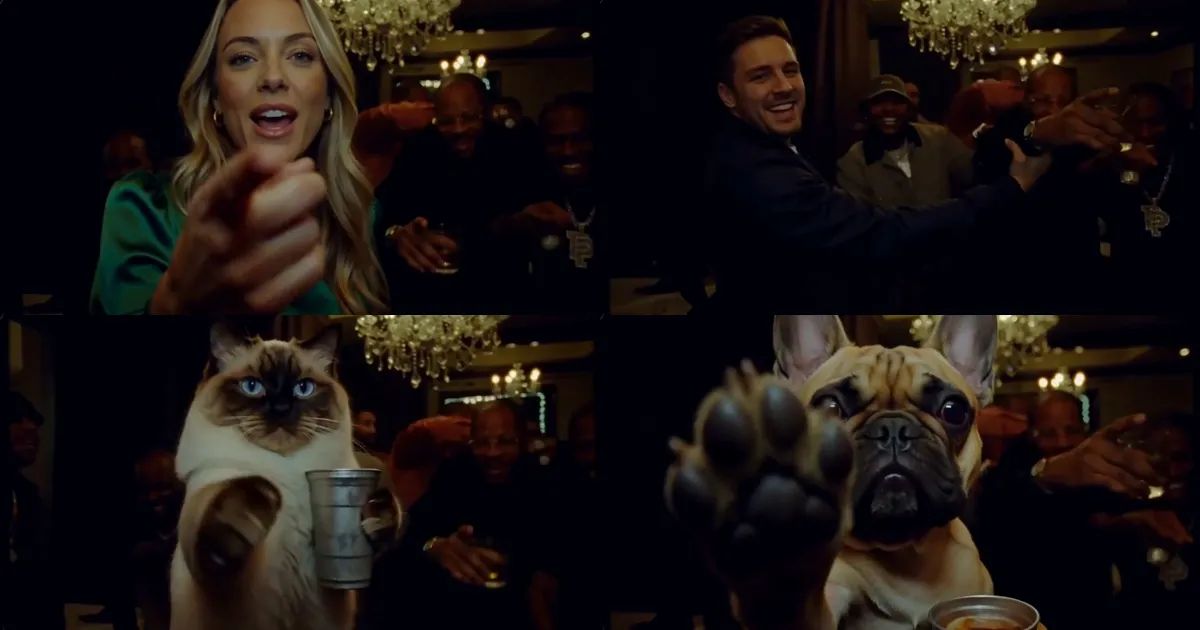
Upload one photo and take the lead in the viral Burning Bridges AI party clip: the same chandelier room, the same crowd, the same moves. Works with people, cats and dogs.

Dog AI VideoCat AI VideoAI Dance VideoTikTok AI VideoAI Video Maker

Burning Bridges AI: put yourself, your cat or your dog in the party scene

One photo in, one 15-second Burning Bridges clip out: the same chandelier-lit party, the same crowd and the same moves, now starring you or your pet.

Use cases

Key features

The same party, beat for beat

The chandelier-lit room, the crowd around you, the handheld camera and every gesture, from the collar touch to the two-finger point at the lens and the laugh behind one hand, follow the original 15 seconds.

People, cats and dogs

Choose Person to keep your face and the clothes in your photo, or Cat or Dog to put your pet in the lead: standing on its hind legs with its own face, fur and paws, holding the cup.

How to use

  1. 01

    Upload one clear photo of yourself or your pet, waist-up or full body.

  2. 02

    Choose Person, Cat or Dog, then keep 768p or pick 1440p.

  3. 03

    Generate the 15-second clip and download it.

Deep dive

Burning Bridges AI is the party-clip trend that took over short-video feeds in late September 2026. It starts from a handheld shot of a packed private dining room under crystal chandeliers: the man at the centre raps along with a silver cup in his hand, touches his collar, points across the room, jabs two fingers at the lens and finally laughs with a hand over his face. People swap someone else into that spot and keep everything else, so the feed is full of friends, football players, cartoon characters and a lot of pets throwing the same party.

This template makes that version from one photo. Choose Person and upload a photo of yourself: you take the lead in your own clothes, and every guest, the chandeliers, the camera moves and the timing stay exactly as in the original clip. Choose Cat or Dog and your pet takes the spot instead, standing on its hind legs with its own face, fur and paws, cup held tight.

The result is a 15-second 16:9 landscape clip, the same shape as the versions people are posting, ready for a story, a reply or a group chat. Use a clear, well-lit photo, ideally waist-up or full body, and only use photos of people who are happy to star in it.

For the full walkthrough, with the moves broken down, which photo to pick and what broke while we built this template, read our guide: How to make the Burning Bridges AI video.
Frequently asked questions

What is the Burning Bridges AI trend?+

A viral AI video format from late September 2026. People replace the man at the centre of a chandelier-lit party clip with themselves, a friend, an athlete or a pet, and keep the room, the crowd and every gesture. Most versions are shared as short vertical videos.

Can I use my cat or dog?+

Yes. Choose Cat or Dog before you generate. Your pet stands upright on its hind legs with the same face, fur and markings, holding the cup in its paws. Pets vary more from run to run than people, so use a clear photo where the whole animal is visible.

Does it keep my face and outfit?+

Yes. With Person selected, the model carries over your face and the clothes in your photo, so a waist-up or full-body photo works best. You will be recognizable, but it is not a pixel-perfect copy.

How long is it, and what shape?+

15 seconds, 16:9 landscape like the original party clip, at 768p by default or 1440p if you pick it.

How many credits does it cost?+

425 credits at 768p and 690 credits at 1440p.

Is this affiliated with the original video?+

No. This is an unofficial template inspired by the trend. It is not affiliated with the artist, the people in the original clip or the label behind it.

Guides and trends

How to Make the Burning Bridges AI Video Starring You, Your Cat or Your Dog

How to Make the Burning Bridges AI Video Starring You, Your Cat or Your Dog

What the viral Burning Bridges AI trend is, which moves happen in the 15-second clip, which photo to use, and what went wrong while we built the template. Works with people, cats and dogs.

AI ImageImage GeneratorEdit ImageSVG Generator

AI VideoText with ReferenceMotion ControlStart/End FrameExtend VideoEdit VideoLip SyncVideo Sound Effects

AI AudioText to SpeechVoice CloneSound EffectMusic Generation

ExploreAll ModelsAll TemplatesAI ToolsGlossaryCompare modelsFree toolsAlternativesAI CLIAPI DocsAgent Skill

CompanyBlogPricingFAQPrivacyTermsReport Infringement

Ask AI about ZOOOP

© 2026 ZOOOP. All rights reserved.