ภาพ AI

ภาพ AI

สร้างและแก้ไขภาพด้วย GPT Image 2.5, Nano Banana 2.1, Seedream 5.0 Pro และอื่น ๆ แล้วอัปสเกล รีทัช หรือเปลี่ยนสไตล์ได้ในที่เดียว

ลองสร้างภาพด้วย AI

ภาพ

  • เครื่องกำเนิดภาพ
  • แก้ไขภาพ
  • เครื่องมือสร้าง SVG
  • อัปเกรดภาพ
  • ลบพื้นหลัง
  • ลบวัตถุ
  • ฟื้นฟูภาพถ่าย

โมเดลภาพ

  • Nano Banana 2 Liteใหม่
  • Seedream 5.0 Flashใหม่
  • Nano Banana 2.1ใหม่
  • Muse Image
  • GPT Image 2.5
  • Seedream 5.0 Pro
  • Midjourney V8.2
  • Nano Banana Pro
  • Flux 2 Pro
  • Grok Imagine
โมเดลภาพเพิ่มเติม

เอฟเฟกต์ภาพถ่าย

  • ลองชุดเสมือนจริง
  • เปลี่ยนชุด
  • เปลี่ยนทรงผม
  • รูปโปรไฟล์มืออาชีพ
  • เปลี่ยนอายุ
  • แปลงสไตล์ภาพ
  • ปรับภาพพอร์ตเทรต
  • ฟิกเกอร์ AI
เครื่องมือภาพเพิ่มเติม
วิดีโอ AI

วิดีโอ AI

เปลี่ยนข้อความและภาพเป็นคลิปสไตล์ภาพยนตร์พร้อมเสียงในตัว ด้วย Seedance 2.5, Gemini Omni 1.1 Flash, MiniMax H3, Kling V4 และ Wan 3.0

ลองสร้างวิดีโอด้วย AI

วิดีโอ

  • เครื่องกำเนิดวิดีโอ
  • เฟรมเริ่มต้น/สิ้นสุด
  • ควบคุมการเคลื่อนไหว
  • แก้ไขวิดีโอ
  • ลิปซิงค์
  • ขยายวิดีโอ
  • เอฟเฟกต์เสียงวิดีโอ
  • วิดีโออัพสเกลเลอร์

โมเดลวิดีโอ

  • Kling V4ใหม่
  • MiniMax H3 Max Turboใหม่
  • Gemini Omni 1.1 Flashใหม่
  • MiniMax H3 Max
  • Vidu Q4
  • Seedance 2.5
  • MiniMax H3
  • Wan 3.0
  • Kling O3
  • Grok Imagine V1.5
โมเดลวิดีโอเพิ่มเติม

เทมเพลตวิดีโอ

  • AI เต้น
  • วิดีโอสัตว์เลี้ยง
  • วิดีโอเปลี่ยนหน้า
  • ฮาโลวีน
เทมเพลตเพิ่มเติม
เสียง AI

เสียง AI

เสียงพูดที่สมจริง โคลนเสียงได้ทันที เอฟเฟกต์เสียง และดนตรี จาก ElevenLabs, Gemini, MiniMax และ Lyria

ลองแปลงข้อความเป็นเสียงพูด

เสียง

  • แปลงข้อความเป็นเสียงพูด
  • โคลนเสียง
  • เอฟเฟกต์เสียง
  • การสร้างเพลง
  • เอฟเฟกต์เสียงวิดีโอ

โมเดลเสียง

  • Gemini 3.1 Flash TTSใหม่
  • Lyria 3 Proใหม่
  • ElevenLabs V3
  • MiniMax Speech 2.8 HD
  • Qwen3-TTS
  • Inworld TTS
  • MiniMax Music 2.6
  • ElevenLabs Sound Effects
  • Index TTS 2
โมเดลเสียงเพิ่มเติม
เครื่องมือ AI

เครื่องมือ AI

แก้ไขและใส่เอฟเฟกต์ได้ในคลิกเดียว: อัปสเกล ลบพื้นหลัง ลบวัตถุ ฟื้นฟูภาพถ่ายเก่า ลองชุด และอีกมากมาย

ดูเครื่องมือ AI ทั้งหมด

เครื่องมือภาพ

  • อัปเกรดภาพ
  • ลบพื้นหลัง
  • ลบวัตถุ
  • ฟื้นฟูภาพถ่าย
  • ปรับภาพพอร์ตเทรต
  • แปลงสไตล์ภาพ
  • เปลี่ยนพื้นผิววัสดุ
  • เปลี่ยนมุมมองภาพ

เอฟเฟกต์ภาพถ่าย

  • ลองชุดเสมือนจริง
  • เปลี่ยนชุด
  • เปลี่ยนทรงผม
  • เปลี่ยนลุคแต่งหน้า
  • รูปโปรไฟล์มืออาชีพ
  • เปลี่ยนอายุ
  • เปลี่ยนสีหน้า
  • ภาพคนถือสินค้า
  • วาร์ปไปเมืองดัง

เครื่องมือวิดีโอ

  • วิดีโออัพสเกลเลอร์
  • แก้ไขวิดีโอ
  • ขยายวิดีโอ
  • ลิปซิงค์
  • เอฟเฟกต์เสียงวิดีโอ
เครื่องมือ AI ทั้งหมด

เทมเพลตมาแรง

วิดีโอเต้น สัตว์เลี้ยง และฮาโลวีนที่ใครๆ ก็กำลังทำกันตอนนี้ อัปโหลดรูปเพียงรูปเดียว แล้วรับคลิปพร้อมแชร์ได้ในไม่กี่นาที

ดูเทมเพลตมาแรงมาแรงZombie Love Story

หมวดหมู่เทมเพลต

  • AI เต้น
  • วิดีโอสัตว์เลี้ยง
  • วิดีโอเปลี่ยนหน้า
  • ฮาโลวีน
  • ฟิกเกอร์ AI
เทมเพลตเพิ่มเติม

สำรวจ

  • คลังโมเดลทุกรุ่น AI ที่รองรับ - รูปภาพ วิดีโอ เสียง
  • ผ้าใบไม่มีที่สิ้นสุดสตอรี่บอร์ด เรียบเรียง และรีมิกซ์บนผืนผ้าใบที่ใช้ร่วมกัน
  • บล็อกบทช่วยสอนการสร้างภาพยนตร์ AI โมเดลการดำน้ำลึก ข่าวผลิตภัณฑ์
  • คำถามที่พบบ่อยคำตอบอย่างรวดเร็วสำหรับคำถามทั่วไป

นักพัฒนา

  • AI CLIสร้างภาพและวิดีโอจากเทอร์มินัล
  • เอกสาร APIREST API สำหรับการสร้างภาพ วิดีโอ และเสียง
  • ทักษะตัวแทนให้รหัสคลอดด์ Codex หรือการสร้างภาพและวิดีโอของเคอร์เซอร์
เทมเพลต AIราคา
หน้าแรกผ้าใบ
เครื่องมือสร้าง AI
เครื่องกำเนิดภาพแก้ไขภาพเครื่องมือสร้าง SVG
ข้อความที่มีการอ้างอิงเฟรมเริ่มต้น/สิ้นสุดควบคุมการเคลื่อนไหวแก้ไขวิดีโอลิปซิงค์ขยายวิดีโอเอฟเฟกต์เสียงวิดีโอ
แปลงข้อความเป็นเสียงพูดโคลนเสียงเอฟเฟกต์เสียงการสร้างเพลง
เทมเพลต
เทมเพลตยอดนิยม
เครื่องมือ
เครื่องมือ AI
ทรัพยากร
ผลงาน
  1. หน้าแรก
  2. เทมเพลต
  3. ฮาโลวีน
  4. Rainy Clown Photo

Rainy Clown Photo

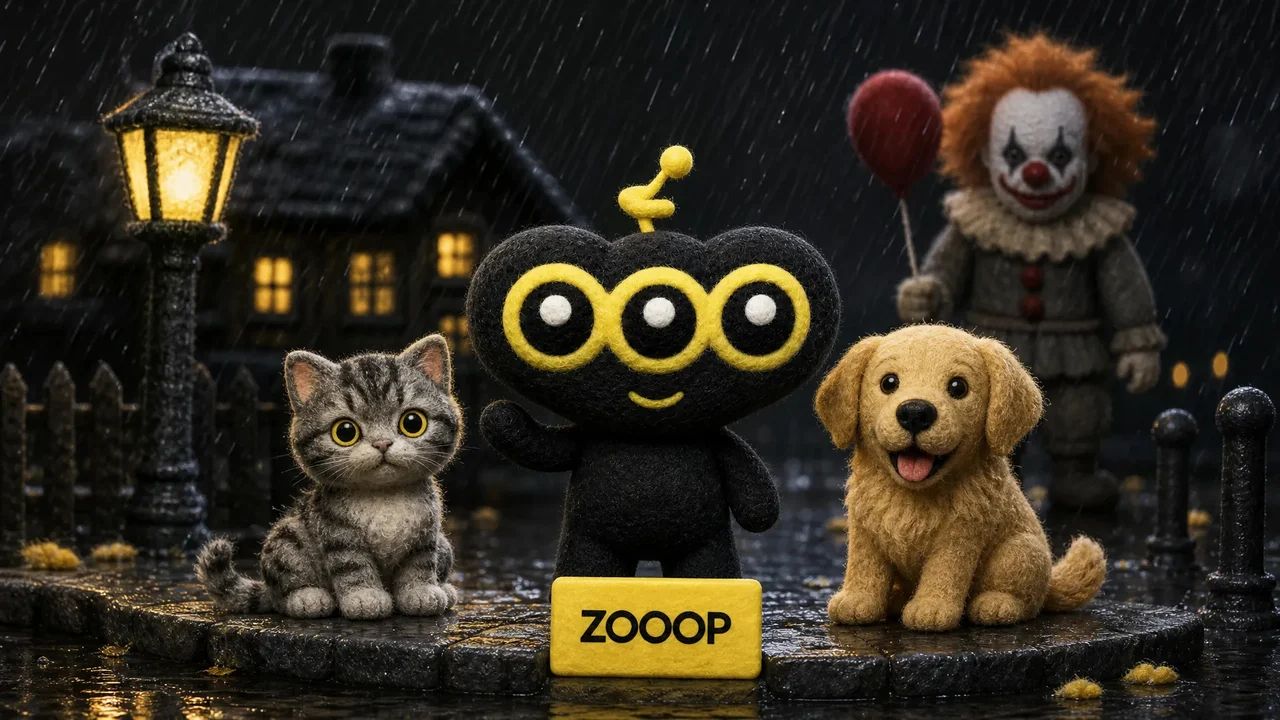
Upload a person, cat or dog photo for a cinematic portrait beside a horror clown. A red balloon, rain and wet street reflections set the Halloween mood.

Rainy Clown Photo

You or your pet, a red balloon, and an unsettling guest on a rain-soaked street.

กรณีการใช้งาน

คุณสมบัติที่สำคัญ

One person or pet photo

Create the scene with your own portrait or a photo of your cat or dog. Pets keep a natural animal body and seated pose.

A cinematic Halloween mood

Cool night lighting, a warm porch light and glossy puddle reflections set the atmosphere.

วิธีใช้

  1. 01

    Upload one clear photo of one adult, cat or dog.

  2. 02

    Choose 9:16, 3:4 or 1:1 and your output resolution.

  3. 03

    Generate the photo, review the result and download it.

เจาะลึก

A quiet suburban street, a red balloon and an unexpected guest beside you. Rainy Clown Photo turns one portrait into a cinematic Halloween scene: a person sits on the curb while a sinister clown crouches behind them, with cool streetlights and warm house lights reflected in the wet road.

You can also upload a cat or dog. Pets stay on their own four paws with natural fur and animal proportions, sitting calmly beside the clown. The red balloon is tied to a small weight beside them.

The composition takes its cues from the rainy Pennywise photo trend. It uses your uploaded subject as a reference while creating a new pose and setting. Fine rain and an eerie grin give the image its horror mood; the scene is designed without blood, injuries or violence.

Start with a sharp photo of one adult, cat or dog with an unobstructed face. The default 9:16 layout leaves room for the balloon and puddle reflections. You can also choose a 3:4 portrait or a square image. Facial details and framing can vary between generations. This is an AI-created fan-style scene and does not imply an official film collaboration.
คำถามที่พบบ่อย

Which photo works best?+

Use a clear, well-lit photo of one adult, cat or dog, facing the camera with the face unobstructed. Avoid group photos and heavy filters.

Will the result look exactly like my original photo?+

The model uses the face, fur and markings as references, but creates a new pose and environment. Likeness and small details may vary. Human clothing is restyled; pets keep their natural fur.

Is the scene graphic?+

It is designed as an eerie posed Halloween photo, without blood, injuries, weapons or an attack.

Is this an official movie photo?+

No. It is an AI-generated fan-style scene, not an official film still or collaboration.

Can I use my cat or dog?+

Yes. Upload one clear pet photo. The pet stays a real cat or dog, seated naturally beside the clown, with the balloon tied nearby.

How many credits does one photo cost?+

1K costs 11 credits, 2K costs 17 credits and 3K costs 26 credits per generated photo. The default is 2K. These prices cover one uploaded person or pet photo and any offered aspect ratio.

คู่มือและเทรนด์

วิธีใช้ AI ทำภาพถ่ายคู่กับ Pennywise ให้ตัวคุณเอง แมว หรือสุนัข

วิธีใช้ AI ทำภาพถ่ายคู่กับ Pennywise ให้ตัวคุณเอง แมว หรือสุนัข

สร้างภาพกลางคืนที่ฝนตกด้วย Pennywise จากภาพเหมือนหรือภาพสัตว์เลี้ยง ดูผลลัพธ์จริงสี่ภาพ พร้อมวิธีเลือกภาพอ้างอิง รูปแบบภาพ และรายละเอียดที่ควรตรวจสอบ

ภาพ AIเครื่องกำเนิดภาพแก้ไขภาพเครื่องมือสร้าง SVG

วิดีโอ AIข้อความที่มีการอ้างอิงควบคุมการเคลื่อนไหวเฟรมเริ่มต้น/สิ้นสุดขยายวิดีโอแก้ไขวิดีโอลิปซิงค์เอฟเฟกต์เสียงวิดีโอ

เสียง AIแปลงข้อความเป็นเสียงพูดโคลนเสียงเอฟเฟกต์เสียงการสร้างเพลง

สำรวจทุกรุ่นเทมเพลตทั้งหมดเครื่องมือ AIอภิธานศัพท์เปรียบเทียบรุ่นต่างๆเครื่องมือฟรีทางเลือกAI CLIเอกสาร APIทักษะตัวแทน

บริษัทบล็อกราคาคำถามที่พบบ่อยความเป็นส่วนตัวเงื่อนไขแจ้งการละเมิด

© 2026 ZOOOP. สงวนลิขสิทธิ์